Last month I was checking the API bill for a small chatbot project I built for a friend’s project, and I actually stopped scrolling for a second. Same system prompt, same instructions, same tool list, sent again and again for every single patient query. We were paying full price for those same 3,000 tokens hundreds of times a day. That is when I actually sat down and read Anthropic’s and OpenAI’s caching docs properly, not just skimmed them like I usually do at 1am.

Prompt caching is one of those features that sounds boring on paper but actually saves real money once you understand it. It is not some fancy new model or a trick you need special access for. Both Claude and GPT models support it now, and honestly, if you are building anything with a repeated system prompt or long context, not using it is basically leaving money on the table.
This article covers what prompt caching actually is, how the token savings work, what Anthropic recommends, what OpenAI does differently, and some of the gotchas that nobody tells you about until your bill looks weird.
What Prompt Caching Actually Means
Here’s the thing. Every time you send a prompt to an LLM, the model has to process every single token in that prompt before it can generate a reply. This includes your system instructions, your tool definitions, any long documents you pasted in, and the actual user question. If your system prompt is 5,000 tokens and you send 1,000 requests a day, that is 5 million tokens getting processed just for the part that never changes.
Prompt caching fixes this by remembering the “prefix” of your prompt, the stable part that comes first, so the model doesn’t have to redo that work every time. Instead of recomputing everything from scratch, it grabs the cached version and only processes whatever is new in your latest message.
Technically, what gets cached is the key value representation the model built while processing those tokens the first time. I won’t go too deep into the internals here (that is a whole separate topic), but basically the model skips the expensive part and jumps straight to generating your answer using the stored computation.
The result is two things happen at once: you pay less, and you get your response faster. Anthropic’s documentation says caching can cut costs by up to 90 percent on the cached portion and reduce latency noticeably for long prompts. OpenAI’s cookbook makes a similar claim, up to 80 percent faster time to first token on long cached prefixes.
Claude’s Approach: Explicit Cache Breakpoints
Anthropic does prompt caching a bit differently than OpenAI. You actually have to tell Claude which part of your prompt to cache, using something called a cache_control marker with type set to ephemeral. You place this marker after the block of content you want cached, your system prompt, your tool list, a long document, whatever stays the same across calls.
This is more work upfront compared to OpenAI’s fully automatic approach, but it gives you more control. You decide exactly where the “stable” part ends and the “variable” part begins. You can set up to four separate cache breakpoints in one request, which is handy if you have a system prompt, then a tool list, then a long RAG document, then conversation history, all with different rates of change.
The pricing works like this. A cache write, meaning the first time that content gets cached, costs more than a normal request. For the 5 minute cache, writes cost about 1.25x the base input rate. For the extended 1 hour cache option, writes cost about 2x base rate. But once written, cache reads (every subsequent request that hits the same cached prefix) cost only about 0.1x the base rate. That’s a 90 percent discount on the input tokens that were cached.
So say you’re using Sonnet 4.6 where base input is $3 per million tokens. A 5 minute cache write on a 10,000 token system prompt costs around $37.50 per million equivalent, basically $0.0375 for that one write. But every read after that costs just $0.30 per million tokens instead of $3. If you’re making 20 requests within that 5 minute window, you save something like 84 percent compared to sending the whole thing fresh every time.
Now here’s a thing I actually didn’t know until I read a few blog posts on it. Anthropic used to run the default cache TTL longer, but from what I’ve seen across multiple sources in 2026, the default window is 5 minutes, with an option to extend to 1 hour if you’re willing to pay the higher write cost. If your app makes requests less frequently than every 5 minutes, the cache expires between calls and you basically start cold every time. This actually messed up quite a few cron based agents and batch pipelines that were tuned assuming a longer window. People who set things up for hourly batches suddenly found their savings dropping from 80 percent down to something like 40 to 55 percent, because the cache kept expiring before the next batch ran.
There’s also a minimum size requirement. Anthropic’s docs say the cacheable prefix needs to be at least 1,024 tokens for most models (some smaller models need more). If your prompt is shorter than that, caching just won’t kick in, no matter how many times you send it.
OpenAI’s Approach: Automatic, No Config Needed
OpenAI took the opposite route. Their caching is automatic. You don’t add any special flag or marker in most cases, the API checks server side whether your request’s prefix matches something it processed recently, and applies the discount without you asking for it. This is obviously less work to set up. You basically get it for free just by structuring your prompts sensibly, putting the stable stuff first and the changing bits at the end.
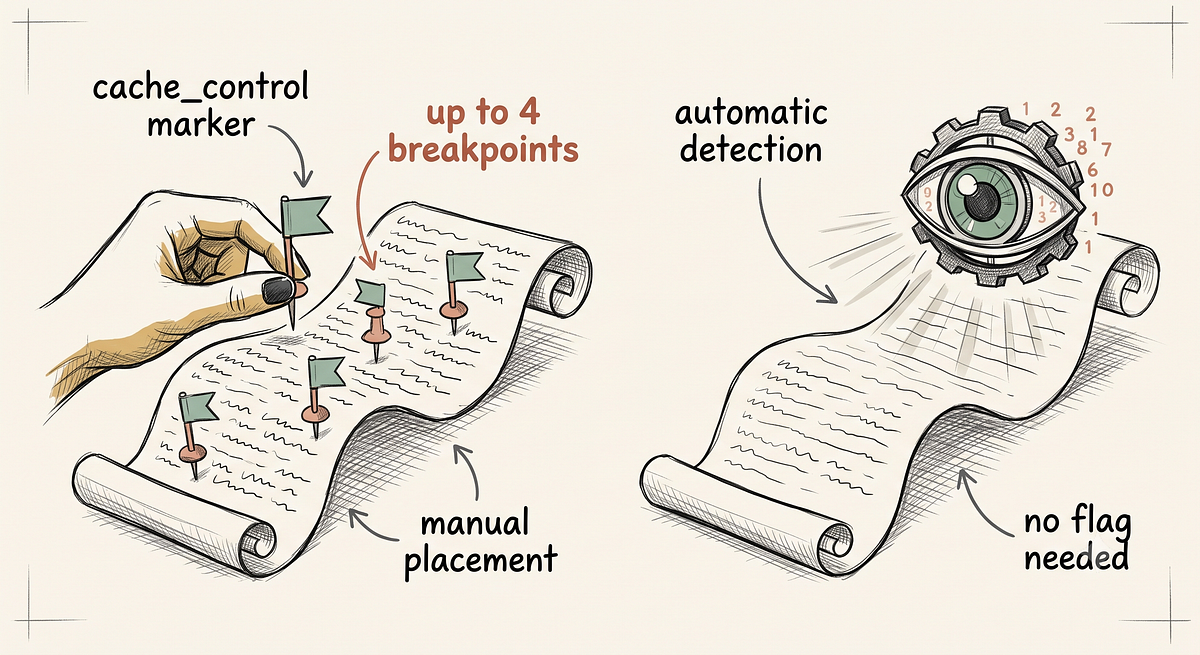
The catch is you have less control over exactly what gets cached and for how long. OpenAI doesn’t publish an exact TTL, though from what I’ve read it tends to sit somewhere around 5 to 10 minutes for the older setup, and there’ve been changes recently extending some caches up to 24 hours on newer models, according to a report from Effloow Lab that actually tested this by hammering the API repeatedly and watching the cache counters.
On pricing, this is where things get a little confusing because different sources say different numbers, and I think it depends on which model generation you’re looking at. Some documentation from early 2026 mentions a straightforward 50 percent discount on cached tokens (so half price, not 90 percent off like Claude). Other more recent sources, especially ones covering GPT-5.x models, mention up to 90 percent off cache reads, closer to Anthropic’s numbers. My honest suggestion here is don’t trust a single blog post on the exact percentage, check OpenAI’s live pricing page for whatever model you’re actually using, because this seems to be a moving target through 2026.
One more change worth flagging. Starting with GPT-5.6, OpenAI apparently started charging for cache writes too, at 1.25x the uncached rate, matching Anthropic’s structure more closely. Before that, on GPT-5.5 and earlier, cache writes on the automatic mode were free. So if you built your cost estimates around older docs, it’s worth double checking against whatever model you’re actually running in production right now.
There’s also a minimum threshold here too, 1,024 tokens of stable prefix, same number as Anthropic actually, and caching happens in chunks of 128 tokens above that floor. So a 1,500 token prefix only caches the first 1,024 tokens, not the full amount.
Where This Actually Saves You Money
TBH, when I first read about prompt caching I thought it was one of those features that sounds good in a blog post but doesn’t matter much in real life. I was wrong, and here’s why.
Think about a customer support chatbot. Every single conversation starts with the same big system prompt describing tone, rules, product details, maybe a list of FAQs. That system prompt might be 3,000 to 8,000 tokens. Multiply that by thousands of conversations a day and you’re burning serious money on content that never changes.
Or think about a coding assistant that has a big tool definition list, file structure context, and coding guidelines attached to every single call. Same deal.
Or a RAG pipeline where you’re stuffing 20,000 tokens of retrieved documents into every prompt because the retrieval step keeps pulling similar chunks for similar queries.
In all these cases, the stable portion of your prompt (system instructions, tool schemas, long reference documents) is exactly what caching is built for. The part that changes, the actual user’s latest message, stays uncached and gets billed normally, which is fine because it’s usually small anyway.
A few practical numbers I found while researching this. One analysis showed that for high frequency workloads, if you’re making 20+ requests within the cache window, savings can hit 80 to 90 percent on the input side. For lower frequency stuff where requests come in sparsely, savings drop but you still usually come out ahead unless your traffic is genuinely too spread out (say, one request every 20 minutes with a 5 minute TTL, in that case you’re basically paying the write premium every time with almost no read benefit).
Practical Tips (What Actually Works)
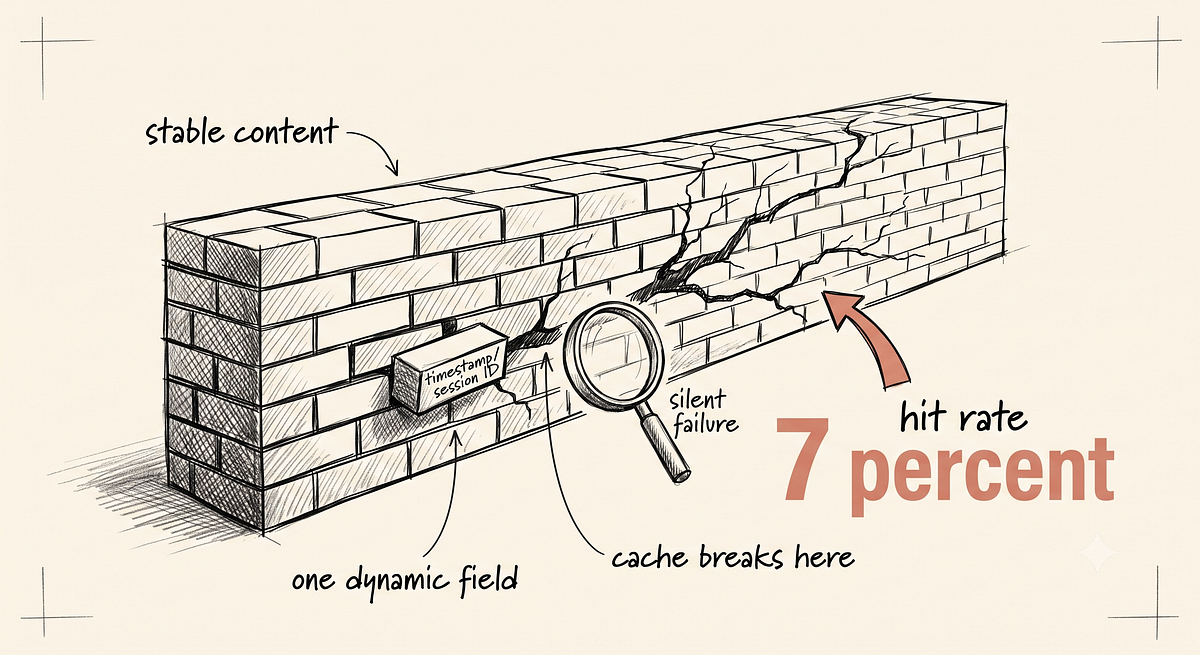
Order matters a lot. Put everything stable at the front of your prompt, system instructions first, then tool definitions, then long static reference material, then anything that changes slowly like older conversation history, and finally the current user message at the very end. If you shuffle stable and variable content together, your cache hit rate falls apart because even a tiny change earlier in the prompt breaks the match for everything after it.
Don’t cache small stuff. If your system prompt is only 200 tokens, caching isn’t going to help much and might not even trigger given the minimum token requirements both providers have.
Watch your logs. Anthropic’s own documentation apparently warns that cache failures can happen silently, meaning your request still goes through fine but you get zero cache creation and zero cache reads in the usage numbers, and you’d never know unless you’re actually checking those fields. One team apparently had a 7 percent hit rate for a while because of one dynamic field placed in the wrong spot in the prompt, something as small as a timestamp or a random session ID sitting before the stable content instead of after it.
Match your TTL choice to your traffic pattern. If you’re running something that gets hit constantly, seconds apart, the 5 minute cache is more than enough and cheaper to maintain. If you’ve got gaps of 10, 20, 30 minutes between calls (cron jobs, scheduled agents, overnight batch processing), you might actually be better off paying the higher 1 hour cache write cost on Claude, because it beats writing a fresh cache every single time your job runs.
Combine with batch processing where it makes sense. Anthropic’s Batch API knocks 50 percent off both input and output pricing, and that stacks with caching. So for things that don’t need instant replies, you can potentially combine both discounts.
Things That Trip People Up
The biggest one, honestly, is assuming caching is a “set it once and forget it” feature. It’s not. Cache windows expire. Traffic patterns shift. A prompt structure that worked great for caching in January might quietly stop working in June if you add a new field somewhere in the “stable” part of your prompt without checking, because now that section technically changed and the whole downstream cache breaks.
Another one is model differences. Not every model supports every cache duration option, and pricing multipliers differ between models even within the same provider. What works cost wise for Sonnet might not translate directly to Haiku or Opus without recalculating, since base rates are different across the board.
And honestly, I still find some of Anthropic’s cache_control syntax a bit fiddly to get right the first time. I spent longer than I’d like to admit trying to figure out why my cache wasn’t triggering, only to realize I had a dynamic user ID sitting inside what I thought was my “stable” system block. Small thing, but it broke everything.
Common Questions People Search For
A lot of people search things like “does prompt caching reduce output cost too” (short answer, no, it only affects the input side, output tokens are billed the same either way), or “is prompt caching worth it for small apps” (depends on your volume and how repetitive your prompts are, if you’re sending under a few hundred requests a day with small prompts, the savings might be too small to bother configuring), or “Claude vs GPT caching which is cheaper” (as covered above, it genuinely depends on the model generation and which TTL you pick, so check current pricing pages rather than trusting older blog numbers).
People also ask about Gemini’s caching, which works similarly with its own storage cost model, roughly $0.10 an hour for a 100,000 token cache according to one source I read, so it pays off at high volume but needs some math for low traffic apps.
Wrapping This Up
Prompt caching isn’t flashy. It won’t make your model smarter or give you some brand new capability. What it does is quietly cut your bill and speed up your responses if you structure your prompts the right way, stable stuff first, changing stuff last, and you actually pay attention to your usage logs instead of assuming it’s working.
For that project chatbot I mentioned at the start, once I moved the system prompt and tool definitions to the front and added the cache marker properly, our monthly bill for that piece dropped by more than half. Not because I changed the model or made the prompt shorter. Just because I stopped paying full price for the same 3,000 tokens over and over again.
If you’re running any kind of production LLM app right now and haven’t checked whether caching is actually kicking in for your requests, that’s probably worth twenty minutes of your time this week.