I was scrolling through Reddit last week and I saw a post title that made me stop mid-scroll: “Taught Claude to talk like a caveman to use 75% less tokens.” I genuinely thought it was a joke. Like, someone being silly for upvotes. Then I saw 10,000 upvotes and a comment section where half the people were laughing and the other half were already installing the thing.
Update: Ready to set this up? Read my new Step-by-Step Installation Guide for the Caveman Plugin here. How to Install & Use the Caveman Plugin in Claude Code (Step-by-Step Guide)

I installed it too. And honestly, the results were interesting enough that I wanted to explain the whole thing properly — because there’s a lot of hype around it, some of the numbers are a bit misleading, and I think most people don’t fully understand what it’s actually doing or why it works.
Let me break it down the way I would explain it to someone who’s never thought much about how LLM costs work.
First, what even is a “token” and why does it cost money?
If you’re using Claude Code (Anthropic’s AI coding tool) or calling the Claude API directly, you’re paying per token. A token is roughly 3–4 characters of text — so a word like “function” is about 2 tokens, and a word like “the” is 1 token. Every time Claude reads your message, that’s input tokens. Every time it writes back, that’s output tokens.
Here’s the part that catches people off guard: output tokens cost about 4x more than input tokens. So when Claude writes you a long, polite, well-explained response… you’re paying for every single word of it. The “Sure! I’d be happy to help you with that” at the start. The “Here’s what the code does” explanation in the middle. The “Let me know if you have any questions!” at the end. All of it.
If you’re a developer using Claude Code for 6–8 hours a day, running maybe 30–40 prompts per session, this adds up. Fast.
So what is caveman mode, exactly?
Someone (a developer named Julius Brussee, with a GitHub repo that now has nearly 14,000 stars as of early April 2026) built a small skill file for Claude Code that basically tells Claude to stop being so polite. No greetings. No sign-offs. No “here’s what I just did” summaries. No narrating each step before doing it. Just… the answer.
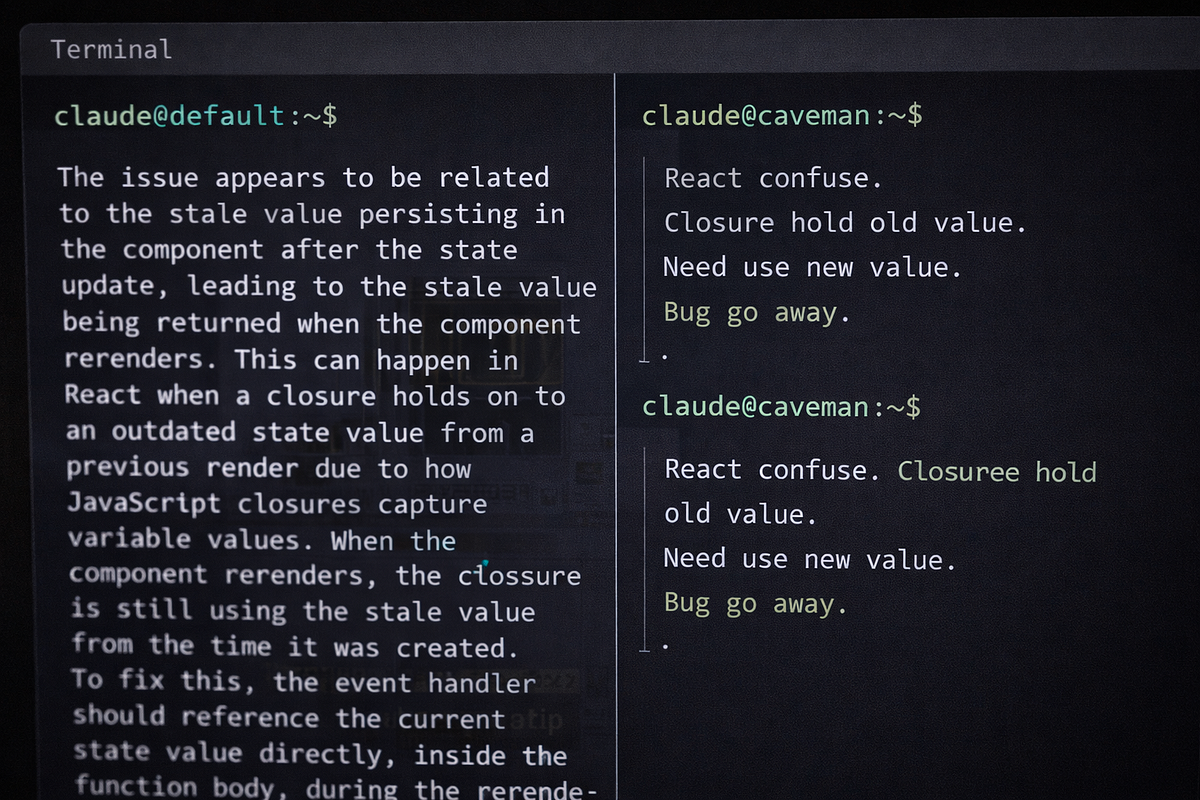
The idea came from a simple observation: Claude’s explanations often sound like this —
“The reason your React component is re-rendering is likely because you’re creating a new object reference on each render cycle. When you pass an inline object as a prop, React’s shallow comparison sees it as a different object every time, which triggers a re-render. I’d recommend using useMemo to memoize the object.”
In caveman mode, the same answer is:
“New object ref each render. Inline object prop = new ref = re-render. Wrap in useMemo.”
Same information. Way fewer words. If you’re an experienced developer, you read both versions and understood them equally fast. The long version didn’t teach you anything extra. It was just… politeness. Padding.
And that padding is costing you real money.
How do you actually install it?
This is honestly the easiest part. One command in your terminal:
claude plugin marketplace add JuliusBrussee/caveman
claude plugin install caveman@caveman
After that, restart Claude Code. The skill loads automatically at the start of every session. You trigger it by typing /caveman in your Claude Code session — or just saying "caveman mode" or "less tokens please" in plain English, which I find kind of funny. Claude understands.
There are three levels. /caveman lite just drops the filler words. /caveman full switches to fragment-style responses. /caveman ultra goes maximum terse — think ancient scholar on a budget. I mostly use lite or full. Ultra is a bit much when you actually need to understand what went wrong.
There’s also a companion feature called Caveman Compress. This one is separate and does something different — it rewrites your CLAUDE.md file (the memory file Claude reads at the start of every session) into compressed caveman-speak, which reduces input tokens instead of output ones. It saves your human-readable version separately so you can still edit it normally. That part claimed around 46% reduction in that specific file’s token count.
Now, the honest numbers — because the 75% figure is misleading
The repo README shows 75% output token savings. And that number is real — for Claude’s prose responses specifically. When they benchmarked across 11 actual dev tasks, caveman mode averaged 294 tokens per response versus 1,214 in normal mode. That’s a 65% drop in response tokens.
But here’s what the headline doesn’t tell you: prose responses are only a small part of your total token usage in a real session. Most of your tokens come from the input side — your conversation history, the file contents Claude reads, the system prompt. In a typical 100,000-token session, prose responses might account for around 6,000 tokens. Caveman compresses those 6,000 by about 65%, saving you ~4,000 tokens.
That’s roughly 4% of your total session.
At $200/month in Claude Code usage (which is serious heavy use), 4–5% saves you maybe $8–10 a month. Which is not life-changing. But it’s free, it takes one minute to install, and it also does something else that actually matters more.
The accuracy thing is the interesting part
A March 2026 paper on arXiv — “Brevity Constraints Reverse Performance Hierarchies in Language Models” — found that making large models give brief, constrained answers actually improved their accuracy by 26 percentage points on certain benchmarks. That’s not a token-saving trick, that’s a behavior change.
The practical version of this in real coding sessions: when Claude writes shorter, more direct answers, it makes fewer mistakes in the explanation. Fewer correction cycles. Fewer “wait that’s not quite right” moments where you have to send another message. One developer who tracked his sessions carefully found about 7 percentage points higher first-attempt success rate, and averaged 0.6 fewer conversation turns per task. Across 30–40 tasks a day, that’s 18–24 fewer back-and-forth turns. Each turn costs 2,000–3,000 tokens. So the real total savings, once you count fewer turns, gets closer to 8–10% per session.
And then there’s just the speed. Less text to generate means faster responses. If you’re waiting on Claude 15–20 times an hour, even a few seconds per response adds up. One person estimated 15–20 minutes saved across a full work day. I don’t know if my estimate is exactly that, but I do notice it.
Who should actually use this?
Okay so this part matters. The repo itself says it directly: caveman mode is for experienced developers who don’t need the explanation. And that’s true.
If you already know what useMemo is, you don't need Claude to explain React's reconciliation behavior. The shorter answer is just better. But if you're still learning — if you're asking Claude to help you understand why something broke, or you're new to a framework, or you're using Claude to actually teach you things — caveman mode will strip out exactly the part you needed.
Beginners shouldn’t use this. Full stop. The tokens caveman removes are not filler for someone building their mental model. They’re the lesson.
Also — and this is something I noticed myself — there are certain tasks where you want to keep it off even if you’re experienced. If I’m debugging something weird, I actually want Claude to explain its reasoning step by step. The longer answer often catches something I missed. For normal stuff like “add validation to this form” or “refactor this function,” caveman mode is great. For “why is this test failing in a really non-obvious way,” I turn it off.
What about the Classical Chinese mode? Yes, that’s real
The repo also has something called Wenyan mode, which compresses Claude’s responses using Classical Chinese literary style — which is apparently one of the most token-efficient written forms humans ever developed. Triggered with /caveman wenyan. I tried it once, thought it was hilarious, probably won't use it for actual work. But it's there.
There are also bonus features like caveman-commit which writes git commit messages in 50 characters or less, and caveman-review which does one-line code review comments like "L42: bug — user null, add guard." That last one I actually find useful for quick PR passes.
Is this just a meme, or does it actually matter?
Both, honestly. The GitHub tagline is “why use many token when few token do trick” and the whole thing is clearly having fun with the concept. But the underlying idea — that AI models generate a huge amount of padding that costs you money and slows things down — is completely real. Anthropic’s own documentation on managing Claude Code costs already says that concise prompting is one of the main ways to reduce your bill. Caveman is just that idea turned into a one-command install.
The token savings are smaller than the headline number suggests. But the faster responses, fewer conversation turns, and the slightly better accuracy on direct tasks — those are real. I use it daily now, mostly at full level, and I turn it off when I'm debugging something I don't fully understand yet.
One last thing: the repo has another version called caveman-skill by a developer named Shawnchee that works across 40+ AI coding tools, not just Claude Code. Same idea, slightly different implementation. Works with Cursor, Windsurf, GitHub Copilot. So even if you’re not on Claude Code, there’s a version for you.
So should you install it?

If you’re a developer using Claude Code or the Claude API regularly: yes, install it, try it for a week, and see if you like it. It costs nothing, takes 2 minutes, and you can turn it off whenever you want. The money savings alone probably won’t blow your mind, but it genuinely makes responses faster and snappier — and that part I didn’t expect to like as much as I do.
If you’re learning to code or using Claude as a teaching tool: skip it, at least for now. Come back when the explanations feel like noise instead of signal.
That’s really it. No magic, no conspiracy — just a small tool that strips the politeness out of your AI assistant and charges you less for it.