Someone on X posted a screenshot back in April. One prompt, a 104 page literature review, fully cited, exported straight to Word and PDF. The guy typed the request, went to make coffee, and came back to something that would’ve taken a PhD student two weeks. No follow up prompts. No human sitting there babysitting it.
I didn’t believe it at first. I’ve used enough “AI agent” tools that promise the moon and give you a half-broken to-do list. But this one, called Kimi Agent Swarm, is built by Moonshot AI, the Beijing lab behind the Kimi models. And after spending a few weeks actually poking at it for real work, research pulls and one properly messy code migration, I think it’s worth explaining properly. Not the marketing version. The version where I tell you where it choked too.
What Kimi Agent Swarm Actually Is
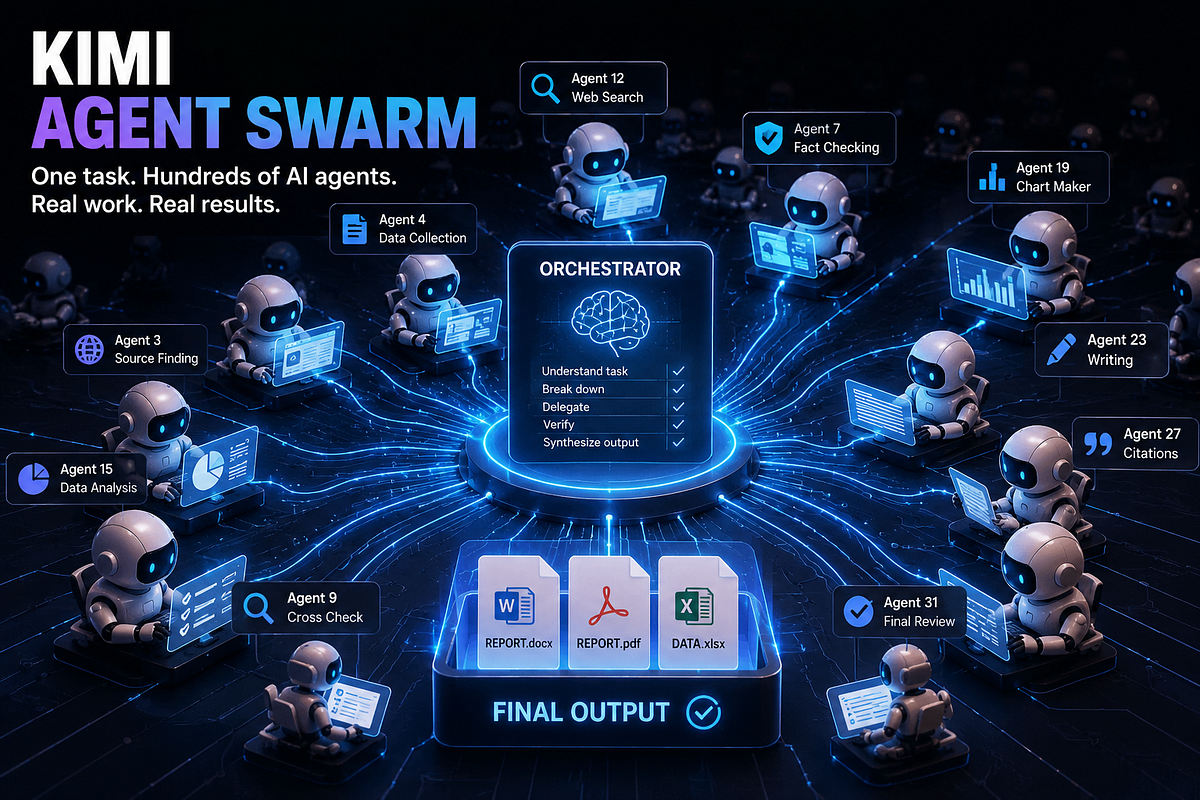
Normal AI chat works one step at a time. You ask, it answers, you ask again. Agent Swarm skips that. You give it one task, and a main “orchestrator” model reads the request and figures out what kind of work it needs, then spins up a batch of specialist sub agents to go do pieces of it at the same time. Then it stitches everything back into one output.
Moonshot describes it almost like hiring a temporary company for a single job. The orchestrator acts as the manager. It doesn’t do the research itself, it delegates, checks the pieces coming back, and assembles the final file. On the current K3 model this can scale up to 300 sub agents running across roughly 4,000 coordinated steps. That’s a big jump from where this started. Kimi K2.5, the first version to ship this in January 2026, topped out at 100 parallel agents and 1,500 tool calls.
So why does this matter more than just “it’s faster”? Because a single model working alone has to do things in sequence. Read the source, then summarize it, then move to the next source. A swarm can have twenty sub agents reading twenty different sources in parallel, another five cross checking facts, and one writing the final draft while the others are still working. It’s less like one very fast writer and more like a newsroom on deadline.
How to Actually Use It
You don’t need any special setup for the basic version, the interface itself is fairly plain. Head to kimi.com or the mobile app, and you’ll see a mode bar near the input box: Deep Research, Slides, Sheets, Docs, and Swarm sitting right there next to it.
Here’s roughly how a session goes.
You type your task in plain language, the same way you’d brief a person. Something specific works far better than something vague, so instead of “research electric cars,” I’d write “compare the top 5 EV makers by 2026 Q2 sales in India and the US, cite each source, and give me the output as a PDF.” Then you pick Swarm mode and hit send.
From there the orchestrator takes over. You’ll actually see it thinking out loud in the interface, sort of, it shows which sub agents it’s spinning up and what each one is chasing down. On longer jobs this can run for a while. I’ve had one take almost forty minutes for a wide industry report. You don’t need to sit and watch it. Close the tab, come back later, the result is waiting.
Once it’s done, you get a finished file, not a chat reply. Word doc, PDF, spreadsheet, or slide deck depending on what you asked for. If something’s off, you can send a follow up and it’ll either patch the existing output or re-run the relevant piece.
For developers, there’s a second door in through Kimi Code, the CLI tool, and directly through the Moonshot API using an OpenAI-compatible endpoint. In the API you don’t see the internal swarm state, you just define the task and get the final synthesized output back.
A few practical notes before you jump in. Swarm mode isn’t always the right toggle. For a quick factual question, using it is like calling a whole team meeting to answer “what time is it.” I’ve started defaulting to regular chat for anything I could answer in under a minute myself, and saving Swarm for jobs with real breadth, something that would eat an actual afternoon if I did it by hand.
Also worth knowing: you can watch the sub agents work in something close to real time if you keep the tab open. It’s oddly satisfying, actually. You’ll see labels pop up like “Agent 4: verifying pricing data” or “Agent 11: drafting section 3,” and a running step counter. On one report job I watched it hit past 200 steps before I gave up watching and just went to do something else.
Features and the Numbers That Actually Matter
A lot of the marketing around this thing is noise, so here’s what’s actually useful to know.
Model and scale. The current flagship is Kimi K3, a 2.8 trillion parameter mixture-of-experts model with a 1 million token context window. It’s the largest open-weight model currently public, and it leads on coding and agentic benchmarks among open models, scoring 80.2% on SWE-bench Verified according to Moonshot’s own release notes.
Swarm limits. Up to 300 sub agents, 4,000 coordinated steps, on K3 and the K2.6/K2.7 generation. K2.5, the original swarm model, caps at 100 agents.
Two thinking modes. Instant mode for quick answers, Thinking mode when it needs to reason step by step through something like math or a multi part logic problem. K3 is apparently the only model in the lineup where you can switch between the two mid session, though I haven’t tested that specific claim myself.
Multimodal input. It reads images, video, PDFs, and documents natively, not as a bolted-on OCR layer. This matters if you’re feeding it messy scanned reports or charts and want it to actually reason over what’s in them, not just transcribe text.
Claw Groups. This one’s newer and still in research preview. It lets the swarm mix in agents that aren’t Kimi at all, other models, locally run agents, even mobile-based ones, all coordinating under the same orchestrator. I haven’t gotten this to work reliably yet, honestly, it kept timing out on my end last week, and I couldn’t tell if that was my setup or their infrastructure still settling.
Office Agent. Handles Word annotations, builds financial models with actual pivot tables, writes LaTeX equations, and outputs directly to PPT, Excel, or PDF without you manually exporting anything.
ClawHub skills. A library of over 5,000 pre-built skills the swarm can pull from for specific workflows, similar in spirit to plugins.
PARL training. According to Moonshot’s published technical documentation, the swarm behavior isn’t a prompt trick bolted onto an existing model. They developed something called Parallel Agent Reinforcement Learning specifically to train the orchestrator to decide when splitting a task actually helps versus when it just burns tokens for no reason. Whether it’s fully solved that problem is a separate question, and I’ll get to that.
Kimi Work and Kimi Claw. Two related but distinct products worth not confusing with Swarm itself. Kimi Work is a desktop app that mounts your local folders and can run scheduled tasks and background Python, aimed at people who want a persistent local agent rather than a browser tab. Kimi Claw is the cloud version of that idea, a 24/7 hosted agent with persistent memory, available from the Allegretto plan and above. Swarm can run inside either one, or through the plain web app.
What It Costs
Because Kimi runs two completely separate pricing systems, and they don’t talk to each other, this is where most people get confused.
The app subscription covers the web app, mobile, Kimi Code, and swarm credits, on a tiered structure. As of this writing there are five tiers: Adagio is free, and gives you unlimited basic chat but only around 6 agent credits a month and no Agent Swarm access at all. Then it’s Moderato at $19 a month, Allegretto at $39, Allegro at $99, and Vivace at $199, the top tier, with 300-agent swarm access and priority processing. Annual billing knocks the effective monthly price down a bit on each tier.
The API is billed separately, per token, and this is where it actually beats Western competitors on price. K3 runs $3 per million input tokens and $15 per million output, with a cache-hit input rate as low as $0.30. Compare that to Claude Opus at roughly $5/$25 or GPT-5.6 at $5/$30, and the gap is real. The budget option, K2.6, drops to $0.55/$2.65 per million, about five times cheaper on output than K3.
One thing worth flagging honestly: swarm runs eat tokens fast, since you’re paying for every sub agent’s context and output, not just one model’s. Yuma Heymans, who runs the multi-agent orchestration site o-mega.ai, has started calling this the “swarm tax,” a job that looks cheap per-token on paper ends up costing more than expected once thirty agents are all reading and writing at once. If you’re on the subscription plans instead of the API, this is less of a worry since it’s credit-based, not metered per token, but heavy users on Moderato do burn through their weekly swarm allowance faster than they expect.
How It Stacks Up Against Just Using Claude or GPT
I get asked this a lot, so let me just answer it plainly instead of dodging.
For a single, focused task, writing an email or debugging one function, I don’t reach for Swarm at all. A regular model does that fine and faster, no orchestrator overhead needed. Where the swarm approach actually wins is breadth: pulling from many sources at once, running the same analysis across a long list of items, or producing several different file formats from one research pass. That’s a structurally different job than “answer this one question well,” and it’s the one thing a single-threaded model just can’t do as fast no matter how good it is.
On raw model quality, I’d still put Claude Opus ahead for careful reasoning and writing that needs a real editorial ear. Kimi K3 is close on coding benchmarks and miles cheaper, but the prose it produces on its own, before you go in and edit, tends to read flatter. Fine for a first draft you’re going to rewrite anyway. Not something I’d publish untouched.
Things I Actually Used It For
Real tasks, not hypotheticals.
Literature review compression. I fed it a research question in a field I only half understand and asked for a sourced overview with at least fifteen references. It came back with a usable draft in under twenty minutes, sources attached, though I still had to double check a couple of the citations myself since one paper it referenced turned out to be a preprint that got heavily revised later.
Competitive analysis batches. Asked it to pull public pricing, feature sets, and recent funding news for six competitors in a niche SaaS category and output a comparison table plus a two page summary. This is the kind of task where parallel sub agents actually earn their keep, since each competitor’s research doesn’t depend on the others.
Dataset generation for a small ML side project. Needed a synthetic dataset of customer support tickets across a few categories. Told it the schema, the categories, roughly how many rows, and it generated the CSV directly. Took maybe two tries to get the category balance right.
Legacy code migration. This is the one Moonshot likes to show off, and I get why. I pointed Kimi Code at a smaller internal script that needed moving from an older framework version to a newer one, and the swarm broke it into independent chunks and ran them in parallel. It worked, mostly. One sub agent’s change conflicted with another’s in a shared config file, and I had to manually resolve that myself. So “hands off” is doing some heavy lifting in the marketing copy there.
Batch content drafts. A friend running a small newsletter operation asked me to test whether Swarm could handle her weekly workload of eight short niche articles at once instead of one at a time. I gave it eight topics in a single prompt and asked for a first draft of each, roughly 800 words, with the sources listed separately. It came back with all eight in about eighteen minutes. Quality was uneven, two of the eight needed a real rewrite, but the other six only needed light editing, which for her is still a big time save over writing from scratch.
Slide deck from a messy PDF. Uploaded a 40 page industry report PDF and asked for a 12 slide executive summary deck. This one actually impressed me the most. It read the charts in the original PDF, not just the text, and rebuilt clean versions of a couple of them in the new slides.
Where It Actually Falls Apart
It’s not magic, and I think anyone selling it as fully hands off work is overselling it a bit. The orchestrator sometimes misjudges how many agents a task actually needs. I asked for a fairly narrow, single-focus summary once and it still spun up nine sub agents for job one agent could’ve handled in half the time and a fraction of the tokens. That’s a cost problem more than a quality one, but it adds up if you’re on the API. It also still needs a human doing final review, especially on anything with numbers or citations. The confidence with which it presents a wrong or outdated figure is the same confidence it uses for a correct one, so you can’t skim the output and trust it blind. I learned that one the hard way on a stat that turned out to be from a 2024 report the sub agent hadn’t realized was outdated. None of this is unusual for an AI tool this new, to be fair, but it’s worth knowing going in.
And Claw Groups, the cross-model swarm feature, is still rough around the edges. Moonshot calls it a research preview and that’s accurate. I wouldn’t build anything that depends on it working reliably yet.
None of that means it’s not worth using. For the price, especially through the API where K3 undercuts Claude and GPT by a wide margin, it’s hard to argue against at least trying it on your next big research pull or batch content job. I went in expecting a gimmick, TBH, and came out using it weekly now, mostly for the wide research pulls that used to eat my whole morning. Just don’t hand it something you’re not willing to fact check afterward, and watch your token spend if you’re on the API instead of a flat subscription. That part sneaks up on you.