AMD barely got its 128GB Ryzen AI Halo box onto desks before it moved the memory target again. As of August 19, 2026, AMD’s current Ryzen AI Halo product page says a new Halo developer system with the Ryzen AI Max+ PRO 495 and 192GB memory support is “coming soon.” AMD had already said the next version would arrive in the third quarter of 2026. We are inside that quarter now, but there is still no exact shop date or final price.
The number is hard to ignore. A mini PC with 192GB of unified memory can give as much as 160GB to the Radeon graphics side, according to AMD. The company also says this is enough for 300 billion plus parameter models at 4 bit quantization. That is server sized memory in a box small enough to sit beside your monitor. A year ago, 128GB in this class looked excessive. Now AMD is treating it like the lower step.
So is 128GB already old? No. I think that would be a silly conclusion. But 128GB is no longer the top of this new local AI category, and that changes how buyers should think about model size, long context, multi model agents, and the amount of spare memory a system needs after the weights have loaded.
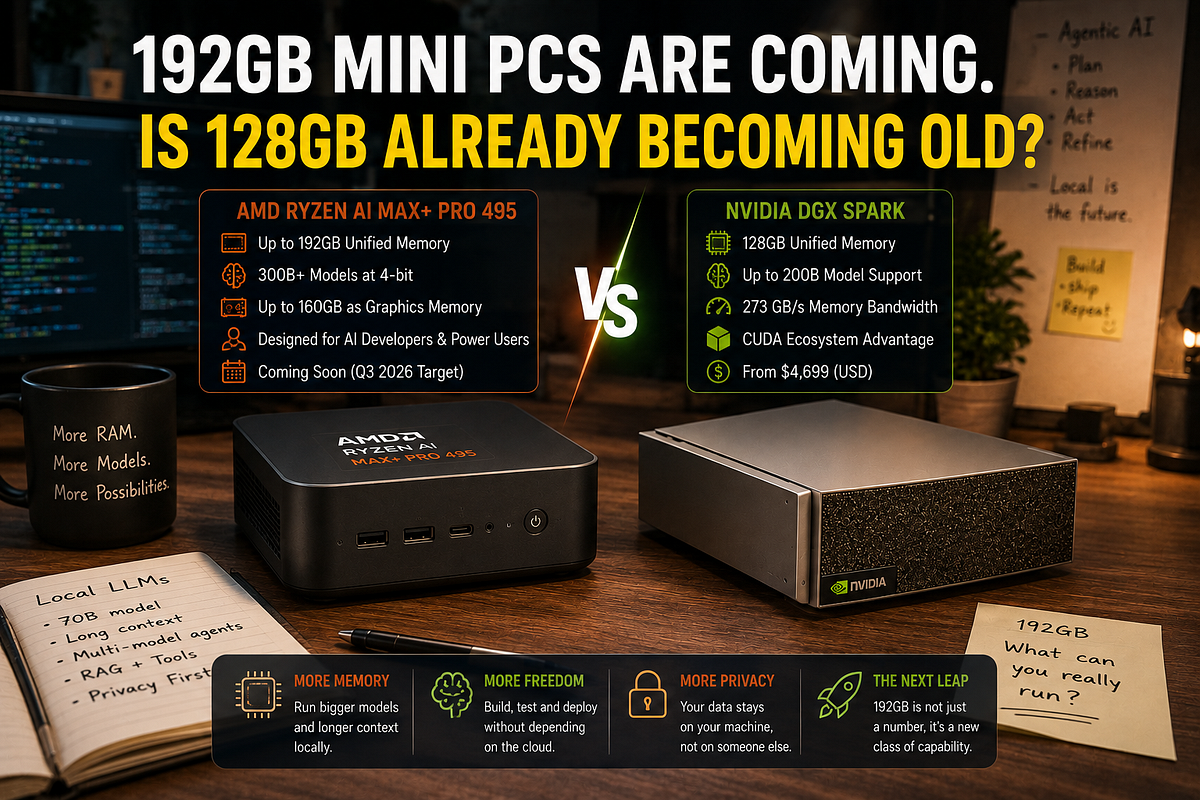
AMD moved the ceiling before 128GB settled in
The current Ryzen AI Halo developer platform uses the Ryzen AI Max+ 395. It has 16 Zen 5 CPU cores, 40 Radeon 8060S graphics compute units, a 45W to 120W power range, and up to 128GB of LPDDR5x memory. AMD says that system can run models up to 200B parameters, depending on format and quantization. It sells the platform as a compact local AI machine for Windows or Linux.
The next chip is called Ryzen AI Max+ PRO 495. I spent more time than I expected checking that name because AMD also has a Max+ 395, a Max+ PRO 395, and now a Max+ PRO 495. I opened spec page twice just to make sure I wasn’t mixing them. The naming is a bit of a mess.
The actual changes are easier to understand. The new chip still has 16 CPU cores and 40 graphics compute units. CPU boost rises from 5.1GHz to 5.2GHz. The graphics clock rises from 2.9GHz to 3.0GHz. Total quoted AI compute moves from 126 TOPS to 131 TOPS, and the NPU moves from 50 TOPS to 55 TOPS. Those are small gains. Useful, yes, but nobody should buy this machine for a 100MHz clock bump.
That extra 64GB is the story.
The Max+ PRO 495 supports 192GB of LPDDR5x-8533 on a 256 bit memory interface. The older Max+ 395 supports 128GB of LPDDR5x-8000. If you do the basic bus calculation, the new setup works out to about 273GB/s of theoretical memory bandwidth, up from about 256GB/s. That is a roughly 7 percent bandwidth lift beside a 50 percent capacity lift. It is a much bigger memory upgrade than compute upgrade. Well, more accurately, it is a capacity upgrade with a small speed refresh attached.
AMD also says the 192GB system can assign up to 160GB as graphics memory. That leaves 32GB for Windows or Linux, the CPU side, background services, model loaders, and whatever else you forgot was running. This split is why the headline should not be “a GPU with 192GB.” It is shared memory. The same pool serves the processor and graphics, and the system maker decides how much can be exposed to each side.
And that is enough to move several large models from “technically maybe” to “reasonable to test.” Not fast. Not cheap. Reasonable to test.
The math is rude
Model memory starts with a very plain calculation. Multiply the parameter count by the number of bits stored for each weight, then divide by eight. A 70B model at 16 bit needs about 140GB for raw weights. At 8 bit it needs around 70GB. At 4 bit it needs around 35GB. A 120B model at 4 bit starts near 60GB. A 200B model starts near 100GB. A 300B model starts near 150GB. Those figures do not include quantization tables, runtime buffers, temporary work areas, context cache, the operating system, or the app serving the model. They are the entry fee, not the final bill.
That is why 128GB can run a 200B model at 4 bit and still feel cramped. The raw weight file may sit near 100GB. Add several gigabytes of quantization data and runtime overhead. Add the KV cache used for conversation context. Add a desktop environment, Python, the model server, and a browser with 47 tabs because apparently we all enjoy suffering. Suddenly the machine has little space left.
A 192GB system does not make that 200B model smaller. It gives the model room to breathe. You may be able to use a higher quality 5 bit or 6 bit quantization. You may keep a longer context window. You may raise batch size. You may run another service without watching swap activity eat the whole afternoon.
Which sounds simple until context enters the chat.
The KV cache stores attention data for tokens the model has already processed. Its size depends on the model design, precision, batch size, and context length. Push a model from an 8,000 token context to 64,000 or 128,000 and the cache can consume many extra gigabytes. Some newer cache formats reduce this. Some model designs handle it better. Still, long context has a cost, and that cost sits beside the model weights in memory.
Mixture of experts models add another wrinkle. A model may activate only part of its weights for each token, which can improve speed compared with a dense model of the same total size. The full weight set normally still needs to be stored somewhere. “Only 30B active” does not mean a 300B model suddenly occupies 30B worth of memory.
AMD says the Max+ PRO 495 can run 300B plus models at 4 bit with up to 160GB assigned to graphics. The raw math supports the basic idea: 300B at 4 bit is around 150GB before overhead. But this is tight. A particular model may fit because its quantization format is compact. Another may fail by a few gigabytes. One may load and then run out of memory when context grows. AMD’s claim is about capability under a chosen setup, not a promise that every 300B model will behave nicely.
The extra space is really for everything around the LLM
The easiest way to waste 192GB is to load one huge model because the number looks fun. The better use is a complete local AI setup that stays resident.
A useful agent may run a main reasoning model, a smaller tool model, an embedding model, a reranker, speech recognition, text to speech, a vision encoder, and a local database. Some of these parts are tiny beside a 120B LLM. Together they still take memory. Then two users connect at once. Then the document parser starts. Then an image model wakes up, and suddenly the machine that looked oversized at breakfast is swapping by lunch.
This is where 192GB starts to make sense. You could keep a 70B model at a higher bit rate and still leave room for a large vision model. You could serve a 120B model with a long context while an embedding service and reranker remain active. You could test two quantizations side by side without unloading one every time. For a developer, avoiding model reloads is not glamorous, but it saves a lot of waiting.
The gain is even clearer for local teams. A single 128GB box can serve one large model well, but concurrent requests push cache and batch memory upward. A 192GB box gives the server more room for several sessions. It will not turn a mini PC into an eight GPU rack. It may stop the second user from crashing the first user’s job.
Fine tuning also benefits, within limits. QLoRA and other low memory methods let developers tune large models without keeping full precision weights and optimizer states on the GPU. More shared memory can hold a larger base model, longer sequences, or a bigger batch. But full training is another matter. Training a 300B model from scratch needs far more memory than 192GB because gradients and optimizer states multiply the weight storage. Anyone selling this as a pocket training cluster is having a laugh.
Image and video work can use the same headroom. AMD lists tools such as ComfyUI in its local AI software support, and large diffusion pipelines can keep a text model, image model, video model, and control components loaded together. The exact benefit depends on the software path. Memory gives you options. It does not fix a slow kernel or an unsupported operator.
There is a less obvious use too: datasets. Local retrieval systems can keep larger vector indexes in memory. Code analysis tools can hold more repository data. A private document agent can process a bigger batch without sending customer files to a cloud API. This is where a company may care about 192GB even if its main LLM is only 32B.
160GB of VRAM is not a 160GB graphics card
AMD says system makers can assign up to 160GB of the 192GB pool as graphics memory. That wording can create the wrong picture. There is no separate 160GB board inside the mini PC. The CPU and Radeon graphics share the same LPDDR5x chips, and the graphics driver is allowed to claim most of that pool for GPU work.
This design solves a real problem. A normal desktop with 128GB of system RAM and a 24GB graphics card still has a 24GB fast memory limit for models that must stay fully on the GPU. You can offload layers to system RAM, but data has to move across PCIe and speed usually drops. A unified memory APU can let the graphics side address a far larger pool without that same copy path.
There is a catch. Shared does not mean unlimited. The CPU and graphics side use the same memory bandwidth. If the GPU is reading model weights at full speed while the CPU is parsing documents or feeding tokens, both are working from one pool. The 273GB/s figure is for the system, not 273GB/s for the GPU plus another private lane for the CPU.
A high end discrete GPU can have far more memory bandwidth and far more compute, even if it carries less memory. That creates a slightly odd result. The 192GB Halo box may load a model that a much faster 24GB or 32GB card cannot hold, yet the smaller card may crush it on a model that fits. Capacity wins one contest. Speed wins another.
The remaining 32GB matters too. Windows or Linux needs space. So do the CPU processes, file cache, model server, browser, vector database, and remote tools. Giving 160GB to graphics is a maximum setting, not a rule for every job. A user running a 120GB model may get better overall behavior by leaving more memory available to the system.
Apps also need to understand the memory setup. Some software checks a reported VRAM number and behaves well. Other software assumes a discrete GPU and makes poor choices. A backend that was tested on 24GB cards may still have hard coded limits. That kind of janky software issue can waste more time than the hardware itself.
So the 160GB claim is useful, but read it correctly. It means unusually large GPU addressable capacity in a shared memory computer. It does not mean HBM class bandwidth or a datacenter accelerator hiding under the desk.
More memory will not make the machine fast
This needs saying because hardware marketing loves capacity numbers. A model that fits can still be painfully slow.
The new 192GB Halo setup has about 273GB/s of theoretical memory bandwidth. That is close to NVIDIA DGX Spark, which also lists 273GB/s. For batch one LLM generation, memory bandwidth often sets a rough speed limit because the system must read a large part of the model weights for each token. Real software is messier, but the basic limit is useful.
Take a dense 300B model stored at 4 bit. The raw weights are about 150GB. At a perfect 273GB/s, reading that much data once would take around 0.55 seconds. That suggests a fantasy ceiling near 1.8 tokens per second before software overhead, cache traffic, memory efficiency loss, and other work. Real results could be lower. A mixture of experts model may do better if fewer weights are active per token, but its behavior depends on the design.
Now take a 120B model at 4 bit, around 60GB of raw weights. The same rough calculation gives a much higher ceiling. This is why a smaller model can feel far better on the same machine even though both fit. Capacity decides whether the door opens. Bandwidth and compute decide how slowly you walk through it.
But the Max+ PRO 495 does not add much compute over the 395. Graphics clock rises by about 3 percent. Memory bandwidth rises by about 7 percent. If the same model runs on both, I would expect a modest speed change, not a dramatic jump. The buyer is paying for larger jobs and more headroom.
Power matters as well. AMD lists a configurable 45W to 120W range for the chip. A small chassis at the top end needs a good cooler, and noise can become annoying during long model runs. System makers may set different power limits. Two mini PCs with the same processor can behave differently after ten minutes because one keeps its clock and the other backs off to control heat.
The memory will likely be soldered. LPDDR5x at these widths is not something you add later with two desktop DIMMs. Buy 128GB and you stay at 128GB. Buy 192GB and you pay for it on day one. That is normal for this class of unified memory machine, but it makes the purchase harder.
Software can hurt more than hardware. AMD says Ryzen AI Halo supports Windows and Linux with ROCm, but its own current ROCm 7.2 notes list real Windows limits. Only PyTorch is supported on Windows, the rest of the ROCm stack remains Linux only, ML training is not supported there, and only LLM batch size one is officially supported. I tried to make the Windows story sound simple, but AMD’s own documentation stopped me. Linux is still the safer choice for a wider set of local AI jobs.
So a 192GB spec sheet is not enough. Check the exact app, model format, operating system, backend, and quantization you plan to use. Otherwise you may buy 64GB of extra memory that your chosen software cannot use properly.
NVIDIA made 128GB the current high end baseline
NVIDIA DGX Spark helps explain why AMD is moving to 192GB. Spark has 128GB of coherent LPDDR5x memory, 273GB/s bandwidth, a GB10 Grace Blackwell chip, and up to one petaflop of FP4 tensor compute. NVIDIA says it can run inference with models up to 200B parameters and fine tune models up to 70B. Two Spark systems can connect for models up to 405B.
That is a very different platform. DGX Spark uses an Arm CPU and NVIDIA’s CUDA based software stack. Ryzen AI Halo is x86 and supports Windows or Linux. AMD can offer more memory in one box, but NVIDIA has years of AI software work behind CUDA, TensorRT, NIM, and the libraries developers already expect. Some readers will choose 128GB NVIDIA over 192GB AMD because their code works there without a weekend of troubleshooting. I don’t think that is irrational.
Microsoft is also preparing the Surface RTX Spark Dev Box with 128GB unified memory and up to one petaflop of AI compute. It is still a prerelease product. The point is not that every machine is identical. The point is that 128GB has become the common memory number for compact AI developer systems at the top end.
AMD’s move to 192GB gives it a clean difference that readers understand in two seconds. More of the model can stay local. More cache can stay resident. More services can run together. It is easier to market than a small clock increase, and it hits NVIDIA in the one area where buyers constantly feel the limit.
Price could decide how much this matters. AMD’s current comparison material uses a $3,999 retail price for the 128GB Halo platform and $4,699 for DGX Spark. AMD has not posted a final price for the 192GB model. I would be surprised if it stays at $3,999, though that is only my guess. Extra LPDDR5x capacity is not free, and this is a PRO part aimed at developers and workstation buyers.
There is also availability. AMD said the new Halo platform would arrive in the third quarter of 2026, and the current page still says “coming soon.” HP and Lenovo were named as partners for Ryzen AI Max PRO 400 systems. We do not yet have a neat list of 192GB mini PCs with final prices, shipping dates, cooling limits, and review data. For now, the 192GB era is announced rather than settled.
Who should wait for 192GB?
Wait if you already know why 128GB is too small.
That may sound obvious, but it is the best buying rule here. A developer running 200B models at 4 bit, testing 120B models at 6 bit or 8 bit, using 100,000 token contexts, serving several users, or keeping several AI services loaded can use the extra memory. A team building a private agent for large codebases or document stores may also benefit. In those cases, 64GB is not decoration. It removes a limit you are already hitting.
A 192GB box also makes sense for people who want to test 300B class models locally and accept low token speed. The machine can become a model compatibility lab. It can answer questions such as: Does this quantization load? Does the prompt template work? Does the agent call tools correctly? Can we test private data without sending it outside? Those jobs do not always need fast chat output.
Buy 128GB if your work sits around 70B models, 120B at 4 bit, image generation, coding assistants, or one local agent stack. That is still a lot of memory. It is also easier to buy today, and the current systems have more user reports, setup notes, and tested software paths.
Most people do not need either size. A 32GB or 64GB machine can run many 7B to 32B models very well. A 96GB Mac or PC can handle a lot of 70B quantized work. Buying 192GB for a 14B coding model is like renting a warehouse for one chair. Nice warehouse, though.
And do not buy only for a parameter number. A good 70B model may beat a weak 200B model on your task. A smaller model may respond five times faster. Cloud models may still give better results for occasional difficult work, and a local box may sit idle for most of the day. Memory capacity is one part of the decision.
Privacy also needs a bit of common sense. Running locally keeps prompts off a remote API, but the machine still needs security updates, disk encryption, access control, backups, and careful network settings. Local does not mean safe by magic.
128GB is not old. The top step moved
After all that model name checking, the answer is simpler than AMD’s product list.
A 128GB mini PC is not becoming old in 2026. It is becoming the sensible high end choice for local AI developers who want 70B to 120B models, selected 200B experiments, and multi model workflows without buying a rack. NVIDIA DGX Spark, the current AMD Halo platform, and Microsoft’s coming RTX Spark box all show that 128GB has become a serious category rather than a weird one off.
The 192GB Max+ PRO 495 moves the upper limit. It gives AMD a way to fit 300B class 4 bit models, expose up to 160GB as graphics memory, and leave more room for long context or several services. The small compute gain does not change the story. Capacity does.
AMD still owes buyers the exact system price, ship date, and independent performance numbers. Those details will decide whether this is a useful workstation or a very expensive memory demo. The software split between Linux and Windows also needs attention, especially for anyone planning training or larger batch sizes.
So no, 128GB is not obsolete.
The day 192GB mini PCs ship, 128GB will probably become the value option. The 192GB box will be for the people who can already name the model, quantization, context length, and second service that push their current machine past the limit.