A strange thing has happened to the mini PC. A box that used to be bought for office work, home labs, media servers, or a tiny Linux setup is now being sold as a machine for running 120 billion and even 200 billion parameter AI models on your desk.
The size of these machines is the funny part. NVIDIA DGX Spark is about 150 mm wide, 150 mm deep, and 50.5 mm tall. AMD Ryzen AI Halo is almost the same footprint at 150 by 150 by 45.4 mm. You can put either one next to a normal monitor and forget how much memory is sitting inside. Both carry 128GB of LPDDR5x unified memory. A few years ago, 128GB sounded like workstation RAM for people running virtual machines or giant engineering projects. In 2026 it has become one of the numbers local AI people look for first.
And I think the reason is simple. Local LLM work is starting to hit a memory wall before it hits a compute wall.
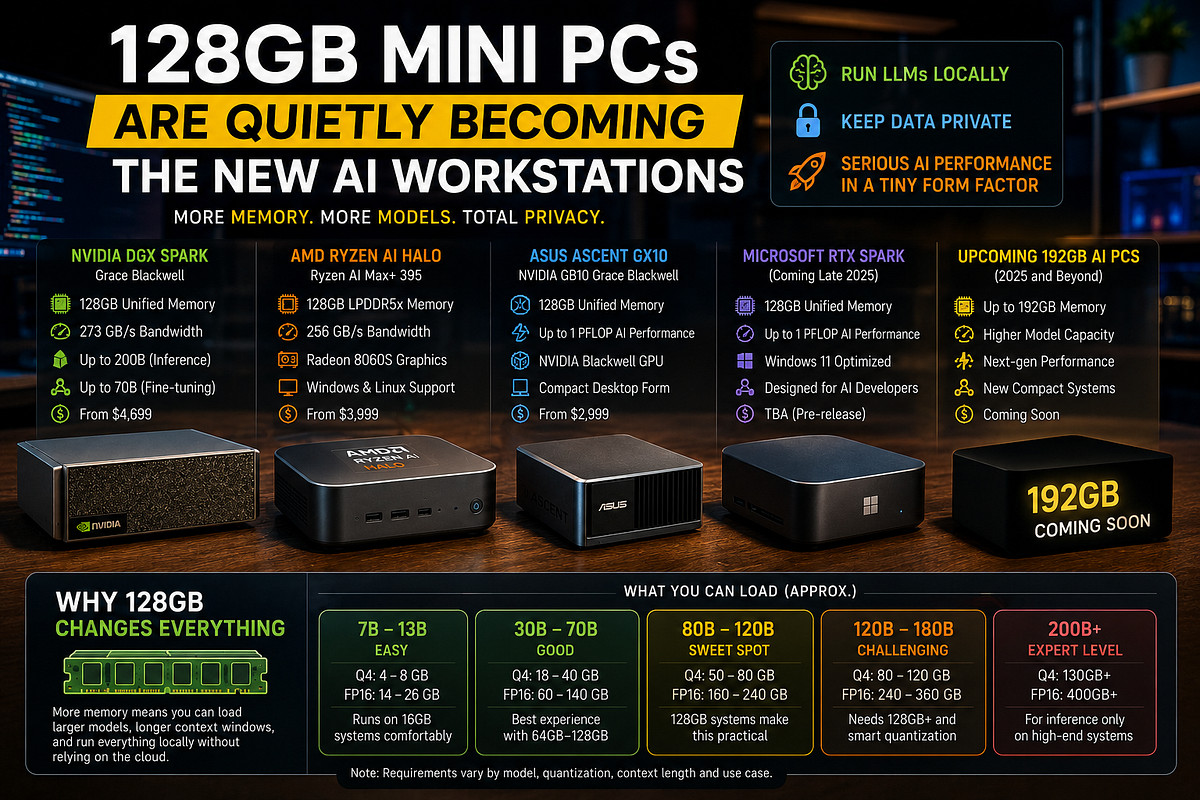
Why 128GB changes local AI more than another benchmark number
People shopping for AI hardware usually get pulled toward TOPS, TFLOPS, GPU cores, AI engines, and whatever giant number is printed at the top of the product page. I get it. Big compute numbers are easy to compare. Memory is less sexy. But if the model does not fit, none of those compute numbers help you much.
Take a 70 billion parameter model. At FP16, the weights alone need around 140GB before you count runtime overhead. At 8 bit, the rough weight size drops to about 70GB. At 4 bit, the simple math says about 35GB. Real files can be larger because quantization needs scales and other data, and the machine still needs memory for the operating system, runtime, context cache, temporary buffers, tools, and whatever else your agent is doing. So a 64GB machine can run many 70B class models at lower precision, but it can start feeling cramped once you increase context or keep other AI services alive.
Now move to a 120B model. Four bit weights are roughly 60GB before overhead. A 200B model lands around 100GB by the same rough calculation. Suddenly 128GB is not a silly luxury. It is the difference between looking at a model card online and actually loading the model on your own desk.
That is the part that gets missed in normal mini PC reviews. You are not buying 128GB because Chrome has gone mad again. You are buying room for weights, context, and the messy extra memory AI software eats once a model starts doing real work.
Context can become a memory hog by itself. The model has to keep information about previous tokens so it can continue the conversation or reason over a long document. That cache grows with context length, model size, architecture, batch size, and precision. It is why a model that loads successfully can still run out of memory when you push a much longer prompt into it. Anyone who has watched a local model load fine and then fall over after increasing context knows this pain. The first error message is usually less educational than you hoped.
So 128GB buys breathing room. It lets you stop treating every gigabyte like emergency ration.
There is another benefit. Unified memory means the CPU and GPU work from one large memory pool instead of forcing a small dedicated GPU memory limit on the whole job. The exact design is different between NVIDIA and AMD, but the result is easy to understand. The AI accelerator can work with far more model data than a normal 16GB or 24GB graphics card can hold locally.
This does not mean unified memory is automatically faster. Capacity and speed are different problems. A machine with 128GB can load a model that a 24GB GPU cannot, then generate tokens slower than that smaller GPU on a model both machines can fit. People mix these two ideas all the time. Can it load the model? How fast can it run the model? You need both answers.
That distinction is where DGX Spark starts making sense.
DGX Spark made the 128GB mini AI box feel real
NVIDIA’s DGX Spark is based on the GB10 Grace Blackwell Superchip. It has a 20 core Arm CPU, a Blackwell GPU, 128GB of coherent LPDDR5x memory, and 273GB/s of memory bandwidth. NVIDIA rates it at up to 1 PFLOP of FP4 tensor compute with sparsity. That last number looks huge on a product page, but FP4 with sparsity is a specific measurement. I would not compare it directly with an FP16 number from another machine and declare a winner. Vendor math gets messy very fast.
The memory story is cleaner.
NVIDIA says a single DGX Spark can fine tune models up to 70B parameters and run inference on models up to 200B parameters. That 200B claim tells you what NVIDIA thinks the 128GB pool is for. This is not 128GB added because workstation buyers asked for more browser tabs. The entire machine is built around keeping larger AI work local.
The box itself is tiny. It weighs about 1.2 kg and uses a 240W power supply, with NVIDIA listing the GB10 chip at 140W TDP. Storage is 4TB NVMe. It also has 10GbE and ConnectX 7 networking, which becomes relevant if one box stops being enough.
Two DGX Spark systems can be linked for larger jobs. NVIDIA and several OEM partners talk about running models up to the 405B class across a pair. That is where the mini PC comparison starts becoming slightly weird. We are discussing two boxes that take less desk space than many old Wi Fi routers, yet the target workload is a model size that used to push you toward servers with several expensive accelerator cards.
Of course, “supports 200B” needs some common sense. It does not mean every 200B model will fit at every precision with giant context and run at a speed you will love. Quantization matters. Context matters. The runtime matters. Model architecture matters. Some workloads will be comfortable and some will be a total headache. The claim tells us the intended scale, not a promise that physics has taken the afternoon off.
DGX Spark’s other advantage is software. CUDA, TensorRT, PyTorch support, NVIDIA NIM, containers, and the wider NVIDIA AI stack have years of developer habits built around them. If your existing work already assumes CUDA, this matters more than a small difference in memory bandwidth. You can have the nicer hardware on paper and still waste half a day because a package expects another architecture or a build does something janky.
Arm is the catch. DGX Spark’s CPU side is Arm, not x86. A lot of modern AI software works fine there, especially when NVIDIA has prepared the path. Old binaries, random native tools, custom dependencies, and some developer utilities can still make Arm more annoying than an x86 workstation. I had to check the software story more than once while researching these boxes because the hardware pages make everything sound clean. Real development machines are rarely that clean.
DGX Spark also is not cheap. AMD’s current comparison material lists DGX Spark at $4,699. At that price you are buying more than RAM. You are paying for the GB10 design, NVIDIA software, networking, compact size, and a path that looks similar to bigger NVIDIA systems.
For some developers that is enough. For others, AMD has a very different answer.
AMD Ryzen AI Halo treats 128GB like a workstation feature
AMD Ryzen AI Halo uses the Ryzen AI Max+ 395. It is a 16 core, 32 thread Zen 5 processor with Radeon 8060S integrated graphics based on RDNA 3.5 and an XDNA 2 NPU. The developer box has 128GB LPDDR5x at 8000 MT/s, with 256GB/s of memory bandwidth. AMD lists 60 FP16 TFLOPS of GPU compute and up to 50 TOPS from the NPU.
Again, do not put NVIDIA’s FP4 petaflop beside AMD’s FP16 TFLOPS and treat the larger number as a clean score. They describe different precision modes and conditions.
The useful comparison is this: AMD gives you nearly the same 128GB memory capacity in nearly the same physical size, but the CPU is familiar x86 and the machine supports both Linux and Windows 11. That makes Ryzen AI Halo feel more like a normal PC that happens to have an unusually large shared memory pool.
For people who want local LLMs plus normal desktop work, that can be a big deal. Your editor, browser, build tools, Windows software, x86 containers, local databases, and AI runtime can all live on the same machine without the Arm question hanging over every odd dependency. Linux is there if you prefer it. AMD is also pushing ROCm support, LM Studio, Ollama, PyTorch, vLLM, LoRA and QLoRA workflows through its developer setup.
AMD says Ryzen AI Halo supports models up to 200B parameters. Its May 2026 benchmark material tested GPT OSS 120B, Qwen 3.5 122B, Qwen 3.6B, and GLM 4.7 Flash 30B against DGX Spark. AMD reported higher average token rates for its own box across those selected tests. But the footnote matters: the tests used a 100 token context and a preproduction Ryzen AI Halo system. That is useful vendor data, not the final word on every local LLM workload.
I would actually care more about what happens at 32K, 64K, or 128K context than a short 100 token run if I were buying a $4,000 machine for agents and document work. Long context changes memory pressure and can change performance behaviour quite a bit. AMD itself has a separate cost example using 128K context, which shows how different a real workload can be from a short benchmark.
Still, AMD’s box costs less in the company’s current comparison. AMD lists its 128GB Ryzen AI Halo developer platform at $3,999 versus $4,699 for DGX Spark. Seven hundred dollars is enough money that I would not wave it away as a minor detail.
And AMD is already moving past 128GB.
As of August 17, 2026, AMD’s Ryzen AI Halo page says a version based on the Ryzen AI Max+ PRO 495 with 192GB memory support is coming soon. There is no need to invent a launch date. AMD has not given one on that page. The interesting part is that 128GB is already being treated like a step on the road rather than the end point.
That says a lot about where local models are heading.
The category is getting crowded very fast
DGX Spark and Ryzen AI Halo would be easy to dismiss as expensive developer toys if they were alone. They are not.
NVIDIA’s GB10 design has spread into machines from major PC makers. ASUS has the Ascent GX10 with 128GB coherent unified memory. Dell sells a Pro Max with GB10 and 128GB. HP has the ZGX Nano G1n AI Station with the same 128GB class memory setup and support for models up to 200B. Lenovo’s ThinkStation PGX also uses GB10 with 128GB LPDDR5x. These systems differ in storage, support, enclosure, price, cooling, and vendor tools, but the core idea keeps repeating: very small desktop, very large shared memory pool, local AI first.
This repetition matters more than any one product.
When Dell, HP, Lenovo, ASUS, NVIDIA, AMD, and Microsoft all start building around the same basic memory idea, it stops looking like a one season experiment. PC makers clearly think there is a market between a gaming desktop with one GPU and a rack full of server accelerators.
Microsoft is taking the idea in a more Windows shaped direction. Its Surface RTX Spark Dev Box is still a prerelease product as of August 2026. Microsoft says it will ship with Windows 11 Pro configured for AI development, 128GB of unified memory, NVIDIA RTX graphics, and up to one petaflop of AI compute. The company lists a 100W thermal envelope for the dev box. Pricing and final shipment details are still not settled publicly on the product page.
Then there is RTX Spark itself. NVIDIA announced in June that RTX Spark systems with up to 128GB unified memory are coming to Windows laptops and compact desktops. ASUS, Dell, HP, Lenovo, Microsoft Surface, and MSI are named for fall availability, with Acer and GIGABYTE expected later. NVIDIA says the platform is aimed at local agents, large models, creative work, and gaming on the same PC.
That could move 128GB unified memory out of the developer box corner and into machines normal workstation buyers actually see in stores.
I mean, we have spent years arguing whether 16GB is enough in a laptop. Now NVIDIA is talking about 128GB Windows machines that can run a 120B parameter LLM locally. The jump is a bit ridiculous when you put the two conversations beside each other.
The memory is doing more than holding model weights too. Agent software may keep a main language model loaded while also using embeddings, rerankers, image models, speech models, local databases, browser state, and long context. A 24GB GPU can be very fast, but juggling several models across limited VRAM gets annoying. With 128GB shared memory, the system has more room to keep several pieces alive at the same time.
That is probably where this class of machine makes more sense than the headline model size claims. Running one giant 200B model is nice for screenshots. Running a 30B or 70B model with long context, a vision model, embeddings, a local code index, and an agent process all day is the kind of workload people may actually pay for.
And it keeps the data on the desk.
A local machine does not remove every privacy problem, but it changes the data path. Source code, internal PDFs, customer files, medical images, design documents, or private notes do not need to leave the machine just because the model needs them. For teams with strict data rules, that can be worth more than saving a few seconds on token generation.
There is also the cloud bill. Local hardware has a large upfront price and electricity is not free, so the “no cloud cost” line can get silly if you barely use the machine. But a developer who runs models for hours every day can at least predict the hardware bill. No token meter is ticking in the corner. No API rate limit suddenly ruins a batch job at 1:30 in morning.
The machines are small enough to act like appliances. Put one on the network, SSH into it, and use it from your laptop. HP even markets its ZGX Nano around this idea, where Windows, Mac, or Linux computers can send work to the box over the network. That setup makes sense for a small team. Nobody needs to move their whole desktop life onto the AI machine.
128GB still has hard limits
This is where I want to kill a bit of the hype.
Memory capacity solves the first problem: fitting the workload. It does not make the workload fast. DGX Spark has 273GB/s memory bandwidth. Ryzen AI Halo lists 256GB/s. Those are good numbers for compact shared memory systems, but large language model inference can be very sensitive to memory bandwidth. A huge model that fits may still produce tokens at a rate that feels slow compared with a smaller model on a high bandwidth discrete GPU.
So buying 128GB only to run a 200B model because the box says it can may be a bad plan. A smaller model that runs much faster can give a better daily experience. Model quality is not decided by parameter count alone either. A newer 30B or 70B model can beat an older larger model on the work you care about.
There is the precision issue too. A 200B model at FP16 would need roughly 400GB just for weights. It is not going into a 128GB machine. The reason vendors can talk about 200B inference is lower precision and software work. Four bit gets the rough weight math near 100GB, but overhead still exists. Push context too far and that remaining memory can disappear quickly.
A 120B model is more comfortable at 4 bit. A 70B model gives you much more room. A 32B model leaves enough space for big context and several supporting processes. This is why I think 128GB matters more for flexibility than bragging rights. It gives you choices.
The memory is soldered as part of these compact designs too. You are not buying a normal tower with four DIMM slots and thinking, “I will add another 128GB next year.” What you buy is what you live with. AMD’s move toward 192GB is useful precisely because local AI memory demand is unlikely to move downward.
Software can become the other wall. NVIDIA has CUDA and a mature set of AI tools, but DGX Spark uses Arm. AMD gives you x86 and Windows or Linux, but ROCm support can still depend on the exact tool, operating system, package version, and GPU path. Microsoft’s upcoming Surface box tries to combine Windows familiarity with NVIDIA hardware, which might remove some friction, but it is not shipping as a final retail product yet.
Basically, there is no magic box here.
And then there is price. Four thousand dollars buys a serious desktop. Around $4,700 buys an even more serious one. Some GB10 systems from workstation vendors can cost more once storage and support are included. A person running 7B, 14B, or 30B models does not need 128GB just because 128GB exists. You can build a much cheaper local AI machine for those sizes.
The buyer who benefits is the person who can name the reason for needing the memory before opening the checkout page.
Who should actually buy a 128GB mini AI workstation
If your daily work involves 70B and 120B class models, long context, private code, local RAG, multi model agents, or repeated experiments that would otherwise live in cloud GPU instances, these boxes start looking sensible. The same goes for a small research team that wants a shared machine under a desk instead of asking everyone to set up large local models on separate laptops.
DGX Spark makes the most sense when your work is already built around NVIDIA. CUDA based projects, NVIDIA containers, TensorRT workflows, and a plan to move prototypes toward larger NVIDIA servers all favour that route. The 200Gb/s ConnectX 7 link and two box scaling option are unusual in something this small. You are buying into a very specific development path.
Ryzen AI Halo makes more sense if you want the box to behave like a normal high end PC as well as an AI machine. The x86 CPU, Windows option, Linux option, and lower listed price make it easier to imagine as a main workstation. AMD’s coming 192GB version is also worth watching if 128GB already feels close to your limit.
The OEM GB10 systems are for buyers who care about the company around the hardware. Dell, HP, Lenovo, and ASUS can add their own support contracts, management tools, storage choices, and service setup. A lab buying ten boxes may care about that far more than somebody buying one for a home office.
Microsoft’s Surface RTX Spark Dev Box is the one I would watch if your work is very Windows heavy. It is still prerelease, so treating it like a finished recommendation would be premature. But the idea is clear: 128GB local AI compute, NVIDIA RTX, and Windows development tools in one small box.
Then fall 2026 gets interesting. NVIDIA says RTX Spark will arrive in compact Windows desktops and laptops from several major PC brands. If those machines are priced closer to normal workstations than today’s AI developer boxes, 128GB unified memory could stop being a weird niche spec very quickly.
That is the shift I care about.
For years, local AI hardware advice was mostly about finding the largest GPU you could afford. VRAM decided what you could load, and the rest of the PC was supporting cast. These 128GB machines change that shape. The memory belongs to the whole system, the AI accelerator can work with a much larger pool, and the physical computer can fit in one hand.
It still will not replace a rack of H100s or Blackwell server GPUs. It is not trying to. A tiny 128GB box has different limits on bandwidth, thermals, sustained compute, and scaling. Anyone promising datacenter performance from a mini PC is selling you a very nice story.
But the middle of the market was empty for a long time. You either squeezed models into consumer VRAM or rented serious compute somewhere else. Now there is another option: keep a surprisingly large model on a small machine that sits beside your keyboard.
That is why 128GB matters.
Not because every local AI user needs it today. Most don’t. It matters because model sizes have finally pushed PC makers into designing memory around AI workloads instead of asking AI workloads to fit whatever memory PCs happened to have.
AMD is already talking about 192GB. NVIDIA has 128GB Windows systems due this fall. Dell, HP, Lenovo, ASUS, Microsoft, NVIDIA, and AMD are all putting real products around the same idea.
A year from now, 128GB may look less like an absurd mini PC specification and more like the point where a desktop stopped being just a PC and started becoming a personal model server.