A computer that fits in one hand is now powerful enough to run AAA games, edit 4K video, and train small AI models. That sentence would have sounded absurd a decade ago. Mini PCs were the machines IT departments quietly bolted behind monitors for basic office work, nothing more. In 2026, that reputation is outdated, and the shift happened faster than most buyers realized.
The mini PC category has gone through three distinct eras: the boxy, underpowered “just enough” machines of the 2000s, the standardized NUC-driven boom of the 2010s, and the current generation that pairs desktop-class GPUs and AI processors with a chassis smaller than a hardcover book. Each era solved a different problem, and the result is a market where a $1,400 device can now outperform mid-range gaming towers three times its size.
This article breaks down how mini PCs got here, which models lead the category right now, what each one is actually good for, and why more buyers are choosing them over traditional desktops even when raw performance isn’t the deciding factor.
Where Mini PCs Actually Came From
The Apple Mac mini, launched in 2005, is usually credited with popularizing the category, giving budget buyers and Windows switchers a cheap entry point into the Mac ecosystem. It shipped as a stripped-down machine, criticized at launch for limited memory, but it proved there was demand for a small, quiet desktop that didn’t look like a beige tower. Intel followed with something different in 2008: the “nettop,” built around Atom processors that sipped as little as 2.4 watts of power. These weren’t fast machines. They were built for browsing and email, and they made that limitation obvious.
The real turning point came in 2012, when Intel introduced the Next Unit of Computing, better known as the NUC. It measured just 10x10 centimeters and let hobbyists and IT departments build customizable systems around Core i-series chips. This standardized the entire category. Suddenly Dell, HP, and dozens of smaller manufacturers had a reference point to build against. Early NUC models made tradeoffs that seem strange now. The “Box Canyon” NUC shipped with an early Thunderbolt port but no Ethernet jack at all, because Intel assumed everyone would just use WiFi. Customers hated it, and sales suffered until the follow-up model added the LAN port back.
Through the 2010s, mini PCs kept expanding into new territory: digital signage, industrial kiosks, home theater setups, DIY projects powered by the Raspberry Pi. But performance still lagged well behind full desktops. That gap started closing hard once AMD’s Ryzen mobile chips and Apple’s M-series processors entered the picture.
Apple switched the Mac mini to its own silicon in 2020, starting with the base M1 chip. It was a strange, limited machine at first, with no option for anything more powerful. That changed fast. By 2023 there was an M2 Pro variant, and the November 2024 refresh brought the M4 and M4 Pro chips in an even smaller 5x5 inch body. Meanwhile, Intel made a decision that shocked the small form factor community: in 2023, the company announced it was ending direct investment in its own NUC line, handing the reference design over to Asus. The device that had defined and standardized the category for over a decade was, in effect, retired by its own creator. Mini PC has outlasted the NUC that arguably built the modern version of the category, and that’s not a small irony.
What replaced Intel’s dominance wasn’t one company. It was a wave of manufacturers, mostly based in China, building on AMD’s Ryzen mobile architecture: Minisforum, GEEKOM, Beelink, GMKtec, AceMagic, and others. These companies iterate faster than Apple or the old Intel NUC team ever did, sometimes releasing three or four model refreshes in a single year. That pace is part of why the category looks so different today than it did even eighteen months ago.
The Top Mini PCs Right Now, and What They’re Actually Built For
Not every mini PC is trying to do the same job. Some are built to disappear behind a monitor and handle spreadsheets quietly. Others are built to run modern games at real frame rates. Splitting them by genre makes the category much easier to understand.
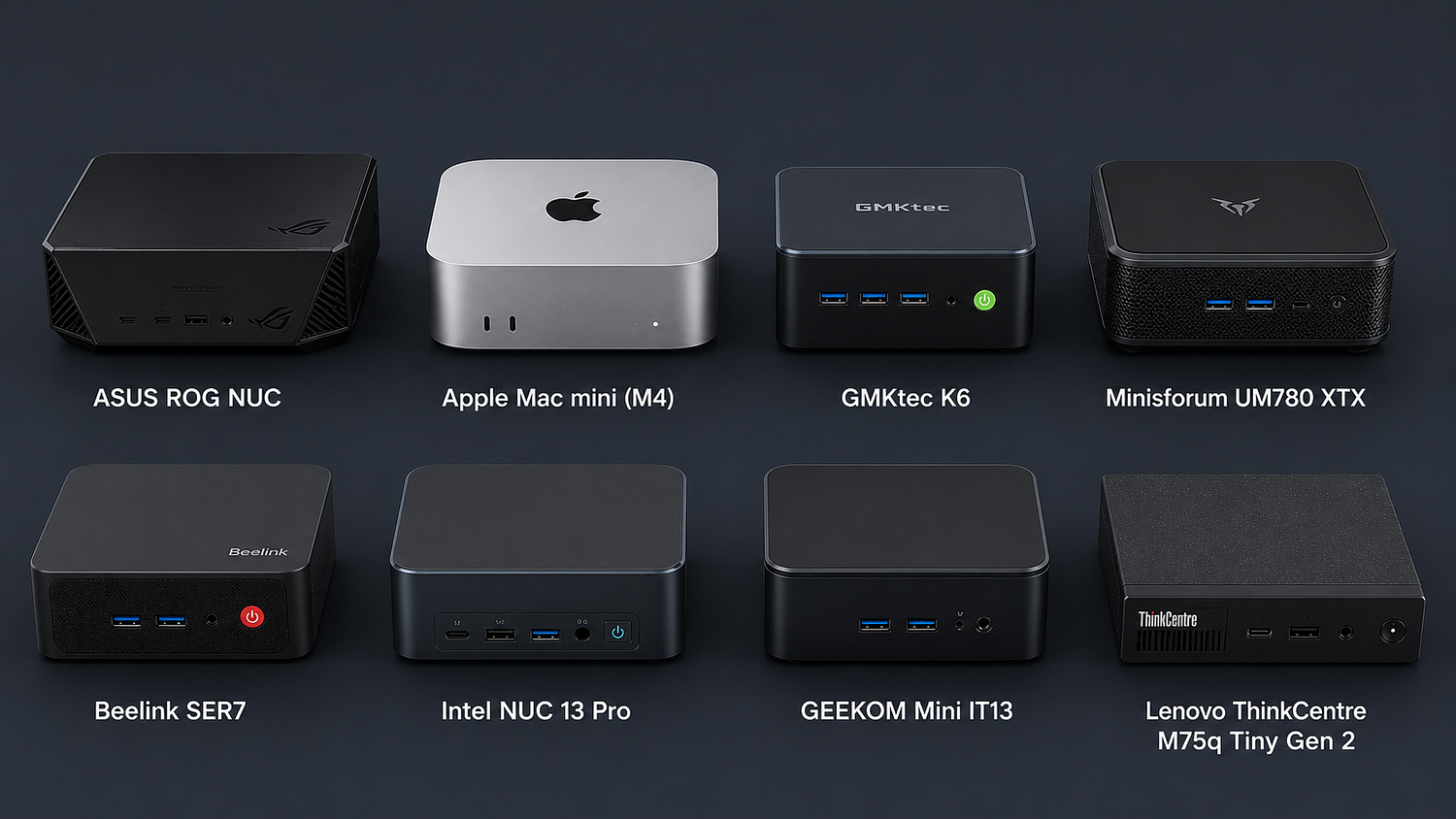
Apple Mac mini (M4) remains the overall benchmark for general productivity and creative work. It runs Apple’s M4 processor with enough memory bandwidth to handle Apple Intelligence features locally, and it starts at a price point that undercuts most Windows mini PCs with comparable build quality. Its characteristics: silent operation under most workloads, excellent power efficiency, and a body just 5x5 inches wide. The pros are obvious for anyone inside the Apple ecosystem: tight integration with iPhone and iPad, strong video and photo editing performance through apps like Final Cut Pro, and a resale value that historically holds up better than Windows mini PCs. The cons are just as real. Memory and storage are soldered in at the factory, so there’s no upgrading later, and gaming support remains thin compared to Windows. This is the pick for creative professionals and everyday users who want a quiet, reliable machine and don’t plan on gaming or heavy Windows-only software.
Minisforum AtomMan G1 Pro currently sits at the top of the gaming mini PC conversation. It pairs a 16-core, 32-thread AMD Ryzen 9 8945HX processor with a genuine desktop-class Nvidia RTX 5060, not the weaker mobile variant most competitors use. That distinction matters. The desktop GPU is allowed to draw up to 145 watts, and combined with the CPU it can hit 245 watts in what Minisforum calls “Beast Mode.” A five-heat-pipe cooling system rated for 300 watts of thermal load keeps things from melting down under sustained gaming sessions. It ships with 32GB of DDR5–5200 RAM and a 1TB SSD at a street price around $1,440, all packed into a 3.8-liter chassis styled to resemble a game console. Characteristics-wise, this is the closest thing to a genuine desktop gaming rig that still fits under a TV. The pros: real 1080p and even 4K gaming with DLSS 4 support, five USB ports, and 5 Gbps LAN. The cons: it runs hot and loud under full load compared to office-focused mini PCs, and the barebone version without RAM or storage, while cheaper at around $1,040, requires buyers to source their own components.
GEEKOM A5 Pro (2026 Edition) targets the middle of the market, and does it well. Built around AMD’s Ryzen R5 7530U, a 6-core, 12-thread chip that boosts up to 4.5GHz, it handles daily office tasks, home entertainment, and light gaming without breaking $600. GEEKOM backs the A5 Pro with a 3-year warranty and build quality rated to survive at least five years of regular use. The characteristics lean toward dependability over raw power. Pros include strong value, quiet operation, and enough headroom for light creative work. The con is straightforward: it’s not built for anything graphically demanding, and buyers expecting gaming performance will be disappointed.
Beelink SER5 MAX has built a reputation as the value pick of the category, frequently appearing on “best mini PC” lists specifically for buyers who don’t want to spend Mac mini money. It trades some raw performance for a much lower price point, making it a common recommendation for students and home office setups on a budget.
Framework Desktop occupies a category almost by itself: the upgradable mini PC. Where Apple and most Windows competitors seal memory and storage at the factory, Framework built its desktop around the philosophy that made its laptops popular, repairability first. It was impressive enough on release that some reviewers created an entirely new “best AI mini PC” category just to describe it, thanks to its ability to handle local AI workloads that would otherwise need a much bigger machine.
Lenovo ThinkCentre neo 50q Gen 4 rounds out the field as the office and home-use default. It won’t turn heads with benchmarks, but it delivers quiet, dependable performance for the kind of daily tasks most people actually run: browsers, spreadsheets, video calls, and light multitasking.
For pure budget builds, the GMKtec G10 keeps prices under $350 without falling into unusable territory, while machines like the Bmax B6 Plus, built around a low-power Intel Core i3–1000NG4 originally designed for thin laptops, cover the absolute basics: email, YouTube, browsing, and not much else. It’s an honest machine that doesn’t pretend to be anything more.
Specifications That Actually Matter When Comparing Models
Buyers get overwhelmed by spec sheets because manufacturers list dozens of numbers that don’t all matter equally. Three specifications separate a genuinely usable mini PC from a frustrating one: RAM, storage type, and cooling design.
RAM requirements scale with intended use. A mini PC intended purely for office work can run comfortably on 8GB, though 16GB is the safer modern baseline. Anyone planning to use a discrete GPU, even a modest one, needs at least 16GB, and creative professionals or gamers should look for 32GB to avoid stutter during multitasking. Storage matters just as much as capacity. NVMe SSDs move data several times faster than older SATA drives, and the difference shows up immediately in boot times and application loading, not just in file transfers. Cooling design is the specification most buyers ignore and most reviewers complain about. A mini PC crams desktop-level heat output into a fraction of the airflow space, and cheaper models cut corners here first. That’s why the AtomMan G1 Pro’s five-heat-pipe system is worth mentioning specifically. It’s not a marketing footnote, it’s the reason the machine can sustain full GPU load without throttling.
Connectivity has also become a genuine differentiator rather than an afterthought. Wi-Fi 6, USB-C, and Thunderbolt 4 are close to standard now across mid-range and premium models, letting a single cable handle display output, data transfer, and power delivery for compatible monitors.
The Rise of the “AI Mini PC”
A newer subcategory has emerged fast enough that reviewers had to invent a name for it. The Framework Desktop’s release prompted at least one major gaming outlet to introduce “best AI mini PC” as its own ranking, separate from general performance or gaming picks. The reasoning is simple: modern mini PCs increasingly ship with dedicated NPUs (neural processing units) built for running local AI models, transcription, image generation, and automation tasks without sending data to the cloud.
The Minisforum AtomMan G1 Pro leans into this too, its RTX 5060 rated for 614 TOPS of AI performance, a number that would have been meaningless to most buyers two years ago and is now a real purchasing factor for people running local language models or AI-assisted creative tools. Apple’s approach is different but points at the same trend. The Mac mini M4’s unified memory architecture is specifically what allows it to run Apple Intelligence features locally rather than routing every request through a server. Whether this becomes a permanent category or eventually just merges into “the mini PC,” it’s already shaping how manufacturers spec their 2026 lineups, and buyers shopping today should factor in NPU performance the same way they’d check RAM or storage.
Lifespan, Warranties, and What “Reliable” Actually Means Here
Manufacturers generally rate mini PC lifespans between five and seven years, depending on usage patterns and how well the internal cooling holds up over that stretch. Units with upgradeable RAM and storage, still a feature on some Windows models even as Apple moves further away from it, tend to stay useful longer, particularly for general productivity and media tasks where a small RAM bump can meaningfully extend a machine’s working life.
Warranty terms have become a genuine differentiator too. GEEKOM backs its A5 Pro with a 3-year warranty specifically because the company is betting on build quality holding up under years of continuous use, a bet that would have seemed risky for a budget-adjacent mini PC a decade ago. That kind of confidence from manufacturers is itself a signal of how far component quality has come. Cheaper models in the sub-$300 range rarely offer the same coverage, and buyers should treat warranty length as a rough proxy for how much a company trusts its own thermal and component choices.
Why Mini PCs Are Winning Over Full-Size Desktops for Many Buyers
The honest answer is that mini PCs aren’t more reliable than a well-built full-size desktop in every measurable sense. A tower with proper airflow and room for a full-size GPU will usually out-cool and out-upgrade a mini PC over its lifespan. But that’s not actually the comparison most buyers are making anymore.
What mini PCs offer instead is consistency under real-world conditions. Full desktops accumulate dust, cable clutter, and component mismatches over years of piecemeal upgrades. Mini PCs ship as a single sealed unit, tested as one system by the manufacturer, which removes a huge source of the instability that plagues self-built towers. There’s no compatibility guessing game between motherboard, RAM, and GPU when everything arrives pre-matched and pre-tested. Lower power draw also means less heat stress on components over time, and the compact aluminum and glass chassis designs common in 2026 models actually dissipate heat more evenly than the cheap steel cases found in budget towers a decade ago.
Then there’s the simple matter of space and noise. A mini PC hides behind a monitor or sits on a shelf, runs near-silent under normal load, and doesn’t need a dedicated desk footprint the way a mid-tower or full-tower case does. For home offices, dorm rooms, and shared living spaces, that’s not a small factor, it’s often the deciding one.
None of this comes free. Mini PCs still can’t be expanded the way most desktop towers can, at least not without real technical skill, and some models genuinely struggle with heavy, sustained workloads like long video renders or intensive 3D work. They also run entirely off the mains, so unlike a laptop there’s no battery to fall back on during a power cut. Overheating remains a real risk on the cheaper end of the market, which is exactly why cooling specs deserve more attention than they usually get.
Picking the Right One for the Job
The category has split cleanly enough now that “best mini PC” isn’t really one answer anymore. Gamers who want console-adjacent performance without console limitations are best served by machines like the AtomMan G1 Pro. Creative professionals inside Apple’s ecosystem still have little reason to look past the Mac mini M4. Office and home users who just need something dependable get excellent value from machines like the GEEKOM A5 Pro or Lenovo’s ThinkCentre neo 50q. And anyone who wants to build and repair their own machine over time, rather than replace it outright every few years, now has a real option in Framework’s approach to the category.
The mini PC of 2026 bears almost no resemblance to the nettops of 2008 or the barebones NUC kits of 2012. What started as a compromise machine for people who couldn’t afford or didn’t want a full tower has become, for a growing number of buyers, the more sensible choice by default.