Oracle WebLogic Server remains one of the most widely deployed enterprise Java application servers in the world. Large organizations across banking, healthcare, insurance, retail, manufacturing, logistics, and government sectors continue to depend on WebLogic for business-critical applications. Many of these systems have been running for years and support functions that organizations cannot easily replace.
At the same time, artificial intelligence is rapidly becoming part of enterprise software. AI-powered document search, virtual assistants, knowledge management systems, recommendation engines, automated classification tools, and workflow automation platforms are increasingly being integrated into existing business applications.
Rather than replacing established systems, most organizations are choosing a more practical approach. They are extending their current enterprise platforms with AI capabilities. This strategy reduces risk, protects existing investments, and allows teams to adopt AI technologies without rebuilding core business systems.
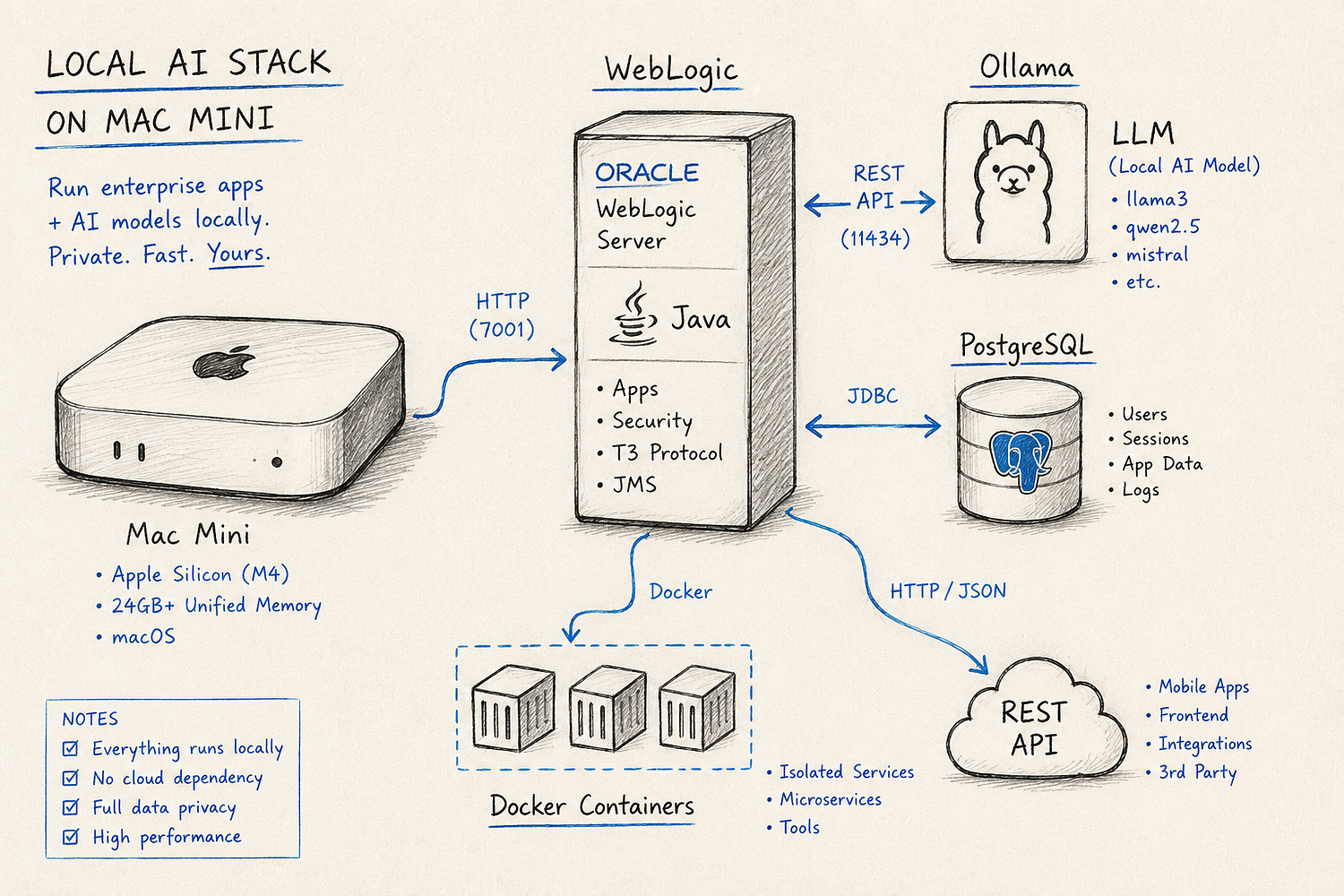
Modern Apple Silicon devices have created another interesting opportunity. The Mac Mini, powered by M-series processors, now provides enough computing performance to run enterprise Java applications alongside AI workloads. With sufficient memory, a single Mac Mini can host WebLogic Server, databases, Docker containers, vector databases, development tools, and local language models.
For architects, developers, and enterprise technology teams, this creates an affordable platform for testing, development, training, and proof-of-concept projects. Understanding how WebLogic and AI services work together on Apple Silicon can help organizations evaluate modernization strategies before committing to larger infrastructure investments.
Understanding Oracle WebLogic Server
Oracle WebLogic Server is a Java Enterprise Edition application server designed to run enterprise applications at scale. It provides services that business applications rely on, including transaction management, authentication, authorization, messaging, connection pooling, clustering, resource management, and application deployment.
For many organizations, WebLogic acts as the foundation of critical business operations. Banking systems process transactions through WebLogic. Insurance platforms manage claims. Healthcare systems coordinate patient records and workflows. Government agencies use enterprise applications built on WebLogic for citizen services and internal operations.
WebLogic is often integrated with:
- Oracle Database
- Enterprise identity providers
- Messaging systems
- REST and SOAP APIs
- ERP applications
- Internal business platforms
These integrations explain why WebLogic remains relevant even as cloud-native technologies become more common. Replacing a mature enterprise application is often far more expensive than modernizing it.
This is where AI integration becomes valuable.
Instead of rebuilding applications, organizations can add AI services while continuing to use existing WebLogic infrastructure.
Why Mac Mini Is Becoming a Serious Enterprise Development Platform
Several years ago, the idea of running enterprise workloads on a compact desktop computer would have sounded unrealistic.
Apple Silicon changed that.
The Mac Mini now delivers strong CPU performance, efficient memory management, low power consumption, and excellent thermal efficiency. Models equipped with higher memory configurations can support workloads that previously required dedicated servers or high-end workstations.
A typical enterprise development environment may include:
- Oracle WebLogic Server
- PostgreSQL
- Oracle Database XE
- Docker Desktop
- Python runtimes
- AI frameworks
- IntelliJ IDEA
- Vector databases
A properly configured Mac Mini can run all of these components simultaneously.
Power consumption is another advantage. Traditional development servers often consume several times more electricity than a Mac Mini. For development teams running multiple environments, the savings can become meaningful over time.
The compact form factor also simplifies deployment in training labs, innovation centers, development teams, and testing environments.
Apple Silicon and AI Workloads
One reason the Mac Mini performs well with AI workloads is the Apple Silicon architecture.
Traditional systems separate CPU memory and GPU memory. Data frequently moves between different components, creating overhead.
Apple Silicon uses a unified memory architecture.
This means the CPU, GPU, and Neural Engine can access the same memory pool. Large datasets do not need to be copied repeatedly between components. AI workloads often benefit from this design because language models, embeddings, and vector operations can access memory more efficiently.
The Neural Engine is another important component.
Although enterprise AI workloads often rely on CPU and GPU processing, the Neural Engine helps accelerate machine learning operations across supported applications and frameworks.
For AI experimentation, this architecture provides a practical balance between performance, energy efficiency, and cost.
Organizations evaluating local AI models often discover that memory capacity matters more than processor speed. Large language models consume substantial amounts of memory during inference.
This is why many enterprise teams select Mac Mini configurations with 32GB, 64GB, or higher memory allocations when planning AI development environments.
How AI Integrates with WebLogic Applications
WebLogic itself is not an AI platform.
Instead, it serves as the enterprise application layer that coordinates business operations while communicating with specialized AI services.
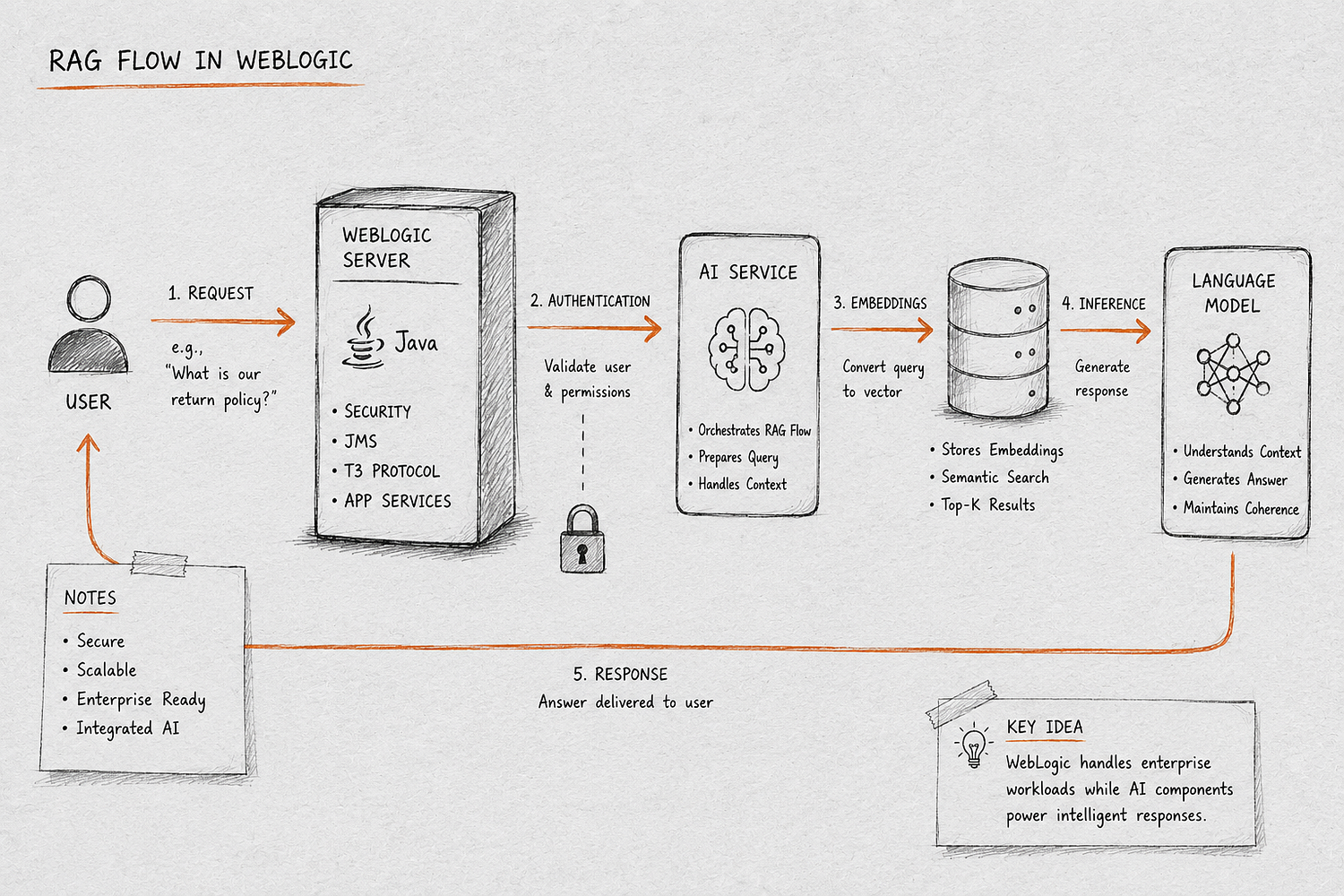
A typical workflow looks like this:
A user accesses a WebLogic-hosted application.
The application authenticates the user.
Business rules determine what information the user can access.
The application sends relevant data to an AI service.
The AI service processes the request.
Results are returned to the application.
The user receives a response.
This separation provides several benefits.
Security remains under enterprise control.
Business logic stays within existing applications.
AI services can be updated independently.
New models can be introduced without modifying core enterprise systems.
As AI technology continues evolving, this architecture provides flexibility while protecting existing investments.
Building an AI-Enabled WebLogic Environment
A modern AI-enabled environment often includes several components.
WebLogic hosts the business application layer.
A relational database stores operational data.
Vector databases store embeddings for semantic search.
Python services manage AI workflows.
Language models perform inference.
Monitoring systems track application performance.
Container platforms host supporting services.
The communication flow typically follows these steps:
- User submits a request.
- WebLogic validates identity.
- Business rules are executed.
- AI service receives the request.
- Contextual information is retrieved.
- Model generates a response.
- Results return to WebLogic.
- User receives the output.
This approach allows AI functionality to be added without redesigning existing enterprise applications.
Retrieval-Augmented Generation and Enterprise Search
One of the most common AI use cases involves Retrieval-Augmented Generation, often called RAG.
RAG combines language models with enterprise knowledge sources.
Instead of relying solely on model training data, the AI system retrieves relevant information from company documents before generating responses.
A typical RAG workflow includes:
- Document ingestion
- Text extraction
- Embedding generation
- Vector storage
- Semantic retrieval
- Response generation
For example, an employee may ask:
“Show the latest vendor onboarding requirements.”
The system searches internal documents.
Relevant content is retrieved from a vector database.
The language model generates a response based on those documents.
The result is often more accurate than relying on a language model alone.
Many organizations implementing AI within WebLogic environments start with RAG because it allows existing enterprise knowledge repositories to become searchable through natural language.
Running Local AI Models on Mac Mini
Local AI deployment has become increasingly popular.
Platforms such as Ollama allow organizations to run open-source models directly on local hardware.
Common models include:
- Llama 3
- Qwen
- Mistral
- Gemma
Local deployment provides several advantages.
Sensitive data remains inside the environment.
Cloud API costs are reduced.
Latency decreases.
Development teams can continue working without internet connectivity.
For enterprise evaluation projects, local deployment often provides a lower-risk path for experimentation.
Organizations can validate use cases before committing to cloud-based AI services.
Installing and Configuring WebLogic
Deploying WebLogic on a Mac Mini follows the same general process used on other platforms.
The environment typically includes:
A supported Java Development Kit.
Oracle WebLogic Server binaries.
Domain configuration.
Administration Server setup.
Managed Server configuration.
Database connectivity.
Application deployment.
Once WebLogic is operational, AI services can be deployed separately using Docker containers or standalone services.
This separation keeps the architecture flexible and easier to maintain.
Many organizations also create automated deployment pipelines that provision WebLogic environments and AI services together.
Performance Expectations
Performance depends on multiple variables.
Application complexity affects resource consumption.
Database activity influences response times.
AI model size impacts memory usage.
Concurrent users affect overall system load.
For development and testing purposes, a Mac Mini equipped with sufficient memory can comfortably support WebLogic, databases, containers, and moderate AI workloads.
Production environments introduce additional requirements.
High availability.
Load balancing.
Disaster recovery.
Backup systems.
Monitoring platforms.
Security tooling.
These requirements often lead organizations to deploy production workloads on Linux servers, cloud infrastructure, or Kubernetes clusters.
Recommended Hardware Sizing
The following sizing recommendations provide a useful starting point.
EnvironmentRecommended MemoryWebLogic Development Only16GBWebLogic + Database32GBWebLogic + Containers32GBWebLogic + Local AI Models64GBLarge AI Testing Environment96GB+
Storage also matters.
NVMe SSD storage significantly improves application startup times, database performance, and container operations.
Organizations planning AI experimentation should prioritize memory first, followed by storage performance.
Security and Governance
Security remains one of the most important considerations in enterprise AI projects.
AI systems frequently interact with sensitive information.
Organizations must ensure proper controls remain in place.
Areas requiring attention include:
Authentication and authorization.
Data encryption.
Audit logging.
Prompt validation.
Access control enforcement.
Data retention policies.
Regulatory compliance.
WebLogic already provides mature enterprise security capabilities. These capabilities can continue enforcing access controls while AI services perform analysis and inference operations.
This layered approach helps reduce risk and simplifies governance.
Real Enterprise Use Cases
Several industries are already integrating AI services into enterprise applications.
Banking
Customer support assistants can retrieve policy information, account procedures, and product details from internal systems while maintaining security controls.
Insurance
Claims processing systems can classify documents, summarize case information, and assist adjusters with decision support.
Healthcare
Medical staff can search clinical procedures, policies, and operational documentation through natural language interfaces.
Manufacturing
AI systems can analyze maintenance records, technical manuals, and operational procedures to improve troubleshooting processes.
Internal IT Support
Organizations can create AI-powered help desks that answer employee questions using existing knowledge bases and support documentation.
These implementations often use WebLogic as the application layer while AI services provide additional intelligence.
WebLogic Versus Modern Alternatives
Organizations building entirely new systems often evaluate other platforms.
Apache Tomcat offers a lightweight deployment model.
Spring Boot has become a standard choice for modern Java applications.
Quarkus focuses on low memory consumption and fast startup times.
JBoss EAP provides enterprise Java capabilities similar to WebLogic.
Kubernetes-based architectures allow independent scaling of application services and AI components.
For greenfield AI projects, Spring Boot and Kubernetes frequently provide greater flexibility.
For existing enterprise environments, WebLogic often remains the most practical option because business systems, integrations, security controls, and operational processes are already built around it.
Production Deployment Strategy
Many organizations adopt a staged deployment model.
Development begins on local environments such as Mac Mini systems.
Testing moves to dedicated staging infrastructure.
Production workloads operate on enterprise-grade environments.
A typical deployment path looks like this:
Mac Mini Development Environment → Staging Environment → Production Cluster
This approach allows teams to experiment rapidly while maintaining enterprise operational standards.
Production environments frequently include:
- Kubernetes clusters
- Oracle Linux servers
- Monitoring platforms
- Centralized logging
- Backup systems
- High availability configurations
The Mac Mini becomes the innovation platform, while production environments deliver scalability and reliability.
Future of WebLogic in an AI-Driven Enterprise
Enterprise modernization rarely happens through complete replacement.
Organizations prefer incremental transformation.
WebLogic continues handling transaction processing, integration workflows, authentication, authorization, and business rules.
AI services provide intelligent search, document analysis, conversational interfaces, workflow assistance, and automation.
This combination allows organizations to adopt AI capabilities while preserving existing investments.
As enterprise AI adoption continues expanding, hybrid architectures that combine established application servers with modern AI platforms are likely to remain a common strategy across industries.
Final Thoughts
Oracle WebLogic Server and AI workloads can operate effectively together on modern Mac Mini systems. For development environments, proof-of-concept projects, AI experimentation, training labs, and enterprise innovation initiatives, the combination provides a capable and cost-effective platform.
The Mac Mini offers enough performance to host WebLogic, databases, containerized services, vector search platforms, and local language models within a single environment. This allows teams to evaluate AI integration strategies without requiring large infrastructure investments.
For organizations already running WebLogic applications, AI integration through APIs and retrieval-based architectures provides a practical path toward modernization. Existing business systems can continue delivering operational value while gaining new capabilities such as intelligent search, document analysis, automation, and conversational experiences.
Rather than viewing WebLogic and AI as competing technologies, many enterprises are finding value in combining them. Established application platforms continue managing business operations, while AI services add a new layer of intelligence that helps organizations improve productivity, accelerate decision-making, and unlock value from existing information assets.