You want to run a local LLM but your GPU has 4GB, 6GB, or 8GB of VRAM?. Good news, you can actually do real work with these cards in 2026. The situation has improved a lot compared to even a year ago. Bad news is there’s still a lot of confusion about which model to run for what task, and most guides just give you a generic “best model” list without explaining what you actually get.
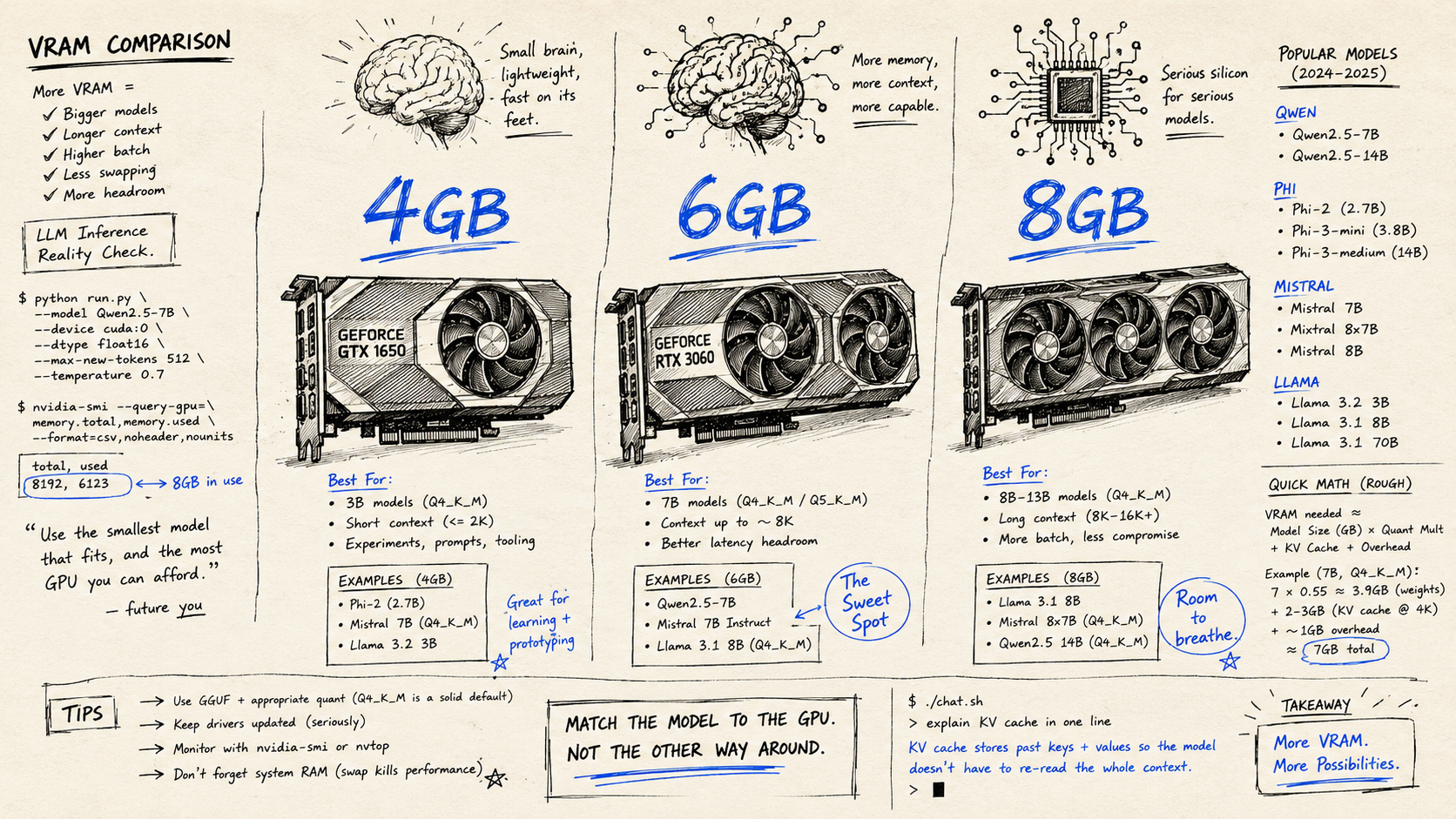
I’ve spent a few months messing around with different setup mostly on an (9060xt 16gb), but also on an older GTX 1660 Super (6GB) from my old laptop which I still haven’t thrown out and I want to lay out what actually works at each VRAM tier. Not theory. What runs, what doesn’t, and where each model breaks down.
One thing first: this article is about dedicated GPU VRAM. If you’re on Apple Silicon (M2, M3, M4 chips), the rules are different because unified memory acts as VRAM and you get a lot more headroom. What I’m describing here applies to regular Windows/Linux boxes with discrete NVIDIA or AMD cards.
The VRAM Math — What Actually Fits Where
Before getting into specific models, you need to understand one thing: quantization. This is basically compressing a model to make it smaller. The standard format you’ll see everywhere is GGUF with levels like Q4_K_M, Q5_K_M, Q8_0. Q4 means 4-bit compression — smaller file, slightly lower quality. Q8 is 8-bit — closer to full quality, much bigger.
For 2026, Q4_K_M is the standard. Running an 8B model at Q4_K_M needs roughly 6GB VRAM. A 34B model needs around 20GB. A 70B model needs roughly 42GB. The other important thing: GGUF and EXL2 formats are the standard now, not FP16.
So with 8GB VRAM you can fit an 8B Q4 model with a little room left. With 6GB you’re tight, a full 7B Q4 barely fits or overflows depending on the model. With 4GB you’re limited to 3B models and smaller.
Now the other thing to know: if a model doesn’t fully fit in VRAM, it starts spilling to system RAM. When that happens, inference speed drops by 5–10x. On a 4GB card with a 7B model, you’ll be sitting there watching tokens come out at 2–3 per second. Not fun.
4GB VRAM — The Restricted Tier
This is where it gets honest. 4GB is tight. I’m not going to pretend otherwise.
At 4GB you won’t be running serious coding tasks or complex reasoning, but for summarization, simple Q&A, and lightweight chat, models at this tier are genuinely usable.
Your main option: Phi-4-mini (3.8B)
Phi-4-mini is a standout at this tier, Microsoft trained it to be efficient, and it shows. The recommendation here is Phi-4-mini Q4_K_M, which gives the best capability-per-gigabyte. Phi-4-mini (3.8B) is the only viable option for 8GB machines when you need maximum efficiency — and at 4GB it’s the clear winner. It scores around 68% on MMLU and 70% on HumanEval, which is not bad at all for a 3.8B model.
The other name that comes up is Gemma 4 E2B (Google’s 2B parameter model from the Gemma 4 family, released around April 2026). Gemma 4 E2B is better at handling text generation, including summarization or analysis of documents. Qwen3.5–2B was better at coding. So depending on what you need, pick one or the other.
What you should NOT do at 4GB: try to run a 7B model. I tried squeezing Mistral 7B Q3 onto a 4GB card and it constantly spilled to RAM. 4–5 tokens per second at best. Unusable for any real workflow.
For 4GB by task:
Coding and programming: Qwen3.5–2B or Phi-4-mini. Phi-4-mini actually handles basic code completion and explanation reasonably well. Don’t expect it to write complex multi-file code from scratch. It’s good for snippets, explaining existing code, and fixing small bugs.
Writing and documentation: Gemma 4 E2B for this. It’s more coherent on text generation tasks than Phi-4-mini.
RAG: This is where 4GB gets interesting. For RAG, you need an embedding model running alongside your chat model. nomic-embed-text has 74.4 million pulls on Ollama, runs on anything with tiny footprint, and produces high-quality vector embeddings for semantic search pipelines. Good news: it only uses about 300MB of VRAM. So you can run nomic-embed-text for embeddings on 4GB without much problem. The chat model for generation is where you’re limited — Phi-4-mini with a small context window.
General Q&A / chat: Phi-4-mini. It’s fast on 4GB cards — TinyLlama 1.1B Q5 on 4GB hits 20–40 tokens per second, while Phi-4-mini Q5 on 6GB hits 15–30 tokens per second — so Phi-4-mini on 4GB at Q4 is somewhere in that range, which is good enough for interactive conversation.
6GB VRAM — The Middle Ground
Six gigabytes is actually more interesting than people give it credit for. You can fit some 7B models if you’re careful with quantization and don’t go crazy with context length.
The practical models that fit in 6GB at Q4: Phi-4-mini (easily), Mistral 7B Q4 (tight — sometimes works, sometimes clips), Qwen 2.5 7B Q4 (similar situation). You also need to account for KV cache when generating long outputs, which eats into your headroom.
The realistic 6GB picks:
Phi-4-mini (3.8B) — fits easily, fast, good quality for its size. At 6GB VRAM, Phi-4-mini Q5 hits 15–30 tokens per second. This is your safest bet if you want something that just works without hassle.
Mistral 7B (Q3_K_M or Q4_K_S) — if you use a slightly more aggressive quantization, you can fit the 7B model. The quality loss from Q4_K_M to Q3_K_M is noticeable but not catastrophic. General chat is fine. Coding starts to suffer. Mistral 7B remains excellent for general use, with good performance on general chat, text summarization, and instruction following. Where it falls short is in complex reasoning, mathematics, and coding tasks that require deep context.
Qwen 2.5 7B (Q3_K_S) — same situation as Mistral, slightly tighter. But Qwen 2.5 7B punches above its weight class with strong reasoning and coding for its size, plus better multilingual support than Llama. If you work in languages other than English or do a lot of structured data work, it may outperform Llama 3.1 8B for your use case.
For 6GB by task:
Coding: Qwen 2.5 7B Q3 for sure. For writing code, Qwen’s coding benchmark scores are higher than Mistral at the same size. I used it for a few weeks to generate boilerplate and basic Python scripts — it was fine for that. But I tried to get it to debug a Flask app with SQLAlchemy, and it kept giving me suggestions that didn’t match the actual version of SQLAlchemy I was running. That’s a known problem with small models — they sometimes confidently suggest APIs that changed.
Writing and documentation: Mistral 7B Q3_K_M. This is where Mistral still shines. It’s clear, follows instructions well, and produces readable text. For writing commit messages, README files, API documentation, or drafting emails — this is actually pretty good.
RAG: Mistral 7B Q3 + nomic-embed-text. Keep your context window short (8K max) because at 6GB VRAM every extra context token you add eats into your model’s available memory. For embeddings, use nomic-embed-text (768-dimensional, 8K context) for most setups or bge-m3 for multilingual documents. Pair with Open WebUI and Ollama for the easiest RAG pipeline. This works surprisingly well for querying personal notes or small document collections.
Programming / function calling: Phi-4-mini actually handles structured output and tool calling better than you’d expect at this tier. If you’re building something with an agent loop that needs reliable JSON output, Phi-4-mini is more predictable than the 7B models at compressed quantization.
8GB VRAM — The Sweet Spot
This is where running local LLMs actually gets good. With 8GB you can fit a proper 7B or 8B model at Q4_K_M quality, with a comfortable context window, and get decent speed.
Qwen 3.5 9B is now the default recommendation for 8GB cards. At 6.6GB on Ollama, it leaves room for context and beats older 8B models on every benchmark. If you’re on 8GB, this is your model.
That’s the short answer. But let me break it down properly.
The main contenders for 8GB:
Qwen 3.5 9B (Q4_K_M) — after benchmarking five models on an RTX 3070 with llama.cpp, the verdict is: Qwen 3.5 9B at Q4_K_M is the best local LLM for 8GB VRAM by a significant margin. It is faster, smarter, and the only model that runs entirely in GPU memory at all four tested context sizes including 32K. It scores 32.4 on the Artificial Analysis Intelligence Index, which is 38% higher than the runner-up GLM-4.6V. It’s also capable of operating at a 200K+ context window with minimal performance penalty on 8GB cards.
Llama 3.3 8B (Q4_K_M) — Llama 3.3 8B offers the best all-around balance. Its MMLU score of 73.0 and HumanEval of 72.6 at Q4_K_M place it within striking distance of models twice its size. The community ecosystem is unmatched — extensive fine-tunes on Hugging Face target specific domains from legal code review to TypeScript generation. The downside: at approximately 6GB for the 8B Q4_K_M variant, it demands more RAM than Phi-4-mini or Mistral Small 3 at comparable quality tiers.
Mistral Small 3 7B (Q4_K_M or Q5_K_M) — Mistral Small 3 7B delivers the highest tokens-per-second on mid-range hardware. It scores 8.0 on MT-Bench, the instruction-following benchmark, producing well-structured outputs with minimal prompt engineering. If speed matters more than raw quality, this is your pick.
Qwen 2.5 7B (Q5_K_M) — this is actually a good pick at 8GB because you can run it at Q5 instead of Q4, which noticeably improves quality, especially on coding and reasoning. I’d use this over the Q4 version if I had the VRAM headroom.
For 8GB by task:
Coding and programming: Qwen 3.5 9B Q4_K_M without question. For 8GB GPUs, Qwen 2.5-Coder 7B or Phi-4-mini 3.8B are good options, but Qwen 3.5 9B leads HumanEval among 7–8B models. For writing functions, completing code, and explaining algorithms — Qwen at this tier is fast and accurate. It’s genuinely usable as a daily coding assistant if your codebase isn’t huge.
Writing and documentation: Llama 3.3 8B or Mistral Small 3. I actually prefer Mistral for writing tasks because the outputs are cleaner and more instruction-following. Writing release notes, technical documentation, API references, commit message templates — Mistral Small 3 at Q5 on 8GB is probably my most-used setup for this.
RAG: For RAG on 8GB VRAM, run Qwen 2.5 7B at Q4_K_M with 128K context. The 128K context window is the key thing here. When you’re pulling document chunks into context, you need that room. Qwen handles long context better than Llama at this size. For the embedding side, nomic-embed-text runs separately, has tiny footprint, and pairs well with pgvector or Qdrant for a fully local RAG stack.
General productivity / writing assistant: Mistral Small 3 Q5_K_M. Fast, clean, reliable. For most text tasks — summarizing meeting notes, drafting emails, rephrasing technical content for non-technical readers — this is the practical daily driver.
Agentic / tool calling: Qwen 3 models have the most stable tool calling, rarely hallucinating calls or dropping parameters. Gemma 4 ships with native function calling trained into the model weights. Llama 3.3 also supports tool calling. For building agent workflows that call tools, Qwen 3.5 9B is the most reliable at the 8GB tier.
One Thing Nobody Mentions Enough
Context length kills VRAM. This is the thing that trips up a lot of people who are new to local LLMs. Agentic workflows chew through context fast. A coding agent that reads files, plans changes, executes code, and reviews results can blow through 4,000 tokens in a single loop iteration. You need at minimum 8K context, ideally 32K. Setting OLLAMA_CONTEXT_LENGTH=32768 in your environment directly increases VRAM consumption.
So if you’re at 8GB and you try to use a 32K context window with a 7B Q4 model, you might overflow. Qwen 3.5 9B handles this better than most because of how it’s optimized. But any other model at 8GB — keep your context window to 8K-16K unless you’ve tested that it fits.
Also: I’ve had Ollama crash mid-session more than once when the context grew larger than expected. The fix was setting the context length explicitly when pulling the model rather than letting Ollama default. Took me about three failed sessions to figure that out.
Quick Reference
For 4GB: Phi-4-mini for almost everything. Gemma 4 E2B if you specifically need text generation and writing.
For 6GB: Phi-4-mini if you want safe and fast. Mistral 7B Q3_K_M if you want a 7B model and are okay with slightly lower quality. Qwen 2.5 7B Q3 for coding tasks.
For 8GB: Qwen 3.5 9B Q4_K_M for coding and agents. Mistral Small 3 Q5_K_M for writing and documentation. Qwen 2.5 7B Q5 for RAG pipelines. And always run nomic-embed-text for embeddings — it barely takes any VRAM.
The good news is all of these run well through Ollama, which has basically become the standard way to run local models. As of late May 2026, Ollama is at version 0.6.x and the library at ollama.com has GGUF builds for all these models ready to pull.
The one thing I’d check is the model page for context length defaults some models default to 2K context in Ollama even when they support 32K, and that can make them seem worse than they are.