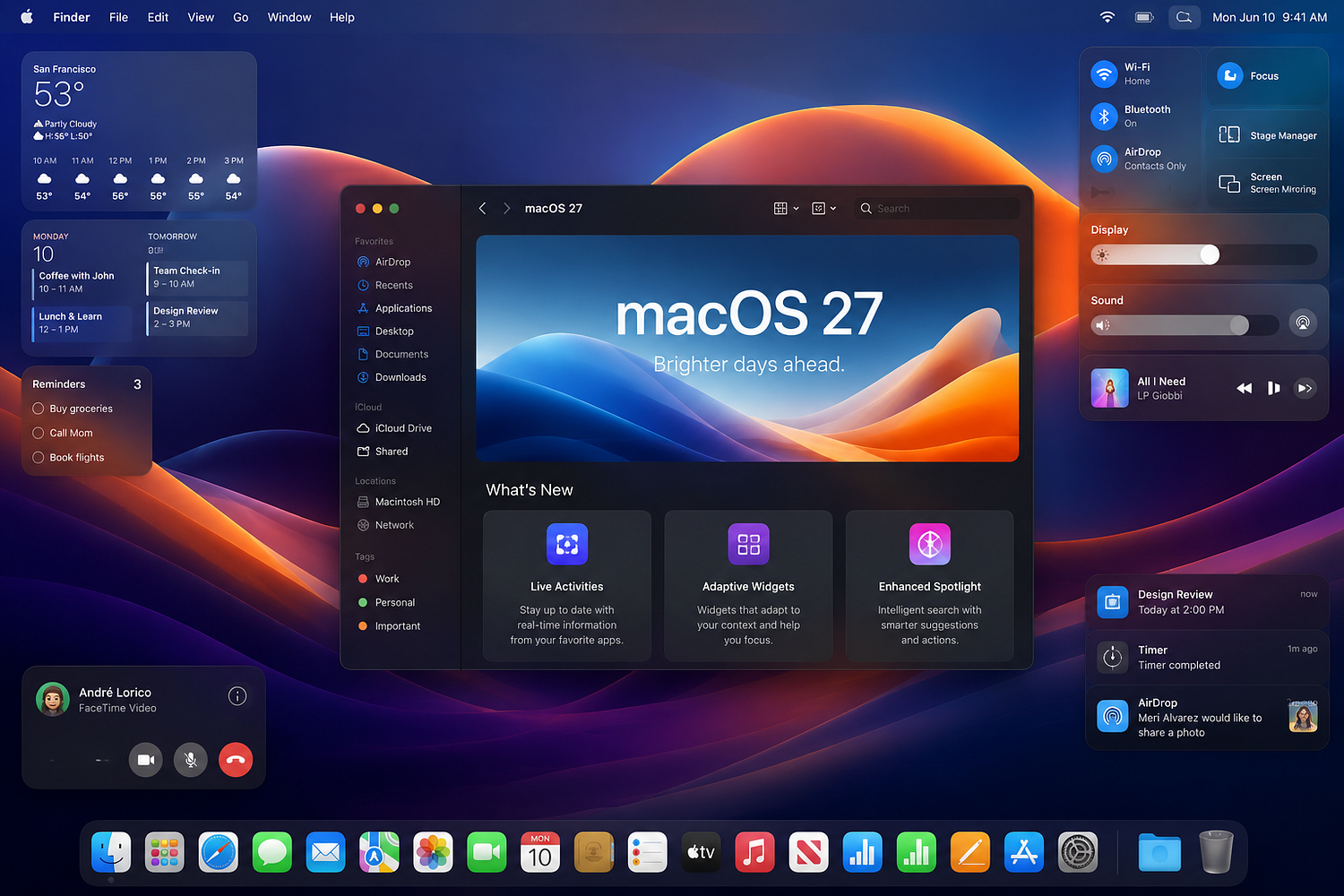
So Apple just wrapped its WWDC 2026 keynote — Tim Cook’s last one as CEO, by the way — and the big Mac announcement is macOS 27, officially called Golden Gate. Named after the landmark in San Francisco, which is very on-brand for Apple.
Is it the most mind-blowing update they’ve ever shipped? Honestly, no. There’s no big redesign, no major new app, nothing that’ll make your jaw drop in a demo video. But there’s a lot going on under the surface, and some of the changes are going to affect a lot of people — especially those still running Intel Macs. More on that in a second. First, the quick version of what Golden Gate actually is.
This is Apple’s yearly macOS update. It comes free for compatible devices, same as always. Developer beta drops on June 9. Public beta probably lands sometime in July. Full release to everyone will most likely be October 2026, though Apple hasn’t confirmed that date yet. The big question everyone is asking right now — on Reddit, on YouTube comments, on pretty much every Apple forum — is whether their Mac will actually run this thing.
The Intel Mac Cutoff Is Real and It’s Happening Now
This was coming. Apple announced last year at WWDC 2025 that macOS 26 (Tahoe) would be the last update for Intel-based Macs. So macOS 27 Golden Gate is, basically, Apple Silicon only.
No Macs made before 2020 are supported, because macOS 27 Golden Gate is only compatible with Macs running on Apple’s own M-series chips — or the A18 Pro, in the MacBook Neo’s case. Apple dropped older Intel models as a clean break, and it means macOS 27 Golden Gate can focus on AI features, since the old Intel chips don’t have NPUs for on-device AI.
The compatible devices list looks like this: MacBook Air with M1 or later, MacBook Pro with M1 or later (all variants — 13-inch, 14-inch, 16-inch), the new MacBook Neo, iMac M1 2020 or later, Mac mini M1 2020 or later, and Mac Studio 2022 and later.
So if you’re on an Intel MacBook Pro from 2019 or an iMac from 2017, you’re done. macOS 26 Tahoe is as far as you go. Apple has confirmed that macOS 26 will continue receiving critical security updates for about the next three years. So you won’t be completely stranded — you’ll get security patches, just no new features. But running an operating system that’s no longer getting proper updates is never a great position to be in long-term.
The reason Apple is doing this makes total sense from a technical side. By concentrating on its own chips, which use Arm architecture, Apple no longer has to worry about Macs running on Intel’s x86 chip tech, which will hopefully mean the macOS team has more time to improve performance of the software and add features in the future.
For people who bought their Mac in 2019 or earlier, this is frustrating. No way around it. The silver lining — sort of — is that the MacBook Neo launched earlier this year at $599, and MacBook Air M1 models are also cheap to buy refurbished now, often around $500–600 if you shop around. But still, nobody likes being forced to upgrade.
And here’s the thing that a lot of people are pointing out in comments across tech forums right now: a 2019 Intel MacBook Pro still runs everything perfectly fine. The hardware itself hasn’t slowed down. Apple is dropping support not because those machines are broken, but because the Intel architecture is just a dead end for where Apple wants to take the OS. The NPU situation is the key one — on-device AI features basically require the Neural Engine that Intel chips don’t have. So if you want the new Siri features, the AI-powered search, any of the smart stuff that Apple is betting on for the next few years, you need Apple Silicon. That’s just the reality of how this transition was always going to end.
Siri Finally Got a Real Upgrade (Powered by Google of All Things)
This is the one that surprised people the most. Siri on Mac has always been… fine. Not great. The kind of thing you set a timer with and then forget exists.
macOS 27 changes that pretty significantly. Powered by Google Gemini, the new AI-infused Siri acts like a proper chatbot. It has features like contextual awareness, conversational capabilities, and improved natural-language support. You can use Siri AI through Spotlight to easily find files or messages you need.
The practical example Apple gave is actually useful. You can ask or type to find a PDF invoice in one of your emails and add its contents to your Numbers budget spreadsheet. That’s the kind of thing where you think — okay, that actually saves me time. Not just “set a reminder” or “play some music.” Cross-app stuff that would normally require switching between three windows.
Apple says that once the user types a question intended for Siri on Spotlight, the system automatically identifies and routes the question to Siri AI. From there, users can continue the conversation from a dedicated window, into which they can drag files and attachments.
And Siri can do things on your behalf now too. Siri can create email drafts and input text messages on iMessage upon request.
Rather than being embedded in the Dynamic Island — which doesn’t exist on MacBooks anyway — Siri AI will form part of Spotlight. You can expand Siri queries into dedicated macOS windows, and a new Siri field will appear when right-clicking on files. That context menu integration is a small detail that could turn out to be very useful day-to-day. Right-clicking a file and just asking Siri about it without opening another app is genuinely different from how Siri used to work.
Siri AI relies on Apple’s revamped search architecture and on its partnership with Google to draw on world knowledge, user information, and either Apple’s local or cloud-based models to deliver results. Siri AI’s voice is also fully customizable with settings for pace and expressivity.
The Google Gemini partnership is the interesting part here. Apple and Google being competitors in basically every other way makes this a strange deal. But Apple was clearly behind on the AI assistant side, and this is their way of catching up fast. It doesn’t seem as if Apple has leapfrogged comparable assistants like Gemini or other AI tools — it’s more that Apple has caught up to the competition with Siri AI.
Whether people actually use Siri on their Mac more now is genuinely hard to predict. The muscle memory of just opening a browser tab or an app directly is strong. But the Spotlight integration removes the friction of having to invoke Siri separately — if you’re already searching, you’re already there.
There’s also a standalone Siri app for the first time on macOS. So if you want to have a longer back-and-forth conversation with Siri — the kind of thing you’d do with ChatGPT or Gemini in a browser tab — you can now do that natively without opening Safari. Whether that becomes a habit depends on how good the actual responses are. The demo looked solid, but demos always do.
One thing worth noting: Siri AI reportedly may lack the persistent memory features found in some rival chatbots, according to Bloomberg. So it won’t remember your preferences or past conversations the way ChatGPT does if you pay for Plus. That’s a real limitation compared to what people are used to from other tools. Apple’s approach seems to be prioritizing privacy — keeping data on-device rather than building a persistent profile in the cloud. That’s a trade-off, not necessarily wrong, but it means the experience will be different from what heavy ChatGPT users are expecting.
The Performance Stuff Nobody Talks About But Everyone Will Notice
This is probably the part of the update that’ll actually matter most for the average person, even though it’s the least exciting to talk about.
The major focus of macOS 27 is making the operating system feel faster and more responsive on Macs and MacBooks. Apple is calling it a “responsiveness” push. Animations feel faster. Mac apps will load 30% faster thanks to pre-loading. Photos should appear in your gallery faster, and AirDrop sharing is up to 80% faster.
The 80% faster AirDrop number is the one people are paying attention to. AirDrop has been clunky for years — the whole waiting while the transfer thinks about whether it wants to work thing. There’s also the classic situation where AirDrop just refuses to see the device you’re trying to send to, and you end up emailing yourself the file instead. If that actually gets addressed, that’s a quality-of-life improvement a lot of people will feel every week.
The app launch speed improvement is worth mentioning too. Apple compared it to OS X Snow Leopard back in 2009, which was famously a performance-focused release rather than a feature-focused one — Apple basically spent a whole year cleaning up the codebase, optimizing memory usage, improving boot times. That release ended up being one of the most well-liked macOS versions ever, because it just made everything feel better without adding clutter. Whether macOS 27 lands the same way remains to be seen, but the comparison is an interesting signal about what Apple’s priorities were for this cycle. Since macOS 27 isn’t a huge overhaul from last year, the team reportedly focused on fixing bugs and improving performance. A chunk of code is being optimized for raw efficiency, stability, and better battery life. Battery life on M-series MacBooks is already pretty good — on the M3 MacBook Air you can consistently get 15–16 hours doing normal work. Getting even a bit more from that would be useful, especially since the numbers Apple advertises and what you actually see in daily use are usually different things.
Spotlight Search Got Smarter Too
Search on Mac has always been kind of hit-or-miss. Spotlight would sometimes find the file you needed immediately, and other times you’d be there wondering why it couldn’t locate something you opened yesterday.
Search has been rebuilt on iOS and macOS for Spotlight, Photos, and Mail with a new ranking system for more relevant results, so finding files and folders on your Mac should be a lot easier.
The Siri AI integration is part of this, but the base search itself also got work. The Photos search update is probably the most useful one for regular people — being able to search through your photo library using natural language has been a feature for a while, but the results quality has been inconsistent. A better ranking system could make a real difference there.
You get system-wide context menus, and Siri AI is now integrated directly into Spotlight where you can ask Siri questions without going into an app. A keyboard shortcut will bring up Visual Intelligence, so you can ask Siri about things on your screen. The Visual Intelligence shortcut is new — so if you’re looking at something on your screen and want to know more about it without switching to a browser, that’s now an option.
Liquid Glass Got Some Much-Needed Fixes
If you’re on macOS 26 Tahoe right now, you know that the Liquid Glass design introduced last year looks good in screenshots but gets kind of hard to read in real life. The transparency effects that give it that glass-like look can make text behind menus and lists almost unreadable in certain lighting conditions or on certain wallpapers.
macOS 27 will have a “slight redesign” compared to macOS Tahoe, according to Bloomberg’s Mark Gurman. The design changes will help improve the readability of macOS Tahoe’s Liquid Glass interface.
Apple will diffuse shadows to make it easier to read, and there’s a new slider to adjust the transparency of Liquid Glass.
The transparency slider is the practical fix here. Being able to turn down the glass effect on your own Mac is better than waiting for Apple to decide what looks good. Different wallpapers, different screens, and different lighting situations all change how readable the interface is — a slider gives people control over that.
Liquid Glass itself is not going anywhere. The people hoping Apple would just drop it and go back to a more solid UI design are going to be disappointed. But making it less annoying to actually use is a reasonable middle ground.
Parental Controls Got a Serious Upgrade
This one flew under the radar in most of the coverage but it’s actually pretty significant.
macOS 27 Golden Gate will let parents put a block on apps, and there are now tools that will prevent unsuitable images, including nudity and gore, from being seen. “We’re giving powerful tools to parents,” according to Craig Federighi, Senior Vice President of Software Engineering at Apple.
The image blocking feature — filtering out nudity and violent images from appearing on screen — is something parents have been asking for. Existing Screen Time controls on Mac have always been more limited than on iPhone and iPad. This brings them closer to parity.
The MacBook Neo and What It Means for macOS
A side note worth mentioning: the MacBook Neo launched in March 2026 at $599, which is the cheapest new Apple laptop in a while. On an earnings call in late April, Apple’s CEO Tim Cook said that customer response to the MacBook Neo was “off the charts,” and the popularity of the laptop reportedly led the company to significantly boost production. Apple supply chain analyst Ming-Chi Kuo said that MacBook Neo shipments were doubled from an initial target of 5 million units to 10 million units in 2026.
So there are potentially 10 million new Mac users this year who bought their first Apple laptop. macOS 27 being a stable, faster, smoother version of the OS — not a disruptive redesign — actually makes sense in that context. Let people settle into the platform before throwing a completely different interface at them.
The MacBook Neo runs on the A18 Pro chip rather than the M-series chips in other Macs, which is a bit unusual — it’s more of an iPad chip than a Mac chip. It still gets full macOS support, but it’s a sign that Apple is starting to blur the lines between its platforms more than before.
When Can You Get It, and Should You Upgrade Right Away?
The developer beta preview for macOS 27 will be available on June 9, but the public beta will come out likely in July, and will be free. The final version will likely release in October 2026.
The short answer on whether to install the developer or public betas: probably don’t, unless you have a spare Mac you don’t rely on. Developer betas are very early, very buggy, and meant for people testing their apps against the new OS. The public beta in July will be more stable but still has issues.
Wait for the full release in October. By that point the major bugs get squashed, the apps you depend on have been updated, and the upgrade is basically painless. If you’re on an M1 Mac or newer, it’ll be a free download, same as every year.
The one group who absolutely needs to pay attention right now: anyone on an Intel Mac who’s been putting off thinking about this. Security updates for macOS 26 will continue for a few years, so there’s no immediate crisis — but the clock is ticking on those machines.
So Is Golden Gate Worth Upgrading To?
For anyone with a compatible Mac: yes, basically. Free upgrade, faster performance, better Siri, improved search, small design fixes. There’s no reason not to, once the stable version is out.
The Siri AI upgrade is the most interesting new addition, even if it’s still unclear how much people will actually change their habits to use it. If the Spotlight integration is as smooth as it looked in the demo, it could genuinely change how people search through their Mac. That cross-app stuff — asking Siri to pull content from one app and put it in another — is the kind of thing that sounds small but saves real time once you get used to it.
And keep in mind that this is Tim Cook’s last WWDC as Apple CEO. He’s handing things over to John Ternus later in 2026, after 15 years in the top job. There’s something a bit symbolic about his final keynote being a stability and cleanup release rather than a fireworks show. macOS 27 is solid, thoughtful, practical. Not flashy.
What macOS 27 isn’t is a dramatic leap forward. It’s a refinement year. Apple does this sometimes — big redesign one year, then a quieter year focused on making everything work better. macOS 27 is that quieter year. Given that last year’s Liquid Glass redesign was a bit rough in places, a year focused on performance and polish is probably the right call.
The developer beta is out tomorrow for those who want to poke around early. Everyone else, set a reminder for October. And if you’re still on an Intel Mac — well, it’s probably time to have a serious conversation about your upgrade options.