Apple released the Mac Mini M4 in November 2024, and honestly, people lost their minds over it in a way that felt a little disproportionate. It’s a small box. It costs $599. It runs Apple Silicon. So why is everyone treating it like some kind of major event?
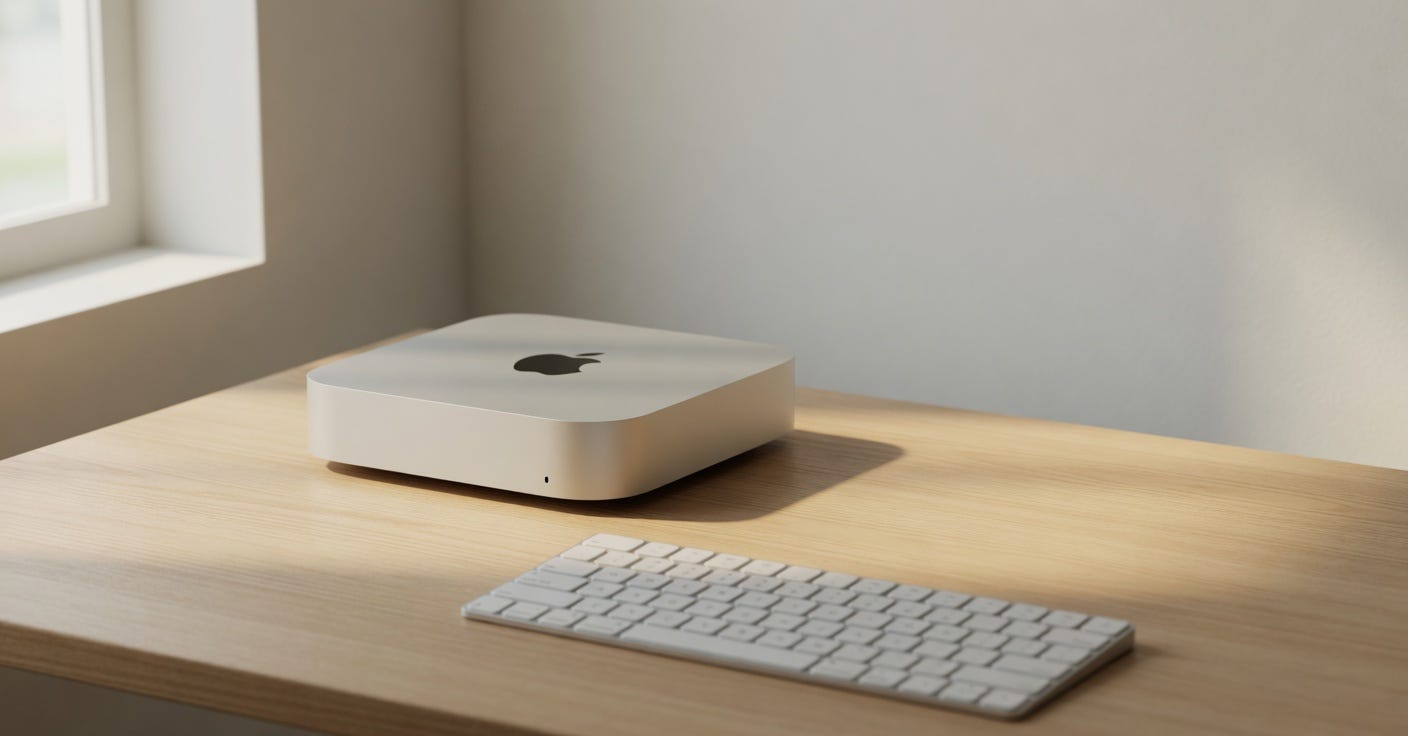
Because it kind of is, actually. The M4 chip brought changes that nobody expected at this price point, and the new Mac Mini is smaller than before, which sounds like a silly thing to care about until you see it in person and realize it’s roughly the size of four stacked iPhones. That’s wild for a machine this fast.
But there’s stuff people don’t talk about enough. The limitations, the weird design decisions, the things Apple clearly held back. So let’s go through all of it.
What Actually Changed With M4
The M4 chip itself first shipped in the iPad Pro in May 2024, so it wasn’t brand new when it came to the Mac Mini. But the Mac Mini also shipped with an M4 Pro option, which is where things get more interesting for people doing heavy work.
The base M4 has a 10-core CPU with 4 performance cores and 6 efficiency cores. That’s actually a shift from M3, which had 4P + 4E on the base chip. So you get two extra efficiency cores, which sounds boring until you look at multi-core scores. In Geekbench 6 tests from November 2024, the M4 Mac Mini was sitting around 3,800 single-core and 15,000-ish multi-core. The M2 Mac Mini scored around 2,700 single and 10,500 multi. That’s a real jump.
The M4 Pro version bumps this to a 14-core CPU and a 20-core GPU, with up to 64GB unified memory. That’s the one that’s actually competing with mid-range workstations, not just “good enough for most people” machines.
One thing that changed and didn’t get enough attention: the base M4 Mac Mini now starts with 16GB unified memory instead of 8GB. Apple quietly raised this, and it matters. Running Chrome with 15 tabs, VS Code, Slack, and Figma on 8GB was genuinely miserable. 16GB is where it stops being a compromise.
Where It Actually Performs Well
Video editing on the M4 Mac Mini is fast. Not “pretty fast for the money” — actually fast. Final Cut Pro renders are noticeably quicker than on an M2, and the media engine handles ProRes much better now. If you’re editing 4K content and exporting often, this chip is well suited to it.
Software development is another area where it just works well. Compiling large Xcode projects, running Docker containers, switching between multiple dev environments — the 16GB base config handles all of this without drama. The efficiency cores help a lot here because the machine doesn’t get hot or loud during lighter tasks, which means sustained performance doesn’t drop as much as it does on fan-heavy Intel machines from even two years ago.
So gaming? This is interesting. Apple Arcade titles and native Mac games run fine. But the GPU situation on Mac has been messy for years, and M4 doesn’t fix the ecosystem problem. The hardware can handle it, the game library can’t. There are some promising signs with ports of AAA titles coming to macOS in early 2025, but it’s still a small library and the experience is hit or miss depending on which game you’re looking at.
The neural engine on M4 is rated at 38 TOPS (tera operations per second), up from 18 TOPS on M3. This is relevant for AI workloads — local LLM inference, image generation with tools like Stable Diffusion, that kind of thing. Running a 7B parameter model locally on the M4 Mac Mini is actually usable. Not fast, but usable. The M4 Pro with more unified memory is better for this, but even the base chip can handle smaller models without too much pain.
The Stuff That Doesn’t Work Well
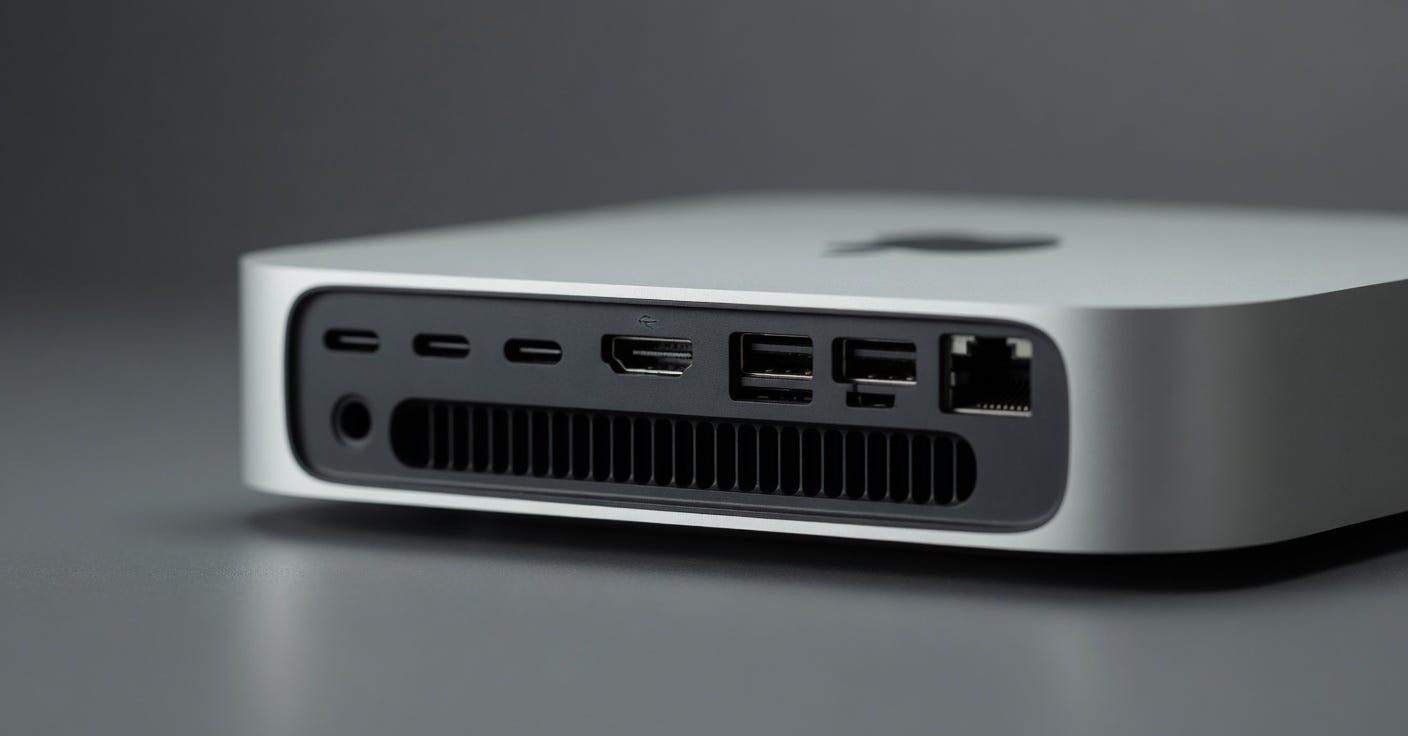
Only two USB-A ports on the back. The rest are USB-C / Thunderbolt 4, which is fine in principle, but if you have older peripherals — a webcam, a USB hub, a keyboard — you’re immediately reaching for dongles. Apple could have put three USB-A ports and nobody would have complained. Two feels like a deliberate choice to push people toward upgrading their accessories.
The front of the machine has one USB-C port now, which is new and convenient for plugging in a phone or drive quickly. But it’s USB 3.2 Gen 2, not Thunderbolt. So it’s fast for storage, but you can’t connect an external GPU or a high-res display through it. A small limitation, but worth knowing before you assume all USB-C ports are equal.
Memory is still not upgradeable. This has been the case since Apple Silicon started, and it’s still the most frustrating thing about buying one of these machines. If you buy 16GB and later realize you needed 24GB or 32GB, you can’t fix that. You buy a new machine. Apple’s unified memory architecture is genuinely efficient, and 16GB on M4 behaves more like 24GB on a traditional x86 system because of how the memory is shared between CPU and GPU — but still. The ceiling is the ceiling.
The base storage is 256GB, which in 2025 is getting tighter every year. macOS itself takes around 15GB, and once you install a handful of apps and have some project files, you’re at 40–50% before you’ve done anything interesting. Yes, external SSDs are cheap and fast, but it’s still annoying.
Ports, Connectivity, and What Apple Left Out
The M4 Mac Mini supports up to three external displays, but this is only true if you use Thunderbolt for two of them and HDMI for one. The base HDMI port is now HDMI 2.1, which supports up to 8K at 60Hz or 4K at 240Hz. That’s more than most people need, but it’s good to see.
Wi-Fi 6E and Bluetooth 5.3 are included. No Wi-Fi 7 yet, which some competitors are starting to offer. For most users this doesn’t matter today, but it will start to matter in the next year or so as Wi-Fi 7 routers become more common.
No built-in speaker. Still. The Mac Mini has never had one, and it still doesn’t. The iMac has a speaker system built in. The Mac Mini expects you to bring your own, which is fair for a desktop box but worth mentioning for anyone setting up a minimal desk with just a monitor.
There is also no SD card slot, no headphone jack on the back. The front USB-C handles audio passthrough if your monitor has speakers, but it’s another peripheral tax.
Upgrades Apple Could Have Made But Didn’t
No Wi-Fi 7 is one, already mentioned. But the bigger omission for a lot of people is Thunderbolt 5. The M4 Pro MacBook Pro that launched around the same time has Thunderbolt 5, which offers 120Gbps transfer speeds. The Mac Mini M4, even the Pro version, tops out at Thunderbolt 4 at 40Gbps. That’s still fast for most use cases, but for people connecting high-bandwidth storage arrays or external GPUs, it’s a real gap.
The cooling system is passive on the base M4 during light workloads and relies on a single fan for heavier tasks. It’s quiet. Like, very quiet. But during sustained loads — long video exports, large model training, heavy compiles — the chip does throttle slightly. Not dramatically, but some benchmarks from early 2025 show that sustained performance under thermal pressure is maybe 8–10% lower than peak performance. That’s acceptable, but it’s there.
Some people want Apple to open up the RAM or storage for upgrading. That’s probably never going to happen with the current architecture — the unified memory is on the same chip package. But Apple could at least offer more reasonable upgrade pricing at the time of purchase. Going from 16GB to 24GB costs $200, which is more than the actual cost of that memory.
The Competition and Why It Matters
The Intel NUC-style mini PC category has been chasing Apple Silicon for a few years now. AMD’s Ryzen 7 8845HS in machines like the Minisforum UM890 Pro gets close in CPU benchmarks, and those machines are often upgradeable with more RAM and storage. You can buy one for $400–500 with 32GB RAM and a 1TB SSD.
So why would someone pick the Mac Mini M4?
The short answer is macOS, the software ecosystem, and the GPU performance relative to thermal output. The Minisforum runs hot and loud under load. The Mac Mini stays cool and quiet doing the same tasks. Also, if you’re in the Apple ecosystem already — iPhone, iAirPods, iPad — the integration is just smoother.
But if you’re on Windows, Linux-compatible, and want the freedom to upgrade components, the Windows mini PC market has gotten really good and the Mac Mini’s value proposition gets weaker. A developer friend at a startup in Bangalore switched his whole team to M4 Mac Minis in January 2025 and said the productivity gains were real. Another guy I know, who does mostly gaming and some video work, looked at it and went back to a custom Windows build instead. Both choices made sense for their situations.
The Mac Mini M4 doesn’t have a great answer for gamers, no matter how good the hardware gets. That’s not an M4 problem — it’s an ecosystem problem that’s been building for a decade. Until more studios commit to native Mac builds, Windows just wins for that use case.
Critics and the “It’s Too Small” Argument
Some people in the enthusiast community think the new size is a problem. The machine got noticeably shorter compared to M2, and some reviewers complained about thermals related to this. The concern is real — smaller enclosure means less airflow space. But based on months of testing and reports from January through March 2025, the thermals have held up fine for most workloads. The chip is efficient enough that the smaller box isn’t the liability people expected.
There’s also the criticism that Apple basically held the M4 chip for Mac Mini too long and then released it without enough port upgrades. That’s fair. When a $599 machine doesn’t get Thunderbolt 5 but the $1,999 laptop does, it feels like deliberate segmentation rather than any technical limitation.
And then the RAM and storage pricing criticism is completely valid and hard to defend. $200 for a memory upgrade that costs Apple maybe $40–50 at component prices is just Apple being Apple. This is the one area where even loyal Apple users tend to just nod and say “yeah, that’s not great.”
Should You Get the Base or the Pro?
For most people doing normal work — browsing, email, light video editing, software development up to a point — the base M4 with 16GB is genuinely enough. It’s fast, it runs cool, it’s quiet, and $599 is a fair price for what you get.
The M4 Pro at $1,399 (16GB) or $1,599 (24GB) makes sense if you’re doing professional video work, 3D rendering, running large local AI models, or compiling massive codebases. The jump in GPU cores from 10 to 20 is meaningful for GPU-heavy tasks. The extra memory bandwidth matters for large model inference.
The sweet spot that many people miss: the M4 Pro with 24GB and 512GB storage at around $1,799. That’s getting into real workstation territory, and it handles most professional creative workflows without complaint.
But get the base M4 if budget matters. Spend the savings on a decent external SSD. It’s a better use of money than paying Apple’s storage upgrade prices.
Real-World Use Cases People Are Actually Getting Right
Home server. This is one that doesn’t get enough attention. The Mac Mini M4’s idle power draw is around 6–7 watts, which is lower than most Raspberry Pi setups under light load when you add a proper SSD. People are using it as a Plex media server, a home automation hub, a small NAS replacement, and a local development server — all at the same time — and the power bill barely moves. A 24/7 machine drawing that little power pays for itself in electricity costs versus older Intel machines within a year or two.
Home recording. Logic Pro on M4 is the best it’s ever been. The low-latency audio processing, the plugin count you can run before hitting CPU limits — it’s a real upgrade for people doing music production at home. A small studio setup with the Mac Mini as the brain, a Focusrite Scarlett interface, and a decent pair of monitors is maybe $1,200 total and handles everything up to semi-professional recording. The previous Intel Mac Minis used to get bogged down with plugin-heavy projects above 60–70 tracks. M4 doesn’t have this problem at those track counts.
Machine learning research at small scale. Running Ollama with Llama 3.1 8B locally on the M4 Mac Mini works. It’s not running at 100 tokens per second, but it’s fast enough for actual work — testing prompts, building small tools, experimenting with fine-tuning pipelines. The 16GB unified memory matters here. On a traditional GPU machine, you’d need at least an RTX 3060 with 12GB VRAM to run the same model comfortably, and that card alone costs $280–320 used. The Mac Mini gives you the memory bandwidth for this at the base price.
Design work. Figma, Sketch, Affinity suite — all run fast. The display support up to 6K (via Pro Display XDR or LG UltraFine) means design professionals get the full color accuracy and resolution they need without buying an iMac. The Mac Mini plus a quality monitor is often cheaper than the equivalent iMac and gives you the freedom to choose your own display.
What Comes Next
The M5 chip is presumably coming sometime in 2025 or early 2026 — Apple hasn’t confirmed anything as of April 2025, and there’s no solid leak about timing. Based on Apple’s chip cycle, M5 Macs are probably 12–18 months away. If you need a machine now, don’t wait. If you can hold off another year, maybe see what M5 brings.
The bigger question for Mac Mini’s future is whether Apple pushes Thunderbolt 5 down to this form factor in the next revision. That would be the main technical upgrade worth waiting for, along with hopefully Wi-Fi 7 support.
For what it is right now, the Mac Mini M4 is the best it’s ever been at this price. That sounds like obvious praise, but it’s worth saying plainly: previous Mac Minis at $599 always felt like they were asking you to accept some compromise. This one doesn’t, at least not in CPU or memory. The compromises are in ports, upgradability, and Apple’s pricing on upgrades — not in raw performance.
And that’s a pretty good position to be in for a tiny box that replaced machines three times its size just four years ago.