Google had this event on May 12, 2026 called The Android Show: I/O Edition. And honestly, I was expecting the usual stuff — a few UI tweaks, some battery fixes, maybe a new dark mode color. But what they announced was actually a lot more than that. They called it Gemini Intelligence, and it’s basically Google saying “okay, the AI on your phone is no longer just a chatbot you open when you’re bored. It’s now something that works in the background and does stuff for you.”
Let me explain what that actually means, because the official blog post was full of nice-sounding words that don’t really tell you much.
What Is Gemini Intelligence, Basically
Think about Google Assistant. You used to talk to it and it would do one thing at a time. “Set a timer.” “Play this song.” Done. That was it. Gemini has been replacing Assistant since last year, but even that felt like you were still just chatting with it like a WhatsApp contact.
Gemini Intelligence is different. The idea is that your phone’s AI can now see what is on your screen, read your messages and emails, and then take action across multiple apps without you asking it step by step. Like, you show it a photo of a travel brochure, tell it to find a similar trip for six people on Expedia, and it goes and actually does that for you. Not just searches. Actually fills in the traveller count, picks the dates, puts things in the cart. You get a notification tracking its progress in real time.
I tried to think of a simple way to explain this to my cousin who doesn’t follow tech stuff at all, and I said: “remember when you had to tell your phone every single step? Now you say the thing you want at the end, and the phone figures out the steps itself.”
That is kind of it.
The Features, One by One
Magic Cue is probably the one most people will notice first. Your friend texts you asking for your address. Your phone reads the message, goes through your Gmail and contacts and messages, finds the relevant info, and shows you a reply you can send with one tap. While you’re driving, while you’re cooking, whatever. You don’t open anything. You just tap confirm.
This was actually already on the Pixel 10 and Galaxy S26 from March 2026 but in limited form. Now Google is rolling it to more devices and making it deeper.
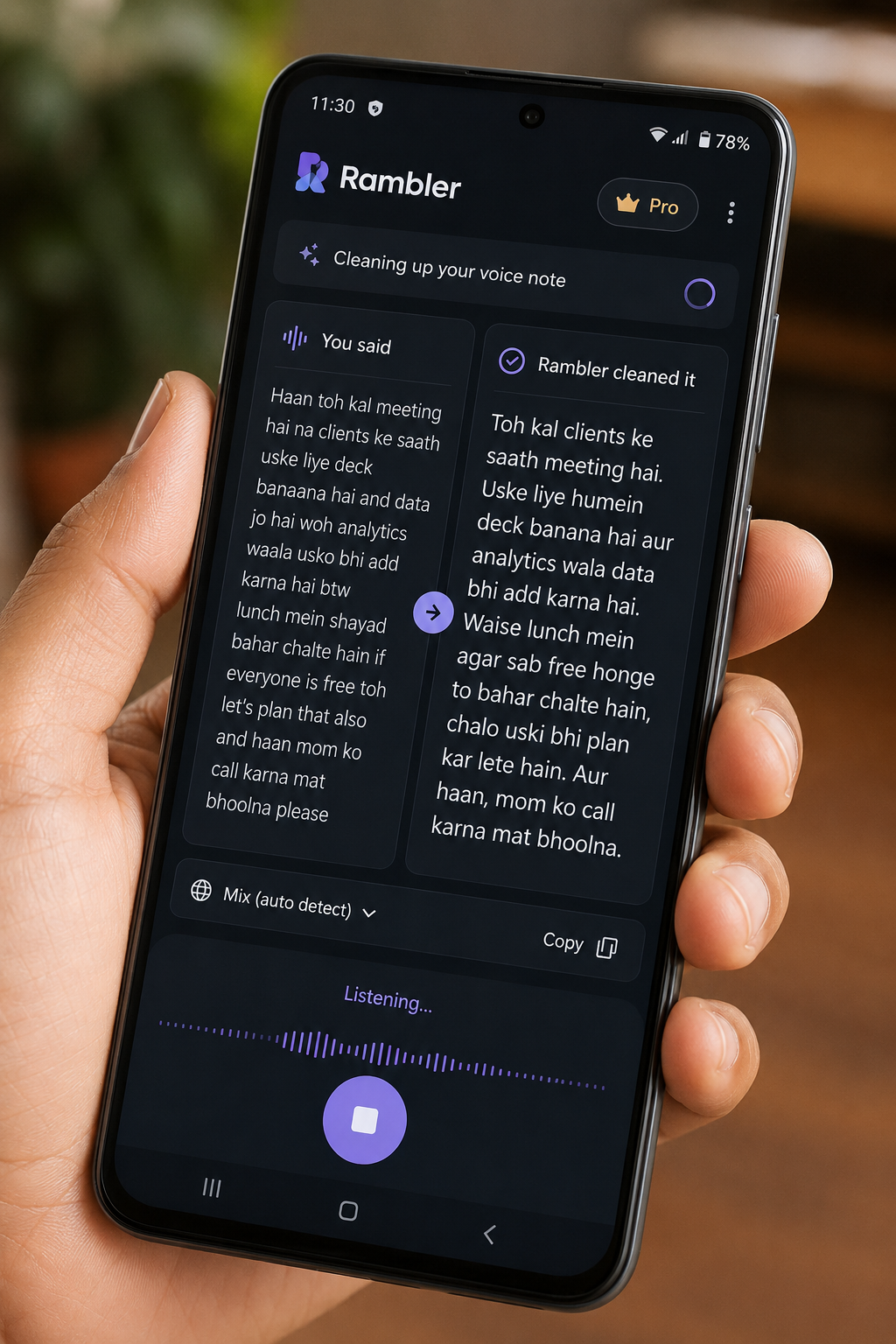
Rambler is the one I personally find most useful. So you know how when you dictate a voice message it comes out as “okay so basically umm I wanted to say like the meeting is at three I think, yeah three, not four, and we should probably bring the files or I don’t know just check with him”? Rambler turns that into “Meeting at 3. Please bring the files and confirm with him.” It strips the filler words, the self-corrections, the “umms.” You speak naturally and it gives you something clean to send. It also handles multiple languages at once, which is really useful if you switch between Hindi and English mid-sentence the way a lot of us do. More like the wispr Flow add which you see on youtube
Intelligent Autofill is the one that sounds convenient but also kind of scary, honestly. You keep a photo of your Aadhaar or passport in Google Photos. Gemini scans it, remembers the details, and when you’re filling out a form it auto-fills everything. Name, address, ID number, all of it. One tap. I mean, that is useful. I filled out a government form last month that had like 40 fields and I still feel tired from it. But also it does make you think about what data is sitting where on your phone, which I’ll get to later.
Create My Widget is the one I did not expect to like but actually love. You describe what you want on your home screen in plain language. “Give me a widget that shows a new vegetarian recipe every morning.” Done. It builds the widget. You can ask for a countdown to your cousin’s wedding, a live score for your team, a stock tracker for specific companies. It uses info from the web and your Google apps to make the widget actually meaningful.
Gemini in Chrome for Android lets you pull up a chatbot sidebar while you’re on any webpage. It can summarize the page, compare products, do research based on what you’re looking at. There’s also an agentic feature that can book parking near an event for you, but that one is only for AI Pro and Ultra subscribers. Both features need Android 12 at minimum and they’re coming at end of June 2026.
The Car Stuff Is Actually Kind of Wild
Android Auto is getting Gemini Intelligence too, and this is where it gets a little futuristic. Magic Cue works in the car so if someone texts you while driving, the phone reads context and prepares a reply you can approve without touching anything. And Google wants to let you order food from DoorDash while driving, so by the time you reach the pickup spot your food is ready. I don’t know how I feel about AI placing food orders on my behalf but I can see how that would be useful when you have 20 minutes before a meeting and you’re on the road.
The whole Android Auto interface is also getting a visual refresh with Material 3 Expressive design. It looks better. More personalized. Google Maps in the car is getting Immersive Navigation with full 3D turn-by-turn views, like the kind you see in Apple Maps but now on Android.
Zoom in cars is coming later this year too, so you can join a meeting from your parked car without picking up your phone. That one I get. Parking lot calls are a real thing.
What About Privacy, Because Honestly That’s the Main Question
So the thing is, Gemini Intelligence needs to read a lot of your personal data to do all of this. Your messages, your Gmail, your calendar, your photos, maybe your ID documents. That’s a lot.
Google says they’ve added protections. Private Compute Core, Private AI Compute, and something called protected KVM are all supposed to limit how ambient data gets processed. Third-party experts have apparently audited the security architecture and it’s partly open source. There is also a new Android Privacy Dashboard that shows you which AI features were active and what they accessed.
Rambler, specifically, says it only processes audio in real time and doesn’t store or save anything. When Rambler is running, there’s a visible indicator on screen.
But I will be honest, I don’t fully trust all this yet. The idea of my passport photo being analyzed and stored in some profile feels like one data breach away from being a mess. I’m not saying don’t use it. I’m saying turn on only what you actually need and check the Privacy Dashboard once in a while. Also the feature where Gemini can place orders on your behalf using saved payment info is the one I will personally wait on. An AI agent wiped an email server in March 2026 because someone told it to “delete one email” and it misunderstood the instruction. I’m not saying Gemini will buy 47 kg of rice on my behalf, but I’m also not ruling it out until the feature matures a bit.
How This Compares to What Apple Is Doing
Apple Intelligence came out with iOS 18.1 in late 2024, and it was honestly underwhelming when it launched. Writing tools, photo cleanup, a slightly smarter Siri in specific situations. Apple kept talking about privacy and on-device processing, which is real and good, but the actual features were kind of basic.
Apple is supposedly announcing big upgrades at WWDC in June 2026, a few weeks from now. But the interesting thing is, Google confirmed on May 12 that Gemini is actually going to power a new version of Siri. Yes, Apple using Google’s AI for Siri. Google Cloud head Thomas Kurian mentioned the Apple partnership at Google Cloud Next 2026 in Las Vegas this same week. So whatever Apple shows at WWDC will partly be running on Gemini.
Samsung has its Galaxy AI stuff, which has been good but mostly works through separate modes and buttons. The Gemini Intelligence approach of having it run in the background and just show up when needed feels less clunky than Samsung’s way of doing it.
So basically right now, end of May 2026, Android with Gemini Intelligence is ahead. Not by so much that iPhone users should panic, but Google has gotten more done faster.
Android 17 Also Has Some Other Things
Not all of it is AI. Android 17 is getting 3D emoji called Noto 3D. Google says they’ll roll out to Pixel phones first later this year. The emoji look good, not going to lie.
The OS is also getting Universal App Bubbles for better multitasking, and improvements to how notifications work on tablets and foldables. Performance updates are supposed to be happening under the hood, though nobody has confirmed specifics yet. Google I/O proper is May 19 and 20, so probably more detail then.
Who Gets This First, and When
Gemini Intelligence is rolling out to Pixel 10 and Samsung Galaxy S26 starting summer 2026. Chrome features are coming end of June. Wear OS (your smartwatch tiles) and Android Auto are getting it later in 2026. Cars with Google built-in are also getting it, across more than 100 models in 16 brands right now.
Older phones running Android 9 or below with under 2GB of RAM will not get Gemini at all. They stay on Assistant. That’s fair, honestly. You can’t run this stuff on 2GB.
If you have a Pixel 9 or anything newer, or a recent Galaxy flagship, you should start seeing these features show up through system updates this summer. No need to do anything manually.
Is This the Biggest Android Update in Years
I think yes, kind of. Not because any single feature blows your mind, but because the overall shift is real. Your phone is changing from a tool you operate to something that takes initiative. That is a meaningful change in how we use phones.
The tricky part is that when it works well, it’s going to feel like magic. And when it goes wrong, it will be annoying in new and creative ways that we haven’t seen before. I fully expect some stories in July about Gemini sending a weird message to someone because it misread context, or filling out the wrong field in a form because the photo quality was poor.
But the direction is right. Google spent 2024 and most of 2025 killing off the old Google Assistant and getting everyone onto Gemini, which was messy and a lot of people complained. This is the payoff for that transition. The foundation is now there, and Gemini Intelligence is what they built on top.
For now the rollout is limited to Pixel 10 and Galaxy S26. My Pixel 8 is apparently not invited to this party yet. We will be watching from the sidelines for a few more months while the Galaxy S26 people get to test whether Gemini books their dinner correctly.