Mini PCs have been around for a while now. But if you walk into a tech store — or just spend 20 minutes on Reddit — you’ll quickly realise that most people have no idea which category of mini PC does what, or why buying the wrong one is basically throwing money away.
So here’s the thing. There are roughly four or five distinct types of mini PCs on the market right now. They look similar from the outside. Some are the size of a thick paperback book. Others are even smaller — the kind you can literally tape to the back of a monitor and forget about. But the differences between them in terms of what they can handle? Massive. And the marketing doesn’t help at all. Every product listing says “perfect for office work, media streaming, light gaming” — which tells you basically nothing.
This article is going to go through each type, what it’s actually good at, where it falls apart, what the critics say, and whether you can even modify the thing after you buy it. No fluff. Just what you need to figure out which one fits your life.
The Main Types, and Why the Categories Matter
Before anything else — why does the category matter? Because a mini PC is not just a small desktop. Different types use completely different chip designs, different cooling systems, different upgrade paths. Picking based on price alone is how people end up with a machine that can’t run two browser tabs and a Zoom call at the same time.
The broad categories are: Intel NUC-style barebones kits, ARM-based units (like the Raspberry Pi family and its bigger siblings), AMD-powered mini PCs (which have gotten surprisingly good since 2023), Windows-on-a-stick or ultra-compact form factor devices, and the newer wave of mini gaming PCs that shove a discrete GPU into a chassis the size of a lunch box.
These aren’t just marketing segments. They represent actual architectural choices that affect everything from power draw to whether you can replace the RAM three years from now.
Intel NUC-Style Mini PCs
These are what most people picture when they say “mini PC.” Small box, usually 11 cm × 11 cm footprint, HDMI and USB ports on the front and back, and a slot for an M.2 SSD inside. Intel made the NUC format famous. After they sold the NUC business to ASUS in 2023, ASUS kept running with it — and honestly the ASUS NUC 13 Pro that came out later that year was better than most of what Intel was doing in the final few NUC generations anyway.
The Intel NUC format is modular. You buy the barebones kit — chassis, motherboard, cooling — and you add your own RAM and storage. That’s either a pro or a con depending on who you are. For IT departments deploying 50 units and buying RAM in bulk, it’s great. For someone who just wants to plug the thing in, it’s an extra step.
Performance-wise, these units land in a comfortable middle range. They handle everyday productivity work without any trouble. Office work, video calls, light photo editing, browser-based work — fine. 4K video playback — also fine, assuming you have a halfway decent processor in there. Where they start to struggle is anything CPU-intensive for long periods. The cooling in a NUC-style chassis is decent but not great. If you’re running a video export or a code compilation that takes 20 minutes, the machine will throttle. The fan gets loud. Not jet-engine loud, but louder than you’d expect from something this small.
The RAM is usually soldered on newer models, which is a problem. The ASUS NUC 14 Pro switched to soldered LPDDR5 memory on several configurations. That means whatever you buy is what you’re stuck with. This was a choice Intel made for thermal reasons and it makes sense technically — but it annoyed a lot of buyers who expected the NUC line to remain upgradeable. There were threads on r/intelnuc complaining about this for months after launch.
Power consumption is low. A typical NUC-style unit idles around 6–10 watts and peaks around 25–35 watts under load. That’s genuinely good. For a machine that’s on all day — home server, media center, office workstation — the electricity cost difference compared to a full tower PC is real and adds up over a year.
Where these lose completely: anything graphics-intensive. Integrated graphics in Intel 12th and 13th gen chips can handle casual games from 2012. They can run Minecraft. They cannot run modern AAA titles at any decent settings. That’s just the reality.
ARM-Based Mini PCs
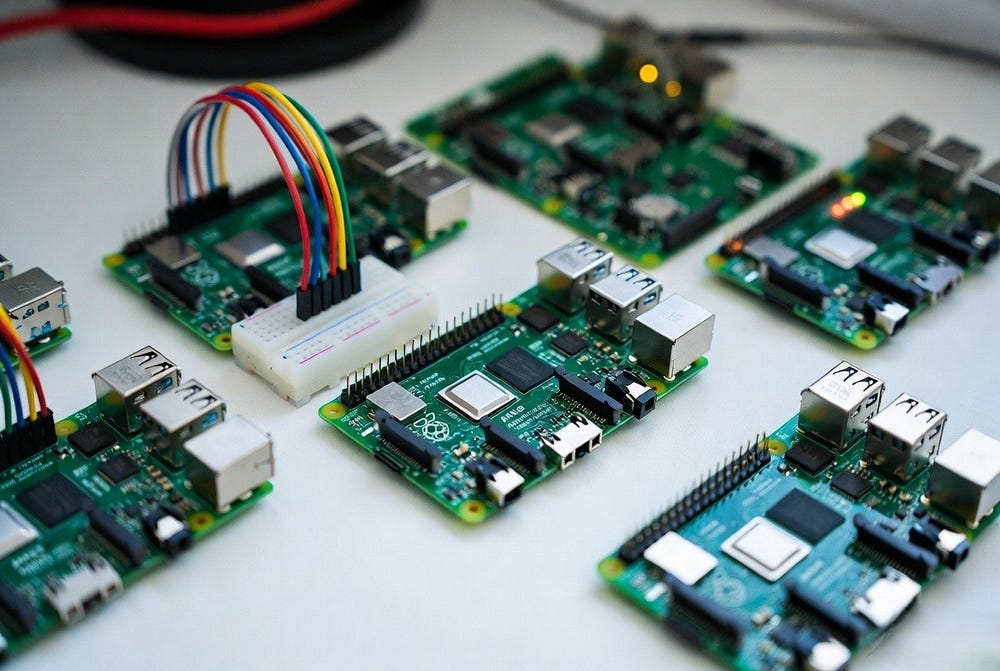
The Raspberry Pi is the obvious starting point here. The Pi 5, which launched in late 2023, is genuinely a different machine from the Pi 4 — faster CPU, a proper PCIe interface, better thermals. But it’s still $80 for the board alone, you still need a case, a power supply, a microSD card or an M.2 hat, and you still need to deal with the fact that the software ecosystem is Linux-only unless you do some creative workarounds.
For what the Pi 5 is designed for — education, tinkering, home automation, lightweight servers, learning Linux, running Pi-hole — it’s excellent. For using as a daily driver desktop replacement? Honestly, it’s a mess. Web browsing is sluggish, Google Meet barely works, and you’ll spend more time configuring than actually working.
The more interesting ARM story right now is Qualcomm Snapdragon X-based mini PCs. Several Chinese manufacturers — Beelink, Minisforum, a few others — started releasing Snapdragon X Elite-based mini PCs in mid-2024. These things are genuinely fast. The Snapdragon X Elite chip has a much better CPU-to-power ratio than Intel’s equivalent laptop chips, and the integrated GPU is usable for light creative work.
The catch is Windows on ARM. Software compatibility has gotten significantly better since Microsoft’s Prism emulation layer improved, but it’s still not perfect. Some x86 apps run slightly slower than they should. Driver support for niche peripherals is still hit or miss. And the fanbase for these machines is small enough that when something breaks, you’re mostly on your own hunting through obscure forums for answers.
So ARM mini PCs are either great for developers and tinkerers or a bit of an adventure for general users. There’s not much middle ground yet.
AMD-Powered Mini PCs (The Ones That Actually Surprised Everyone)
This is where the market shifted in a way a lot of people didn’t see coming.
Beelink, Minisforum, and GMKtec — three brands most people hadn’t heard of three years ago — started putting AMD Ryzen 7000 and 8000 series chips into small chassis at price points that made no sense compared to what Intel was charging for equivalent NUC kits.
The AMD Ryzen 7 8845HS, for example — which Minisforum put into the UM890 Pro that launched early in 2025 — has integrated Radeon 780M graphics. That’s not Intel’s UHD 770 graphics. The 780M can actually run older games at 1080p with reduced settings. Elden Ring runs on it. Not well, but it runs. That was basically impossible on integrated graphics a few years ago.
And the CPU performance on these AMD mini PCs matches or beats Intel NUC-style units in multi-core workloads, often at lower prices. The Beelink EQR6 with a Ryzen 6900HX costs less than comparable ASUS NUC configurations and outperforms them in several benchmarks.
The criticism though — and it’s a valid one — is build quality. These are budget-tier products from brands that don’t have the manufacturing history of ASUS or Intel. Some units have reported thermal paste issues out of the box. Some have had BIOS update problems. The customer support situation ranges from “okay if you speak Mandarin” to “you’re basically on your own.” There are Reddit posts from users who received units with loose IO ports, or with fans that started rattling within six months.
That’s not every unit. Plenty of people have had these machines running for two-plus years without issues. But the quality control is inconsistent in a way that ASUS and Intel units generally aren’t.
What you can modify here is actually quite good compared to NUC-style units. Most of the Minisforum and Beelink AMD models use socketed SO-DIMM RAM — you can pull it out and upgrade it. Storage is usually dual M.2, so you can add a second drive. Thermal paste replacement is a real option if your unit is running hot, and several YouTube channels have documented exactly how to do it on specific models, including which thermal compounds work best.
Windows-on-a-Stick and Ultra-Compact Units
These exist. They are usually terrible.
The pitch is appealing: a full Windows PC the size of a USB drive or a palm-sized box that costs $120. Plug it into your TV or monitor, instant PC. Great idea in theory.
In practice, these units almost always use Intel Celeron or Atom-class chips — the N95, N100, or similar — which are ultra-low-power chips designed for tablets and thin-and-light laptops, not desktop productivity use. They run Windows, yes. Opening 10 browser tabs plus Outlook plus a PDF reader? That’s already pushing the edge. The RAM is soldered, the storage is eMMC or the cheapest SATA M.2 available, and the thermal design is passive cooling — meaning no fan, which sounds nice until the chip throttles itself down to 400 MHz to avoid overheating.
There’s a specific use case where these work fine: digital signage, a dedicated kiosk machine, something you’re running one app on continuously. Running a point-of-sale system. Playing looping video at a trade show booth.
For anything else, save yourself the frustration.
Mini Gaming PCs: The Wildcard Category
This is the newest and probably most interesting segment. Asus ROG NUC, the Minisforum AtomMan G7 Pt, the GPD WIN Max 2 — a range of devices that try to put a discrete GPU in a mini PC chassis.
The ROG NUC with an Intel Core Ultra 9 and Radeon RX 7600M XT, announced and shipped in 2024, is genuinely remarkable hardware. It’s about the size of two thick books stacked on top of each other, it draws about 100–120 watts under full gaming load, and it can run most modern games at 1080p with respectable settings. Cyberpunk 2077 at medium-high settings, 60+ fps. That’s real.
But. The price is $1,500 to $2,000 depending on configuration. The fan noise under load is significant — reviewers have clocked it around 45–50 dB, which is louder than most people expect from something called a “mini” PC. And the GPU is not replaceable. It’s soldered or MXM-style depending on the unit, and MXM upgrades are theoretically possible but practically very difficult because the BIOS has to support the new card, and manufacturers almost never update BIOS to support newer GPUs.
So you’re paying a premium for the form factor, accepting performance that’s roughly equivalent to a mid-range laptop GPU, living with the noise, and betting that the hardware will still feel adequate in four years.
For some people — someone in a small apartment, someone who wants a gaming machine that can double as a TV-connected console alternative — this makes total sense. For anyone with space for a proper desktop, a mid-tower with a dedicated GPU card will perform better at a similar or lower price. That’s just math.
Where Mini PCs Actually Perform Well
Home servers and NAS (Network Attached Storage) setups are honestly the strongest use case across almost every mini PC category above the stick-PC tier. A NUC-style unit or an AMD mini PC running 24/7 as a Jellyfin media server, a Pi-hole instance, a Home Assistant hub, or a Plex server is genuinely excellent. The power consumption is low. The noise is manageable. The performance for serving media or running home automation tasks is more than enough.
Office work and remote work setups are another strong area, especially for companies buying in volume. The per-unit cost for something like a Beelink Mini S12 Pro is well under $200, and for most corporate office tasks — spreadsheets, email, video calls, document editing — it’s entirely sufficient. Dell and HP sell thin client machines for office deployment at much higher price points with worse specs. The Chinese mini PC brands have genuinely disrupted this market.
Digital signage and kiosk deployments. Education labs. Media center PCs connected to a TV. These are all excellent fits.
Where They Fall Short
Thermal limits are the single biggest recurring complaint across every category. You can’t put a 45-watt chip in a chassis the size of a hardcover book and expect it to sustain maximum performance indefinitely. The physics just don’t work. Every review of every AMD mini PC from the last two years mentions throttling during sustained workloads. The chip runs fast, hits a temperature ceiling, and the clock speed drops to keep temperature manageable.
For burst workloads — opening apps, web browsing, running a script that finishes in two minutes — this throttling is invisible and doesn’t matter. For sustained workloads — long video exports, scientific computing, running ML models locally — it matters a lot.
Repairability is a growing concern, especially as more manufacturers move to soldered RAM and custom thermal solutions. The right-to-repair situation for mini PCs is worse than for standard desktops and about on par with laptops. If the motherboard dies, in most cases the unit is done. There’s no ecosystem of replacement parts the way there is for standard ATX desktop builds.
The support situation for budget brands is genuinely risky. Minisforum has gotten better — they have an active presence on Reddit now and they released a proper support portal sometime in early 2025 — but it’s still not the same as ASUS support. If something goes wrong with a $200 Chinese mini PC, you may end up dealing with a long warranty claim process, a unit that has to be shipped overseas, and weeks without a machine.
Modifiability: What You Can Actually Change
This varies wildly by unit.
The Raspberry Pi 5 is the most modifiable thing in this list. There’s an entire ecosystem of hats, add-on boards, cooling solutions, and enclosures. You can add an M.2 hat, an active cooler, a custom case with a touchscreen on the front. The Pi is infinitely hackable. That’s kind of the point.
Intel NUC barebones kits are modifiable within limits. RAM and storage are upgradeable if you bought the barebones version — not upgradeable if you bought a preconfigured unit with soldered memory. Cooling upgrades exist but the chassis is sealed enough that significant thermal mods are difficult.
AMD mini PCs from Beelink and Minisforum are more modifiable than most people realise. The enclosures on some models — the UM series especially — use standard screws, not clips, and the interior layout is documented well enough by the community that you can do thermal paste replacement, RAM upgrades, and storage upgrades without voiding much. A few enthusiasts have even modded the power limits through BIOS tweaks to push more performance out of the chips, though this typically makes the throttling worse in a different way.
Mini gaming PCs are largely not modifiable in any meaningful sense. The GPU situation I mentioned earlier is the main wall. But you can upgrade RAM and storage in most units, which at least keeps them feeling current longer.
The Security and Threat Angle Nobody Talks About
This part is real and kind of underreported.
Budget mini PCs — especially the ultra-cheap Chinese models — have, in some cases, shipped with preloaded software that’s somewhere between bloatware and actively suspicious. There were documented cases in 2023 and again in 2024 where certain T-Series mini PCs from sellers on Amazon were found to have infostealer malware preloaded in the firmware or the Windows image. Not all Chinese mini PCs, and not even most of them, but enough that security researchers flagged it as a pattern worth watching.
The responsible thing to do with any budget mini PC from an unfamiliar brand is to wipe the drive completely and do a fresh Windows install from a Microsoft-sourced ISO. That eliminates this risk entirely. But a lot of buyers don’t know to do this, and the sellers obviously don’t advertise it.
For businesses deploying these units in a corporate environment, this is a non-trivial consideration. The cost savings are real, but so is the due diligence required.
Physical security is another angle for deployments where the mini PC is in a public or semi-public space. The small form factor makes these units easy to grab and walk out with. Kensington lock slots are present on some models and absent on others. Check before you deploy.
Which One Should You Actually Choose?
For general home or office use, without a big budget to burn: an AMD-based mini PC from Beelink or Minisforum in the $200–$350 range is genuinely hard to beat on specs-per-dollar. The quality control risks are real, buy from somewhere with a return policy, and do a fresh Windows install.
For a server or home automation hub: a used NUC Gen 10 or Gen 11 from eBay, or a Raspberry Pi 5 if you’re comfortable with Linux. The Pi 5 with an M.2 hat and a decent power supply is a very capable little server for under $120 total.
For corporate office deployment at volume: ASUS NUC Pro line if budget allows for the reliability premium, or the Beelink Mini S12 Pro series with a fresh OS image for tighter budgets.
For mini gaming that justifies the price: the ROG NUC is the most polished option if you genuinely need the form factor and have the budget. Otherwise, the Minisforum AtomMan G7 Pt is a cheaper alternative with similar GPU performance and noticeably worse build quality, which is a tradeoff only you can decide is worth it.
For tinkering and learning: Raspberry Pi 5, no question.
For a cheap secondary TV PC or media streamer: an N100-based mini PC in the $100–$150 range is actually fine for this specific use case. Just don’t expect it to do anything demanding.
And avoid the stick PCs. Unless you have a very specific reason. Which almost no one does.
The mini PC market has genuinely matured a lot in the last few years. The best AMD units from 2024–2025 are punching above their weight in a way that wasn’t true even two years ago. The reliability and support concerns haven’t fully gone away, but the gap has narrowed. For anyone who doesn’t need a dedicated GPU and doesn’t have room for a tower, there’s a mini PC that fits right now — you just have to know which shelf to look on.