There is a specific kind of frustration that comes from paying for five AI subscriptions, switching between browser tabs like a frantic DJ, and still feeling like none of them actually know your business, your files, or your preferences. Most people assume this is just how AI works — you use their platform, follow their rules, and hope they do not raise prices or change the model without warning.
Open WebUI is the quiet rebellion against all of that.

It is not a product a venture-backed startup is pushing at you. It started as a side project by Timothy Baek, grew into one of the fastest-starred repositories on GitHub, and in 2026 sits at the center of a serious conversation about what a truly private, deeply extensible AI workspace should look like. By May 2025, the project had crossed 90,000 GitHub stars — a number that most commercial AI tools would market heavily. The community barely mentioned it. They were too busy building.
This guide is for the person who wants to understand Open WebUI not just at the surface level, but deeply enough to actually use it well.
Why Most People Treat Their LLM Like a Vending Machine
The mental model most people bring to AI tools is simple. You type something in, something comes out. The interface is a search bar with ambitions. This works fine for casual questions, but it breaks down completely the moment you need the AI to know who you are, what projects you are running, or what documents you actually care about.
Commercial platforms solve this by locking you into their ecosystem. Your data lives on their servers. Their model decides what context to retain. Their fine print determines what the AI will and will not say. You get convenience in exchange for sovereignty, which sounds like a reasonable trade until the moment you realize the data you fed into that system — client notes, internal research, proprietary processes — is now sitting on infrastructure you have no visibility into.
Open WebUI takes the opposite position. Your server, your models, your rules. Nothing leaves the machine unless you explicitly send it somewhere.
What Open WebUI Actually Is (And Why “ChatGPT Alternative” Undersells It)
People call Open WebUI a ChatGPT alternative the way people used to call Linux a Windows alternative — technically accurate, but missing the point entirely. ChatGPT is a product. Open WebUI is closer to an operating system for your language models.
It runs as a web application you host yourself. Point it at an Ollama instance running Llama 4 locally, or give it an API key for Claude or GPT-4o, or both simultaneously, and it manages all of that through a single polished interface. You can switch between a 70-billion-parameter model running on your own GPU and a cloud model mid-conversation, comparing outputs, routing different tasks to different backends.
The feature surface in 2026 is genuinely remarkable. Multi-user support with role-based access control means a small team can share one installation with proper permissions separation. A native RAG engine means you can upload your company knowledge base and have the model actually read from it. A built-in image generation interface connects to ComfyUI or AUTOMATIC1111 backends. Voice input and output work out of the box.
None of this requires a PhD or a $50,000 infrastructure budget. The minimum viable installation runs on a laptop.
The “Operating System” Metaphor Is Worth Taking Seriously
When software engineers call something an operating system metaphorically, they usually mean it manages resources and abstracts complexity away from the end user. Open WebUI does both of those things for LLMs, but what makes the metaphor stick is the extensibility layer.
An operating system without third-party applications is just a boot screen. Open WebUI without its extension ecosystem would be a nice chat interface, nothing more. What makes it genuinely powerful is Pipelines, Functions, and the growing library of community-built tools that sit on top of them.
Think of Pipelines as middleware. A Pipeline sits between your message and the model, intercepting the request, transforming it, calling external APIs, querying a database, running Python code, and then passing a modified result to the model for final processing. Want every message to automatically pull the latest news about the topic before the model answers? That is a Pipeline. Want to log every conversation to a private database for compliance? Also a Pipeline.
Functions are lighter-weight extensions built directly into the interface — tool calls the model can invoke, Action buttons that appear in the chat, or custom Filters that modify input and output. The distinction matters because Functions are easier to write and deploy, while Pipelines handle more complex orchestration that benefits from a separate service. The Open WebUI Community store at openwebui.com/functions hosts hundreds of pre-built Pipes covering everything from web search integration to local file system access.
MCP Servers — Giving Your AI Actual Hands
If you spend any time in AI communities in 2026, you have heard about MCP. Model Context Protocol is Anthropic’s open standard for connecting AI models to external tools and data sources in a structured, predictable way. The analogy that sticks is this — if the model is the brain, MCP servers are the hands, eyes, and ears.
Open WebUI added native MCP support, which means you can configure local MCP servers and have your models use them as tools during a conversation. A filesystem MCP server lets the model read and write files on your machine. A database MCP server gives it the ability to query your SQLite or Postgres database directly. A web search MCP server pulls live results without you having to paste links.
Setting this up requires three things. First, you need an MCP server running — either one you write yourself or one from the community library. Second, in Open WebUI’s admin settings, navigate to the Tools section and add the MCP server endpoint along with any authentication it requires. Third, enable the tool for the model or workspace where you want it available.
The practical result is a conversation that feels fundamentally different. Instead of copying data into the chat window, the model retrieves what it needs. Instead of asking it to write a script and then running that script yourself, it can run it. This is where the AI agent concept stops being theoretical and starts being something you actually use on a Tuesday afternoon.
RAG That Actually Works — Chatting With Your Documents
Retrieval-Augmented Generation is one of those concepts that sounds impressive in a demo and disappoints in practice, usually because the implementation is shallow. The model gets a few loosely relevant chunks of text and hallucinates the rest. Open WebUI’s implementation is more careful, and understanding why helps you configure it correctly.
When you upload a document to Open WebUI’s Workspace, it goes through a chunking and embedding process. The document is split into overlapping segments, each segment is converted into a vector embedding using a model like nomic-embed-text, and those embeddings are stored in a local vector database. When you ask a question, your question is also embedded and compared against the stored document vectors. The most semantically similar chunks get retrieved and injected into the model’s context before it generates a response.
The quality of this process depends heavily on your embedding model and chunk size settings. For most use cases, nomic-embed-text running locally via Ollama is a strong choice — it is fast, produces high-quality embeddings, and requires no API calls. For technical documentation with lots of code, you may want to reduce the chunk size to preserve the structure of individual functions or configuration blocks.
The practical way to test your RAG setup is to ask a question you know the answer to from the document, then ask a slightly rephrased version. If both return accurate answers, your embedding and retrieval are working well. If the rephrased version fails, your chunk size is probably too small or your embedding model needs an upgrade.
Step-by-Step — The Perfect 2026 Installation
The installation story for Open WebUI has matured significantly. In 2024, Docker was essentially the only sensible path. It still works beautifully and remains the right choice for production deployments or any environment where you want isolation and easy updates. But for a lightweight local install on a developer machine, uv has become the recommended alternative.
uv is a Python package manager and environment tool that makes installation dramatically simpler and faster than pip with virtualenvs. If you already have Python 3.11 or newer, the Open WebUI docs walk you through a uv pip install command that has the server running in under two minutes. This is the path to take if you want a minimal install without Docker’s overhead.
For the Docker path, which is what most deployments should use, the core command for a CPU-only installation looks like this:
docker run -d \
  -p 3000:8080 \
  -v open-webui:/app/backend/data \
  -e WEBUI_SECRET_KEY=your_long_random_string_here \
  --name open-webui \
  --restart always \
  ghcr.io/open-webui/open-webui:main
Notice the WEBUI_SECRET_KEY environment variable in that command. That single line is doing more work than it appears to, and it is the source of the most common frustration new users encounter.
The Secret Key Problem — Why You Keep Getting Logged Out
This is the single most common complaint from new Open WebUI users, and it has a completely non-obvious root cause that most tutorials skip over entirely.
Open WebUI uses JWT (JSON Web Tokens) to manage authentication sessions. Those tokens are signed with the WEBUI_SECRET_KEY. If no key is manually defined, the application generates a random one at startup. Every time the Docker container restarts — and containers restart constantly, from updates, from system reboots, from Docker daemon restarts — a new random key is generated. Every existing JWT token instantly becomes invalid because it was signed with a different key. Every logged-in user gets bounced back to the login screen.
The fix is trivially simple once you know what is happening. Generate a long random string (a UUID works, or any password manager’s random generator output), set it as WEBUI_SECRET_KEY in your environment, and that value persists across restarts. Your sessions survive. The problem disappears permanently.
For GPU acceleration on NVIDIA hardware, add --gpus all to the Docker run command and switch to the CUDA image tag (ghcr.io/open-webui/open-webui:cuda). For Apple Silicon, the default image runs natively through Metal without any additional configuration — Apple’s unified memory architecture means even a MacBook Pro with 16GB RAM can run a 7B parameter model at reasonable speed alongside the Open WebUI interface.
Multi-User, RBAC, and the Enterprise Case
One of the underappreciated aspects of Open WebUI is how seriously it takes multi-user scenarios. A fresh install creates an admin account for the first user and can be configured to require admin approval for subsequent registrations, which means you control exactly who gets access to your deployment.
Role-based access control in Open WebUI operates at several levels. At the most basic, you have Admin users who can configure everything, and regular Users who interact with models. More granularly, you can control which models specific users or groups can access, which tools are available to them, and whether they can create their own knowledge bases or only use shared ones.
This matters enormously for small and medium businesses that want to give employees access to an AI assistant without paying per-seat SaaS costs or risking sensitive business data going to an external API. A properly configured Open WebUI deployment with a local Ollama backend means every prompt stays on your server. The legal team can upload contract templates. The sales team can load product documentation. Neither can see the other’s workspaces unless an admin deliberately shares them.
For enterprises with stricter requirements, Open WebUI supports LDAP and OAuth integration, meaning you can plug it directly into your existing identity provider. Staff use the same credentials they use for everything else. When someone leaves the company and their account is deprovisioned in your directory, their Open WebUI access disappears automatically.
Using Claude API With Open WebUI
Connecting Open WebUI to Claude’s API is straightforward and genuinely useful — you get Anthropic’s model quality with your own data staying local in the RAG layer, and your conversations logged only to your own server.
In Open WebUI’s admin panel, navigate to Settings, then Connections, then OpenAI API Connections. Claude’s API is compatible with the OpenAI API format through the appropriate endpoint, so enter https://api.anthropic.com/v1 as the base URL and your Anthropic API key as the credential. For the model list, you will need to manually add the model identifiers such as claude-opus-4-6, claude-sonnet-4-6, or claude-haiku-4-5-20251001 depending on which models you have access to.
Once connected, you can mix Claude models with local Ollama models in the same workspace. A practical pattern is using a local model for brainstorming and drafting with no API costs and fast iteration, then routing final polish or complex reasoning tasks to Claude. Open WebUI’s model comparison view, which lets you send the same prompt to multiple models side by side, is particularly useful for calibrating this kind of hybrid workflow.
Open WebUI vs. the Competition — An Honest Look
The self-hosted AI interface space is not crowded, but it is no longer empty either. Three tools come up most consistently in comparison discussions — Open WebUI, LibreChat, and AnythingLLM. They solve related but distinct problems.
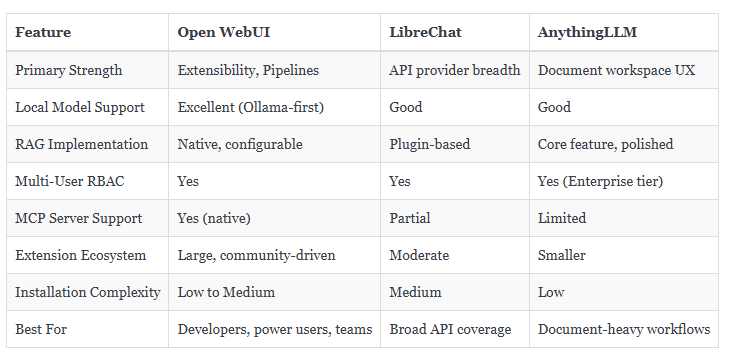
LibreChat’s strength is the sheer range of API providers it supports out of the box. If your workflow requires simultaneous access to a dozen different AI services through one consistent interface, it handles that well. AnythingLLM leans heavily into document management and presents a particularly clean interface for non-technical users who primarily need document question-and-answer functionality.
Open WebUI wins on raw extensibility and community momentum. The Pipelines architecture allows customizations that the other two simply cannot match without forking the codebase. And the pace of development — driven by a large and active contributor base — means new features arrive faster than most teams can fully evaluate.
The Workflow Nobody Tells You About
The most transformative use of Open WebUI is not as a ChatGPT replacement. It is as a persistent, private research assistant that knows your actual work.
The setup takes about an afternoon. You create a Knowledge Base in the Workspace section and populate it with your documents — project notes, reference materials, company policies, whatever domain you need the model to understand. You configure a Pipeline that pulls relevant context from that knowledge base before every query. You add an MCP server for filesystem access so the model can read recent files without you manually copying content into the chat window.
The result is a system where you open a browser tab, describe a problem, and get a response informed by your actual context — not a generic answer built from public internet data. The model does not know your business because you told it your business name. It knows your business because it read your documents.
This is what private AI for enterprise actually means when it is working correctly. Not a locked-down commercial product with a business tier pricing page, but a system you control entirely, tuned specifically to your context, running on your hardware, and accessible to your team.
What Comes Next
Open WebUI’s roadmap in 2026 continues to push toward deeper agent capabilities — persistent memory across conversations, more sophisticated multi-step tool use, and tighter integration with the expanding MCP ecosystem. The community is producing new Pipes and Functions faster than most teams can evaluate them.
The people getting the most value from Open WebUI right now are not the ones who installed it once and use it like a chat window. They are the ones who treated the first installation as the beginning of a configuration process — gradually adding tools, building knowledge bases, refining their Pipelines, and essentially training the system to fit their specific workflow rather than adapting their workflow to fit the system.
That investment compounds. The time you spend understanding how RAG chunking works pays off every time you add a new document. The Pipeline you write once for web search enrichment runs on every relevant query automatically. The RBAC configuration you set up once scales to new team members without additional work.
Open WebUI is not the easiest AI tool you will ever use. It is the one that rewards actually understanding it.
Given that the alternative is renting intelligence you do not own, from a platform you do not control, with data policies that change with the quarterly earnings report, that trade feels increasingly obvious.