The Resilient Architect: A Masterclass in Production-Grade RAG on Azure
The hum of innovation often whispers promises of artificial intelligence. We have seen large language models, or LLMs, transform how we interact with information, crafting prose, answering complex questions, and even generating code. Yet, the journey from a local experiment to a globally accessible, robust AI application is fraught with challenges. Many organizations grapple with the intricacies of deployment, especially when incorporating Retrieval Augmented Generation, or RAG, architectures into the cloud. The goal is not just to make it work, but to make it work flawlessly, resiliently, and at scale.
The transition from a “cool demo” to a production system is where most AI projects meet their end. In the world of LLMs and RAG, the distance between a local script and a globally available, resilient service is measured in sleepless nights spent debugging hallucinations, latency spikes, and silent data failures. To build a RAG system that survives the first thousand users, you must think beyond the prompt. You are no longer just an AI developer… you are a systems architect. You aren’t just sending text to an API; you are orchestrating a complex data supply chain that must be observable, scalable, and self-healing.
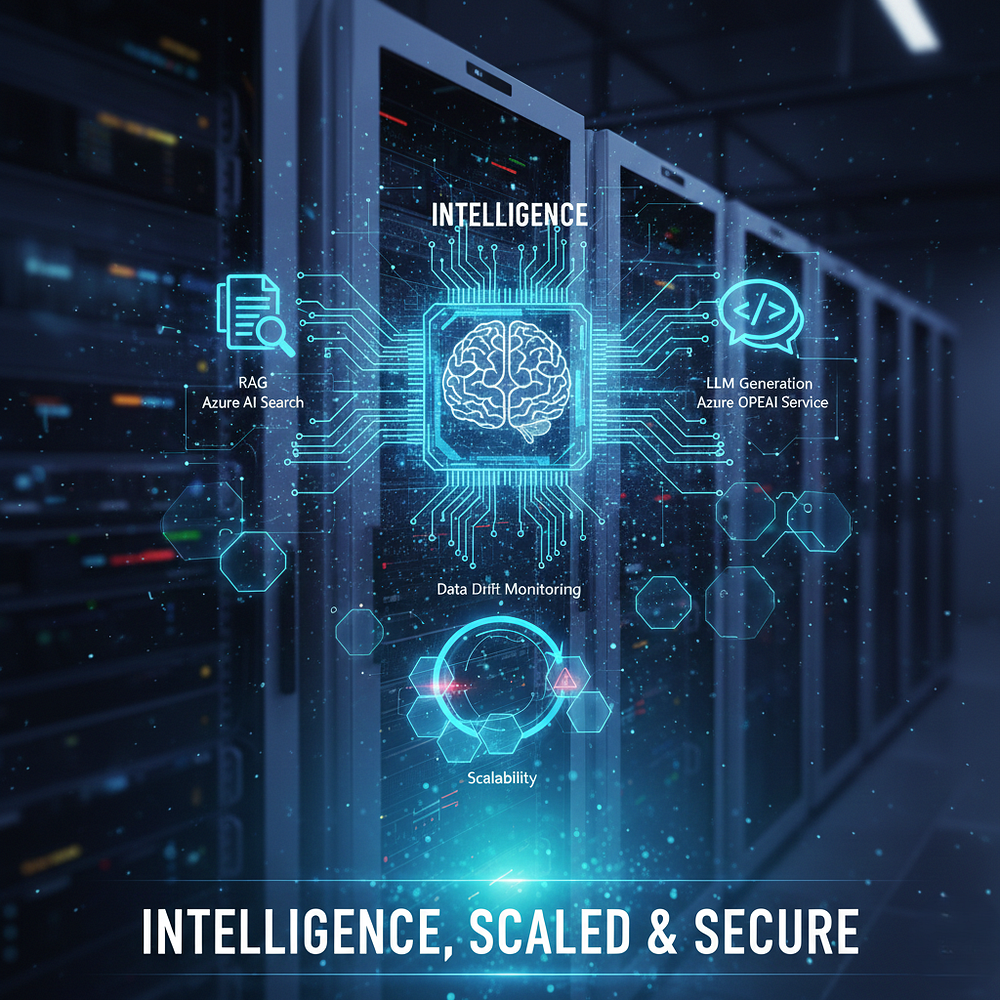
Imagine a world where your AI assistant does not just spout generic answers but taps into your most current, proprietary data, providing insights only you possess. This is the power of RAG. It combines the broad knowledge of an LLM with the precision of a retrieval system, pulling relevant information from a vast document repository to inform its responses. When we talk about deploying such a system on a platform like Azure, we are not merely spinning up a virtual machine. We are orchestrating a symphony of services, each playing a crucial role in delivering a seamless, intelligent experience.
Part 1: The Evolution of RAG Architectures
Before we deploy, we must understand that “RAG” is not a single tool, but a spectrum of complexity. Depending on your use case, you might choose one of three primary paradigms.
1. Naive RAG (The “OG” Framework)
This is the most basic form: Index, Retrieve, Generate. It works by converting a query into a vector, finding the top-k matches, and stuffing them into the prompt. It is fast to build but struggles with complex queries and often fails when the retrieved context is “noisy” or misaligned with the user intent.
2. Advanced RAG (The Refinement Layer)
Advanced RAG addresses the failures of the Naive approach by adding Pre-Retrieval and Post-Retrieval strategies.
- Pre-Retrieval: Includes techniques like query expansion (rewriting the user query to be more descriptive) and sliding window chunking.
- Post-Retrieval: Uses Re-ranking. Instead of trusting the initial vector search results, a second, more powerful model (a Cross-Encoder) evaluates the top 20 results to pick the 5 most relevant ones.
3. Modular RAG (The Future-Proof Build)
Modular RAG is what we will build in this guide. It breaks the pipeline into interchangeable parts: a Search module, a Memory module, and a Reasoning module. This allows you to swap out your vector database or LLM without rewriting the entire system. It supports “Agentic” workflows where the system can decide whether it needs to search the web, search your internal docs, or just answer from its own internal knowledge.
Part 2: The Mathematics of Meaning — How Embeddings Work
To understand how a computer “searches” for meaning, we must look at the math. An embedding is not just a bunch of numbers; it is a coordinate in a high-dimensional universe (the Vector Space).
The Vectorization Process
When you send text to an Azure OpenAI embedding model (like text-embedding-3-large), the model performs the following steps:
- Tokenization: Breaking text into sub-word units.
- Contextual Encoding: The model looks at the relationship between words (e.g., “bank” near “river” vs. “bank” near “money”).
- Pooling: Consolidating these relationships into a single fixed-length vector (e.g., 3,072 dimensions for GPT-4 embeddings).
Calculating Similarity: The Math Behind the Search
Once text is turned into a vector A, and a user query is turned into vector B, Azure AI Search calculates the distance between them. The most common metric is Cosine Similarity:
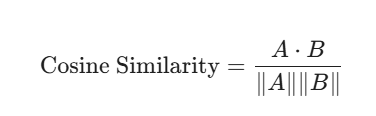
This formula measures the cosine of the angle between two vectors. If the angle is 0 degrees, the similarity is $1.0$ (perfect match). If the angle is 90 degrees, the similarity is 0 degrees(completely unrelated). In production, we often use Hybrid Search, which combines this vector math with traditional keyword scores (BM25) to ensure that if a user searches for a specific serial number or product code, the system doesn’t get “lost” in the abstract math and misses the exact match.
“In the architecture of intelligence, the bridge between a demo and a deployment is built with the bricks of observability and the mortar of resilience.”
Part 3 : The Azure Blueprint: A Foundation for Intelligence
Our journey begins with the architectural blueprint. At its core, deploying a RAG LLM on Azure involves several key components, each serving a distinct purpose. In a production environment, we abandon the “Naive RAG” approach — where we simply dump documents into a folder and search. Instead, we implement a decoupled architecture that separates the Ingestion Pipeline from the Inference Pipeline.
Core Components of the Symphony
- Azure Blob Storage: Your “Source of Truth.” It stores the raw, unstructured assets such as PDFs, docs, and research papers. It is a robust data store for our knowledge base. This is where our documents, articles, and proprietary information reside.
- Azure AI Search: This is the heart of the system. Formerly Azure Cognitive Search, it is an invaluable tool that transforms our raw documents into searchable indexes, allowing for rapid and intelligent retrieval. In 2026, we utilize Integrated Vectorization, which automatically handles the chunking and embedding of data using Azure OpenAI models within the search service itself.
- Azure OpenAI Service: Hosts your embedding models like
text-embedding-3-largeand your reasoning models likegpt-4o. This service allows us to integrate these advanced models securely and scalably into our applications. - Azure Kubernetes Service (AKS): The orchestrator for your application logic. While Azure Container Apps is great for smaller tasks, AKS provides the granular control over networking and scaling needed for enterprise workloads. It provides the ideal environment for deploying our RAG application.
“A Large Language Model is a brilliant mind without a memory; RAG is the library we build to give that mind a history and a home.”
A Step by Step Odyssey: From Code to Cloud
Let us walk through the deployment process, step by step, ensuring every piece falls into place.
“We no longer build software that simply executes; we orchestrate systems that learn to adapt to the silence between the data points.”
1. Data Ingestion and Indexing
Begin by populating your Azure Blob Storage with your enterprise data. This could be anything from internal wikis to customer support documents. Once the data is in Blob Storage, configure Azure AI Search to index this data. You will define indexers that automatically crawl your storage, extract content, and create a searchable index. Consider pre-processing steps here, such as chunking large documents into smaller, more manageable segments to improve retrieval accuracy.
It looks complex on paper, but the implementation is surprisingly elegant. Here is how we define that search index to ensure our vectors have a home.
from azure.identity import DefaultAzureCredential
from azure.search.documents.indexes import SearchIndexClient
from azure.search.documents.indexes.models import (
    SearchIndex, SearchField, SearchFieldDataType, SimpleField,
    SearchableField, VectorSearch, HnswAlgorithmConfiguration,
    AzureOpenAIVectorizer, AzureOpenAIVectorizerParameters, VectorSearchProfile
)
# Initialize Client
endpoint = "https://<your-search-service>.search.windows.net"
credential = DefaultAzureCredential()
index_client = SearchIndexClient(endpoint, credential)
# Define the Vectorizer (The "Translator")
vectorizer = AzureOpenAIVectorizer(
    vectorizer_name="my-openai-vectorizer",
    parameters=AzureOpenAIVectorizerParameters(
        resource_uri="https://<your-openai-resource>.openai.azure.com",
        deployment_id="text-embedding-3-large",
        model_name="text-embedding-3-large"
    )
)
# Define Index with Vector Support
fields = [
    SimpleField(name="id", type=SearchFieldDataType.String, key=True),
    SearchableField(name="content", type=SearchFieldDataType.String),
    SearchField(name="content_vector", type=SearchFieldDataType.Collection(SearchFieldDataType.Single),
                vector_search_dimensions=3072, vector_search_profile_name="my-vector-profile")
]
vector_search = VectorSearch(
    profiles=[VectorSearchProfile(name="my-vector-profile",
                                 algorithm_configuration_name="my-hnsw",
                                 vectorizer="my-openai-vectorizer")],
    algorithms=[HnswAlgorithmConfiguration(name="my-hnsw")]
)
index = SearchIndex(name="production-rag-index", fields=fields, vector_search=vector_search)
index_client.create_index(index)
2. LLM Provisioning
Provision an Azure OpenAI Service instance. Select the specific LLM model you intend to use. This step ensures your RAG application has access to the powerful generative capabilities required to synthesize answers. In the enterprise world, you must pay close attention to regions and availability to ensure your latency remains low.
3. RAG Application Development
Develop your RAG application. This application will act as the orchestrator. It receives a user query, interacts with Azure AI Search to retrieve relevant document chunks, and then passes these chunks along with the original query to the Azure OpenAI Service for generation. Python is a popular choice for this, leveraging libraries like LangChain or LlamaIndex to simplify the RAG pipeline.
The following code demonstrates the heart of the inference logic.
import openai
from azure.search.documents import SearchClient
async def get_rag_response(user_query):
    search_client = SearchClient(endpoint, "production-rag-index", credential)

    # 1. Hybrid Search (Vector + Keyword)
    # Integrated Vectorizer handles the query-to-vector conversion automatically
    results = search_client.search(
        search_text=user_query,
        select=["content"],
        query_type="semantic",
        semantic_configuration_name="my-semantic-config",
        top=5
    )

    context = "\n".join([r['content'] for r in results])

    # 2. LLM Generation with Grounding
    response = await openai.ChatCompletion.acreate(
        engine="gpt-4o",
        messages=[
            {"role": "system", "content": f"Use this context to answer: {context}. If not in context, say I don't know."},
            {"role": "user", "content": user_query}
        ],
        temperature=0 # Critical for factual grounding
    )
    return response.choices[0].message.content
4. Deployment to AKS or Container Apps
Deploy your Dockerized RAG application to either Azure Kubernetes Service or Azure Container Apps. For simplicity and managed experience, Container Apps is often a good starting point. For more complex scenarios requiring fine grained control and advanced networking, AKS provides robust capabilities. Configure ingress controllers to expose your application as an HTTP endpoint.
5. API Management
Place Azure API Management (APIM) in front of your deployed application. This provides a unified gateway, allowing you to manage access, enforce security policies, and monitor API usage effectively. Do not let your application talk directly to OpenAI. Use APIM as a load balancer across multiple Azure OpenAI instances in different regions to bypass Token-Per-Minute limits.
Navigating the Rapids: Outliers, Data Drift, and Scalability
Deployment is just the beginning. The true test of a robust RAG LLM system lies in its ability to adapt and perform reliably in the face of real world challenges. Building the pipeline is only 20% of the work. The remaining 80% is managing the system once it is alive.
Handling Outliers and Anomalies
Outliers in user queries or retrieval results can lead to suboptimal responses. Imagine a query that is completely irrelevant to your knowledge base, or a retrieval that pulls in seemingly unrelated documents. To mitigate this, implement query classification.
Use a “Gatekeeper” LLM, perhaps a smaller model like GPT-4o-mini, to categorize incoming queries. If a query falls outside the domain of your RAG system, you can respond with a polite “I cannot answer that question based on the information I have” instead of a fabricated or irrelevant response.
For retrieval outliers, implement re-ranking mechanisms. After initial retrieval, use a more sophisticated re-ranker, possibly a transformer-based model, to evaluate the relevance of the retrieved documents more deeply before passing them to the LLM. This adds an extra layer of scrutiny… filtering out less relevant information.
Taming Data Drift
Data drift is an inevitable reality in dynamic environments. Data drift in RAG isn’t just about statistical shifts; it’s about contextual decay. Your system might still be “working,” but the answers are becoming irrelevant because the source documents were updated, but the index wasn’t.
Establish a continuous integration and continuous deployment (CI/CD) pipeline for your data. Whenever new documents are added or existing ones are updated, trigger an automated process to re-index your Azure AI Search. This ensures your knowledge base is always fresh. Monitor the performance of your RAG system by logging the search_score and semantic_relevance_score returned by Azure AI Search.
If your average relevance score across all users drops significantly over a window of time, your data has drifted. This signals a need to review and potentially retrain your re-ranker or even adjust your semantic chunking strategy. Implement an A/B testing framework to gradually roll out updates to your RAG system, observing its performance before a full production release.
“Data drift is the silent ghost in the machine — the slow fading of relevance that only a vigilant architect can see before the user does.”
Scaling to Meet Demand
A successful RAG LLM will attract users, demanding significant scalability. Azure offers inherent capabilities to address this.
Horizontal Scaling for Application: Azure Kubernetes Service and Azure Container Apps both support horizontal pod autoscaling. This means that as user traffic increases, new instances of your RAG application will automatically spin up to handle the load. Conversely, they will scale down during periods of low demand, optimizing costs.
Scalability for AI Search: Azure AI Search is designed for scalability. You can adjust the number of search units based on your query volume. More search units provide higher throughput and lower latency.
LLM Throughput: Azure OpenAI Service manages the underlying infrastructure for LLMs. You can provision specific throughput units to ensure your LLM can handle the expected query volume. Monitor your usage and adjust these units as needed. Implement caching mechanisms, such as Azure Managed Redis, for frequently asked questions and their answers. This can significantly reduce the load on your LLM and retrieval system, cutting costs and latency by nearly 90%.
“Scale is the ultimate mirror; it reflects every hairline fracture in your logic and amplifies it into a canyon. Build your foundations in the cloud with care.”
The Human Element: Beyond the Code
Deploying a RAG LLM on Azure is more than a technical exercise. It is about empowering users, augmenting human intelligence, and creating more meaningful interactions. The true value comes from understanding the nuances of your data, the expectations of your users, and the evolving landscape of AI.
By meticulously planning your architecture, diligently managing your data, and proactively addressing operational challenges, you transform a complex technological endeavor into a powerful, insightful tool. The future of AI is not just in the models… it is in the infrastructure that supports them. The cloud frontier beckons, ready for us to deploy intelligent agents that not only inform but inspire. Secure your data, monitor your drift, and always build for the outlier.
“The goal of AI is not to replace the human answer, but to illuminate the path so the human can ask a better question.”